Christmas Photoshoot Ideas for Every Style
Updated 2026-09-16 · PiXmas Editorial Team
Christmas photoshoot ideas work best when you choose a clear holiday theme, keep the lighting consistent, and use recognizable seasonal details. Tree lights, pajamas, wrapped gifts, snowy outdoor scenes, and simple neutral backdrops can all work; match the setup to the subjects and the final use.
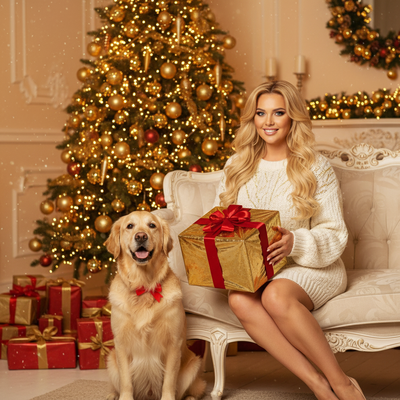
What makes a Christmas photoshoot idea work?
Good Christmas photo ideas combine a clear theme, consistent lighting, and props that read as festive without cluttering the frame.
Themes fall into a few buckets: classic and cozy, playful and themed, minimalist and modern, and outdoor or snowy.
Classic and cozy setup ideas
These work for family cards and mantel photos.
- Tree corner with warm string lights and ornaments in frame
- Fireplace mantel with stockings and soft candlelight
- Matching pajamas on a bed or couch, shot from slightly above
- Hot cocoa mugs and a plaid blanket on the floor
- Window seat with falling snow visible outside
Playful and themed ideas
These suit kids, pets, and couples who want something less traditional.
- Santa hat close-ups against a plain wall
- Gift-wrapping station with paper and ribbon scattered around
- Ugly sweater flat lay or full-body shot
- Pet in a tiny Santa outfit near the tree
- Couple exchanging a small gift by candlelight
Minimalist and modern ideas
For anyone who wants Christmas photos without a busy background.
- Single ornament held up against soft daylight
- Monochrome outfit against a neutral wall with one string of lights
- Top-down shot of wrapped gifts on a table
- Silhouette against a lit tree at dusk
Outdoor and snowy ideas
If weather cooperates, outdoor shoots add texture fast.
- Walking away shot in fresh snow with footprints trailing
- Close-up of mittens holding a pinecone or ornament
- Porch shot with a wreath and string lights framing the door
- Sledding or snowball action shots for kids
How do you get variety without booking a studio?
Traditional shoots need props, lighting gear, and often a second person to help.
An AI Christmas photo app skips most of that.
How to plan a quick photoshoot session
- Pick two or three themes from the lists above so the session has direction.
- Set up one main light source, natural window light works well.
- Take 10 to 15 phone shots per theme, varying angle and distance slightly.
- Review shots on a bigger screen before moving to the next setup.
DIY shoot vs AI photo app: quick comparison
| Factor | DIY Christmas Photoshoot | PiXmas AI App |
|---|---|---|
| Time needed | 1-3 hours including setup | A few minutes per style |
| Props and lighting | You gather and arrange everything | Not needed, AI generates the scene |
| Style variety | Limited by props on hand | 800+ styles available |
| Best for | Real memories in your actual space | Quick variety, cards, wallpapers, gifts |
Limitations
DIY shoots capture your real space and require no software, but they take longer and limit how many looks you can realistically try in one sitting.
AI-generated photos like those from PiXmas are stylized rather than literal, so a source photo with a clear, well-lit face works best for accurate results.
Group photos with several people may need extra care since AI tools work most reliably on single-subject images.
For hands-on, in-the-moment memories, a classic DIY setup with tree lights or a cozy pajama scene still wins.
When should you plan a Christmas photoshoot?
Plan the shoot in early fall if the photos will be used for cards, gifts, or seasonal posts. Search interest for Christmas card photos typically begins rising in September or October before peaking in December (Tech Photo Guy – Google Trends for Photographers, 2018). An earlier session leaves time to select images, make edits, order prints, and reshoot if weather or lighting causes problems. If you want outdoor snow, prepare an indoor backup rather than depending on a specific forecast. The seasonal trend does not make December a poor time to take photos; it simply means earlier planning provides more flexibility for time-sensitive uses.
Frequently asked questions
What are easy Christmas photoshoot setup ideas?
Start with a clean corner near a window, then add a tree, a blanket, wrapped gifts, or warm string lights. Choose a single visual theme instead of filling the frame with decorations. A couch scene, gift-wrapping table, or neutral wall with a wreath can work for beginners.
What are good Christmas photoshoot ideas for models?
Use a defined concept that gives the model clear poses and actions. Options include an editorial look beside a decorated tree, a winter-coat portrait outdoors, a gift-wrapping scene, or a minimalist setup with metallic ornaments. Keep the wardrobe and background colors coordinated so the subject remains the focus.
How do I photograph pets in a Christmas setup?
Choose a familiar space, use pet-safe decorations, and keep the session calm and brief. Place treats or a favorite toy near the camera to guide attention. Avoid forcing costumes or poses, and remove loose ribbon, fragile ornaments, hot lights, and anything the pet may chew or swallow.
What should I wear for a Christmas photoshoot?
Wear colors and textures that fit the setting without matching every item exactly. Cream, forest green, burgundy, navy, plaid, and soft knits suit many holiday scenes. Avoid small distracting patterns and prominent logos. For groups, coordinate the overall palette while letting each person wear a comfortable outfit.
Can I take Christmas photos with a phone?
Yes, a phone can handle many indoor and outdoor Christmas photo ideas. Clean the lens, use window light when available, and steady the phone against a solid surface if the room is dim. Tap the main subject to set focus and exposure, then check for clutter before taking the photo.
When should I schedule a Christmas photoshoot?
Early fall is practical when the images are intended for cards, gifts, or holiday promotions. Interest in Christmas card photos tends to rise in September or October and peak in December (Tech Photo Guy – Google Trends for Photographers, 2018). Schedule earlier if printing, shipping, or weather-dependent outdoor scenes are involved.
Can AI create a Christmas photoshoot from a portrait?
Yes, an AI photo tool can place a clear portrait into stylized holiday scenes without a physical set. PiXmas is one example for exploring that approach. Results are generated rather than documentary, so faces, hands, clothing details, and group compositions may vary and should be reviewed before printing or sharing.