Last-Minute Christmas Photoshoot Ideas for Family
Updated 2026-09-16 · PiXmas Editorial Team
Quick answer: For a last-minute family Christmas photoshoot, use natural window light, a plain wall or tree backdrop, and coordinated (not matching) outfits in red, green, or cream. Shoot in the late afternoon for soft light. If a real shoot is not possible, PiXmas turns one phone photo of each family member into styled AI Christmas portraits in minutes, no scheduling, outfits, or props needed.
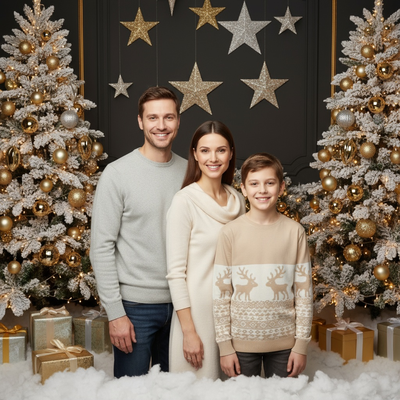
What counts as a last-minute Christmas photoshoot?
It means no studio booking, no matching outfits ordered in advance, and no professional photographer.
You are working with what you already have: a phone camera, your living room or yard, and whatever your family is wearing today.
The goal is a photo that looks intentional even though it was planned an hour ago.
Which locations work without planning?
Use a plain wall, a doorway with light coming in, or the space in front of your Christmas tree.
Outdoor porches and driveways with string lights also work well after sunset.
Avoid busy backgrounds with wrapping paper, cords, or clutter visible in frame.
How do you get everyone dressed fast?
Skip matching outfits. Instead, pick one shared color family like red, green, cream, or plaid, and let everyone wear what they already own in that range.
Solid colors photograph better than busy patterns or logos.
If someone truly has nothing that fits the palette, a red scarf or Santa hat can tie the group together quickly.
Six fast setup ideas
- Everyone sitting on the floor in front of the tree, knees pulled in, camera slightly above eye level.
- A doorway shot with the family looking out, back to the camera, for a candid feel.
- Hot cocoa mugs held up in a toast, shot from the side at the kitchen table.
- Kids in pajamas jumping on a bed with string lights strung along the headboard.
- A porch photo at dusk with string lights, everyone in coats.
- A close, cropped shot of just hands wrapping a present or hanging an ornament.
What if there is no time for any of this?
Some families are traveling, sick, or simply out of daylight hours before the holiday ends.
In that case, an AI Christmas portrait tool can produce a finished family-style image without a shoot at all.
PiXmas works from one existing phone photo per person, applying a Christmas style, Santa scene, or festive backdrop through its app or web version.
You upload photos of each family member separately and PiXmas generates styled portraits that can be grouped into a set, which is useful when a group photo session is not realistic this week.
Real shoot or AI portraits: which fits your situation?
| Factor | DIY Family Photoshoot | PiXmas AI Portraits |
|---|---|---|
| Time needed | 1-2 hours including setup | Under 15 minutes per person |
| Outfits required | Yes, coordinated colors | No, uses existing photos |
| Everyone in one place | Required | Not required |
| Editing needed after | Usually yes | Already styled |
| Best for | Families together and available | Busy, scattered, or last-minute situations |
Limitations
A real photoshoot captures genuine group interaction that AI portraits cannot replicate exactly, since PiXmas generates styled images from individual photos rather than a live group session.
Lighting and mess in your actual home cannot be fixed by editing the photo itself, only worked around with camera angle.
PiXmas currently has a native iOS app and a web version that works on Android browsers, with a native Android app in development.
Quick last-minute checklist
Pick one location, agree on a color palette, shoot during the last two hours of daylight, and take more frames than you think you need.
If timing does not allow a real session, prepare individual phone photos and run them through PiXmas for styled portraits instead.
For a real last-minute shoot, plain backgrounds, one color palette, and natural light will get you a usable photo in under an hour. When even that is not possible, PiXmas is the faster route to a finished, styled family Christmas photo using pictures you already have on your phone.
Frequently asked questions
What should we wear for a last-minute Christmas photo?
Pick one shared color family such as red, green, or cream rather than matching outfits. Solid colors photograph more cleanly than patterns. A shared accessory like a Santa hat or scarf can unify the group if outfits do not match well.
What is the best time of day for a rushed family photo?
Late afternoon, roughly one to two hours before sunset, gives soft natural light through windows or outdoors. Avoid midday sun and dim overhead indoor lighting, which tends to create harsh shadows or a yellow cast.
Are last-minute photoshoots noticeably worse than planned ones?
Not necessarily. Simple backgrounds, one color palette, and good natural light often produce photos that look just as intentional as a planned session, since the main risk is clutter and poor lighting rather than lack of preparation time.
How do I set up a Christmas photoshoot in a small space?
Use one uncluttered wall, corner, doorway, or section beside the Christmas tree as your set. Remove distracting furniture, place subjects several steps in front of the background when possible, and frame tightly. A blanket, stool, greenery, and string lights can create a complete scene without filling the entire room.
How should I prepare Christmas photos for printing?
Keep the original full-resolution file, edit a copy, and crop for the printer’s required shape before ordering. Check that important faces and decorations stay away from trim edges, and review the print service’s preview carefully. Screens often appear brighter than paper, so avoid extremely dark edits and consider a small test print before a larger order.
How do I take professional-looking Christmas photos with a phone?
Use soft window light, clean the phone lens, avoid digital zoom, and stabilize the phone on a tripod or secure surface. Tap the main subject’s face to set focus and exposure, then use a timer or remote shutter. Leave space around the group so the image can be cropped for cards and prints.