Christmas Photo Look Styles & Ideas
Updated 2026-09-16 · PiXmas Editorial Team
Christmas photo look styles are themed treatments that change a photo’s setting, lighting, clothing, color, and mood while aiming to preserve recognizable features. Common options include Santa portraits, cozy sweater scenes, vintage film effects, winter landscapes, festive wallpapers, and pet portraits. The right choice depends on whether the finished image is intended for a card, gift, social post, or screen background.
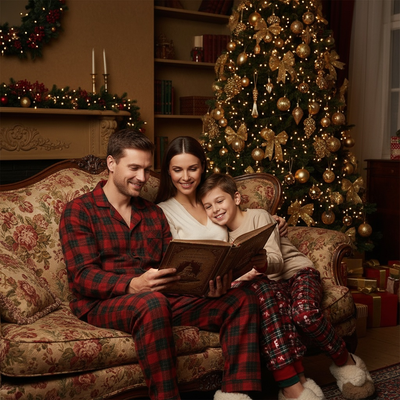
What Are Christmas Photo Look Styles?
A look style is a themed template applied to your photo.
It changes the background, clothing, lighting, and overall mood.
Your face stays recognizable while the scene around it becomes festive.
Common categories include Santa portraits, vintage film, cozy knitwear, winter wonderland, and pet-focused holiday shots.
Which Look Style Fits Your Goal?
Choosing a style depends on how you plan to use the photo.
Cards usually work best with clean, well-lit portrait styles.
Phone wallpapers often look better with wide, colorful winter scenes.
Family group photos benefit from matching outfits and consistent lighting across everyone in the shot.
How Do You Create These Looks From One Photo?
- Take or select a clear phone photo with good lighting and a visible face.
- Upload the photo to PiXmas through the app or web version.
- Browse the style library and pick a category that matches your intended use.
- Generate the portrait and review a few variations within the same style.
- Download the final image or share it directly to messages or social apps.
How Do Popular Look Styles Compare?
| Look Style | Best For | Typical Output | Editing Effort |
|---|---|---|---|
| Classic Santa Portrait | Cards, family gifts | Studio-style close-up | Low |
| Cozy Sweater Family | Group photos, cards | Warm indoor scene | Low |
| Vintage Film Christmas | Nostalgic keepsakes | Grainy, muted-tone portrait | Low |
| Winter Wonderland Wallpaper | Phone or desktop backgrounds | Wide scenic composition | Low |
| Pet Christmas Portrait | Pet owners, gifts | Festive pet-focused image | Low |
Limitations
AI look styles work best with clear, forward-facing photos and good lighting.
Group photos with many people can occasionally produce uneven detail on faces further from the camera.
Extremely dark, blurry, or heavily cropped source photos may reduce final image quality regardless of the style chosen.
Results are AI-generated interpretations, not exact photographic edits of the original scene.
AI Look Styles vs. Studio Christmas Photos
AI Christmas look styles are generated interpretations, while studio portraits are photographs captured in a staged setting. A reported Facebook trend specifically distinguished portraits made from a single uploaded selfie and a Christmas-themed generator from traditional Santa photo sessions (PiXmas guide on AI Christmas photo trend on Facebook, 2026). That distinction matters when choosing a method: generated looks can test different outfits, backgrounds, and moods, but they may alter small facial, hand, clothing, or accessory details. Choose a studio session when documentary accuracy matters; choose an AI look when you want to explore themed concepts from an existing photo.
Frequently asked questions
What is a Christmas photo look style?
A Christmas photo look style is a themed visual treatment that changes elements such as the setting, lighting, clothing, color palette, and mood. Examples include Santa portraits, cozy sweater scenes, vintage film treatments, snowy landscapes, and pet-focused images. Unlike a simple filter, a generative style may reinterpret parts of the scene rather than only adjusting color.
Which Christmas photo style is best for holiday cards?
Clean, well-lit portrait styles usually work best for holiday cards because faces and greetings remain easy to see. Classic Santa, formal winter, and cozy indoor themes are practical choices. Before printing, check that decorations do not cover faces and that the image leaves enough uncluttered space for any text.
Can I create different Christmas looks from the same selfie?
Yes, the same clear selfie can be used to test different Christmas looks. Keeping the source photo consistent makes it easier to compare Santa scenes, sweater portraits, vintage treatments, and winter backgrounds. Results can still vary because each style may interpret facial features, hair, clothing, and framing differently.
How do I choose a Christmas photo style for a wallpaper?
Choose a style with open scenery, balanced contrast, and room around the main subject. Winter landscapes, snow-globe scenes, and festive city backgrounds often suit screens better than tightly cropped portraits. Consider where icons or interface elements appear so important facial details are not hidden during everyday use.
Why does an AI Christmas style change my face?
AI may change facial details because it generates a new interpretation rather than editing every original pixel directly. Blur, shadows, angled poses, covered features, and strong expressions can increase variation. Start with a clear, forward-facing image, then inspect the eyes, teeth, hairline, glasses, and other identifying details before using the result.
Do Christmas photo look styles work for group photos?
Group photos can work, but results are less predictable when faces are small, overlapping, or unevenly lit. Use an image where everyone is clearly visible and facing the camera when possible. Review each person’s face, hands, clothing, and position because a polished overall scene can still contain inconsistent individual details.
Can AI Christmas photo styles be printed?
Many generated Christmas portraits can be printed if the downloaded file meets the printer’s size and quality requirements. Inspect the image at full view before ordering, especially faces, hands, text, and fine decorations. A result that looks acceptable on a phone may reveal artifacts or softness in a larger print.
Do Christmas photo styles work with pet photos?
Yes, pet-focused Christmas styles can work when the animal is clearly visible and not obscured by motion, furniture, or people. Choose a source image with clear eyes and distinct body outlines. Generated fur, paws, collars, and costumes can vary, so review those details before printing or sharing the image.