Pajamas & Sweaters Christmas Photo Ideas
Updated 2026-09-16 · PiXmas Editorial Team
Pajamas and sweater Christmas photos look most cohesive with a limited color palette, relaxed poses, a simple festive setting, and soft light. Plaid pajamas, textured knit sweaters, cocoa mugs, and a tree or fireplace can establish the holiday mood without an elaborate setup. When gathering everyone is impractical, an AI portrait tool can create a coordinated look from clear phone photos.
When should I plan a pajama or sweater Christmas photo?
Plan the outfits, setting, and final use before seasonal interest peaks late in the year. Guidance on Google Trends notes that Christmas searches rise sharply late in the year, and photographers use those spikes to time content about coordinated family outfits, matching pajamas, and festive sweaters (Cemoh, 2026). Early planning gives you time to test how colors look together, choose a suitable background, and decide whether the image will be used for cards, prints, or social posts. If schedules are uncertain, collect clear individual photos as a backup for a coordinated AI portrait.
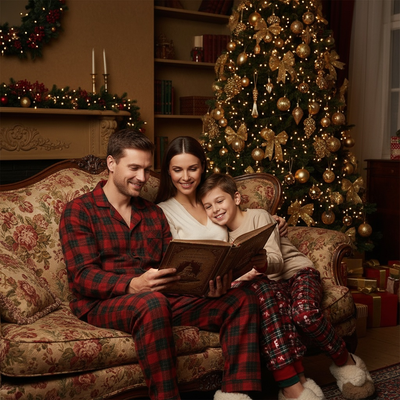
Matching pajamas and cozy sweaters are the backbone of most family Christmas cards. Getting the photo right depends on color coordination, setting, and a few simple posing rules.
What colors work best for pajama and sweater photos?
Red, green, cream, and buffalo plaid remain the most reliable choices for Christmas photo sets.
Stick to two or three colors across the whole family so the image reads as coordinated rather than matched exactly.
Cream and neutral tones photograph well in both daylight and indoor lamp light, which makes them a safe default for pajama sets.
What are simple pose ideas for pajama photos?
- Line everyone up on a couch or stairs, shortest to tallest.
- Have the family sit on the floor near the tree with legs crossed.
- Try a close overhead shot of everyone's slippers and pajama pants together.
- Capture a candid moment opening a gift rather than a posed stare.
- Add a pet in matching pajamas for one extra frame.
What are good sweater photo ideas?
Chunky knit sweaters photograph best against simple backgrounds like a plain wall, snow, or a lightly decorated tree.
A row of mugs with cocoa, a wrapped gift, or string lights held in hand are easy props that do not require much setup.
Group shots work well when everyone wears a different shade of the same color family, such as forest green, hunter green, and sage.
How can I get a pajama or sweater Christmas photo without a full photoshoot?
Coordinating outfits, lighting, and everyone's schedule for a real photoshoot is often the hardest part of a Christmas card photo.
You upload one photo, choose a style such as matching pajamas, cozy sweaters, or a Santa scene, and PiXmas produces a finished portrait without new photography.
This works for solo photos, couples, kids, or pets, and does not require anyone to actually own the pajamas or sweaters shown in the result.
Real photoshoot vs PiXmas AI photos
| Factor | Real Pajama/Sweater Photoshoot | PiXmas AI Photos |
|---|---|---|
| Outfits needed | Must buy or own matching sets | Not required, styles are generated |
| Time to complete | Hours, including setup and retakes | Minutes from one phone photo |
| Coordinating family schedules | Required for group shots | Not required, one photo per person works |
| Style variety | Limited to owned outfits and props | 800+ styles including pajamas and sweaters |
| Pet inclusion | Depends on pet cooperation | Works from a single pet photo |
Limitations
AI-generated photos are stylized interpretations, not a replacement for a real family photoshoot if that experience itself matters to you.
Fine details like exact pajama patterns or specific sweater brands cannot be guaranteed to match real products.
Group photos generated from separate individual photos may show slight differences in lighting or style consistency between people.
How do I start with PiXmas?
Select a pajama or sweater-themed Christmas style from the available options.
Review the generated portrait and download it for cards, texts, or printing.
The web version works on Android browsers today, and a native Android app is coming.
Frequently asked questions
What colors should a family wear for Christmas pajama photos?
Choose a limited palette built around cream, deep green, muted red, or plaid so the clothing supports the faces instead of competing with them. Mix solids with a restrained pattern, then check the outfits together under the lighting you will use. Avoid tiny, high-contrast patterns because they can look busy on cards.
How should we pose for matching pajama Christmas pictures?
Use a relaxed activity rather than asking everyone to stare at the camera. Sitting near the tree, opening a gift, sharing cocoa, or reading together gives people something natural to do. Keep faces visible, place shorter family members toward the front, and take a few candid frames between posed shots.
Do Christmas pajamas need to match exactly?
No, coordinated pajamas often look more natural than identical sets. Keep the clothing within the same general color family and repeat a pattern or texture across part of the group. Solid tops, plaid bottoms, and neutral socks can create a connected look without requiring everyone to wear the same outfit.
Can a pet be included in a Christmas sweater photo?
Yes, provided the pet is comfortable and safely supervised. A festive bandana or blanket may be easier than a sweater for an animal that dislikes clothing. Photograph the pet at eye level, use treats or a familiar sound for attention, and avoid decorations that could be chewed, tangled, or swallowed.
What background works best for Christmas sweater photos?
A simple background works best because textured sweaters already add visual detail. Try a lightly decorated tree, an uncluttered fireplace, a plain wall, or an outdoor evergreen setting. Leave some distance between the people and the background when possible, which helps separate the group from decorations and keeps faces prominent.
How do I avoid glare and harsh shadows in indoor Christmas photos?
Turn off direct overhead lighting when it creates dark eye sockets or shiny highlights. Face the group toward a window, use a shaded lamp, or bounce light from a pale wall for softer illumination. Keep bright string lights behind or beside the subjects rather than directly across their faces, and clean the camera lens before shooting.
Can AI create a matching pajama or sweater Christmas photo?
Yes, AI can apply coordinated pajama, sweater, and holiday-background styling to a clear phone photo. Results are interpretations rather than exact copies of real clothing, so patterns, textures, hands, or small accessories may vary. Use a sharp, well-lit image with an unobstructed face, then review the result carefully before printing or sharing.