Family Baby and Kids Christmas Photos
Updated 2026-09-16 · PiXmas Editorial Team
Family, baby, and kids Christmas photos can be made from clear phone pictures with AI, avoiding the need to arrange a new studio session. Festive settings and clothing can be applied to individual or group images, while clear, well-lit photos with unobstructed faces provide the strongest starting point.
Why are family Christmas photos so hard to plan?
Coordinating outfits for a baby, two kids, and two adults is its own project.
Studio sessions cost money and require everyone to behave on command.
Toddlers do not care about your appointment time or your color scheme.
How does PiXmas create family and kids Christmas portraits?
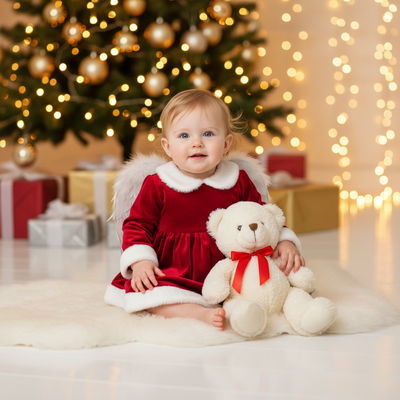
You upload one photo per person, or a family photo, and choose from Christmas styles built for portraits, kids, babies, and Santa scenes.
The AI generates new festive versions of that photo, placing your subject in holiday settings, sweaters, or with Santa, while keeping the likeness recognizable.
- Upload a clear photo of your child, baby, or family group.
- Pick a style category: family portrait, kids, baby, or Santa scene.
- Generate and preview multiple results.
- Download your favorites in high resolution for printing or cards.
What makes kids and baby photos different from adult portraits?
Baby and toddler photos need extra care because faces are smaller and features change fast.
PiXmas styles built for kids and babies are tuned for softer lighting and simpler scenes so the AI has less room to distort small features.
Clear, well-lit source photos with the face fully visible give the most reliable results for younger kids.
PiXmas vs a photo studio vs DIY editing
| Factor | PiXmas | Photo Studio | DIY Editing |
|---|---|---|---|
| Cost | Low, one-time per session | High, per sitting | Free to moderate |
| Time needed | Minutes | Hours including travel | Hours of manual work |
| Matching outfits required | No | Usually yes | No |
| Works for babies/toddlers | Yes, with tuned styles | Depends on mood that day | Yes, but skill dependent |
| Style variety | 800+ options | Limited by studio set | Limited by your editing skill |
Limitations
AI results depend heavily on the quality of your source photo, so blurry or poorly lit images produce weaker portraits.
Group photos with several kids moving at once can be harder for the AI to render cleanly than single-subject shots.
A native Android app is coming, so Android users currently use the web version through their browser.
Results are AI-generated interpretations, not traditional photography, so fine details may vary slightly from the original photo.
Verdict
Upload photos of your kids, baby, or whole family, choose from styles built for each, and get shareable holiday portraits fast.
How can families avoid last-minute card problems?
Family photo planning works better when you separate choosing source images, generating portraits, reviewing details, and ordering cards or gifts. Search interest for Christmas card photos rises in early fall and peaks in December (Tech Photo Guy – Google Trends for Photographers, 2018). That pattern supports starting before holiday deadlines become pressing.
- Choose recent photos with clear faces and even lighting.
- Review eyes, hands, glasses, clothing, and facial resemblance before selecting a portrait.
- Allow time to correct or regenerate images before sending files to a printer.
Frequently asked questions
How do you take family Christmas photos at home?
You can take family Christmas photos at home by using soft window light, a simple background, and a camera positioned near eye level. Keep the session relaxed, remove distracting objects, and photograph children while they interact naturally. For AI editing, also capture a clear image in which each face is visible and unobstructed.
What should a family wear for Christmas photos?
Families should choose coordinated colors rather than identical outfits. Combine a small palette of complementary neutrals, seasonal shades, and simple textures while avoiding busy logos or patterns near faces. If clothing will be changed with AI, a clear neckline and an unobstructed body outline can make the source image easier to interpret.
Can AI combine separate family photos into one Christmas portrait?
AI can create coordinated portraits from separate family photos, but a seamless group result is not guaranteed. Use images taken from similar angles with comparable lighting and recent appearances. Check relative height, facial resemblance, hands, and clothing carefully, because combining separate sources can introduce inconsistencies that require another generation or manual correction.
How do you get natural smiles in family Christmas photos?
Natural smiles usually come from movement and interaction rather than asking everyone to hold a fixed expression. Encourage relatives to walk, cuddle, share a joke, look at a child, or adjust an ornament. Photograph toddlers as they move, and select expressions that look familiar instead of expecting every person to face the camera.
When should you take family Christmas photos?
Take family Christmas photos in early fall when you need time for selection, editing, printing, and possible corrections. Search interest for Christmas card photos rises around September and October before peaking in December (Tech Photo Guy – Google Trends for Photographers, 2018). A casual digital portrait can be created later if no printing deadline applies.
Can AI-generated family Christmas photos look realistic?
AI-generated family Christmas photos can look convincing, but realism and identity accuracy are not guaranteed. Common warning signs include changed facial features, uneven eyes, distorted glasses, unusual hands, inconsistent ages, and clothing that merges into the background. Inspect every person closely and correct visible errors before using the image for cards, gifts, or prints.
What is the best source photo for a baby or child?
The best source photo is recent, sharp, evenly lit, and taken with the child’s full face visible. Avoid heavy shadows, filters, covered features, motion blur, and objects crossing the face or hands. For babies, choose a familiar expression and a supported pose rather than an image with complicated blankets, toys, or background details.