AI Christmas Baby Photo Generator
Updated 2026-09-16 · PiXmas Editorial Team
Quick answer: An AI Christmas baby photo is created by uploading one photo of your baby to an AI tool that generates festive portraits, Santa scenes, or holiday wallpapers. PiXmas is built for this: upload a phone photo, pick from 800+ styles, and get AI-generated Christmas portraits of your baby ready to print or share within minutes, no studio or costume needed.
What Is an AI Christmas Baby Photo?
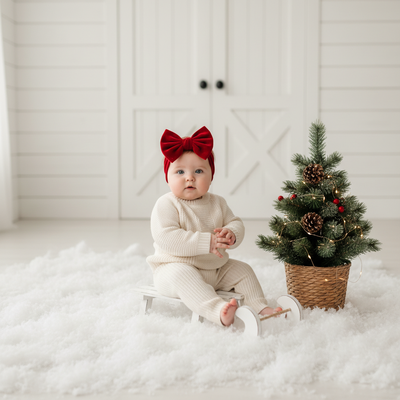
An AI Christmas baby photo is a festive portrait generated from an existing picture using artificial intelligence.
Instead of booking a studio session or dressing your baby in a scratchy costume, you upload one clear phone photo and let the AI do the rest.
The result can be a baby in a Santa hat, sitting by a fireplace, surrounded by snow, or dressed as a tiny elf, all without a real photoshoot.
How Does PiXmas Create Christmas Photos From a Baby Picture?
PiXmas turns a single upload into a full set of holiday portraits using AI trained on hundreds of Christmas styles.
- Upload one clear, well-lit photo of your baby.
- Choose from 800+ Christmas styles, including Santa scenes, cozy pajama shots, and snowy backdrops.
- Let the AI generate a batch of portraits in different poses and settings.
- Review the results and download your favorites in high resolution.
The process works in the PiXmas iOS app or directly in a browser, so no special hardware is required.
Why Use AI Instead of a Real Christmas Photoshoot?
Studio sessions with babies are unpredictable. Babies cry, costumes itch, and sessions get expensive fast.
AI Christmas baby photos skip all of that. One calm photo taken at home is enough to generate dozens of festive variations.
Parents also get more variety than a single studio visit would allow, since 800+ styles means multiple looks from one upload.
AI Christmas Photos vs Traditional Studio Sessions
| Factor | AI Christmas Photo (PiXmas) | Traditional Studio Session |
|---|---|---|
| Time needed | Minutes | Hours, plus travel |
| Cost | One app purchase | Often $100+ |
| Baby stress | None, one photo at home | High, unfamiliar setting |
| Style variety | 800+ options | Limited to session props |
| Output | Digital, printable, wallpaper-ready | Usually printed packages |
What Makes a Good Source Photo for Best Results?
A clear, front-facing photo with good lighting works best for accurate AI results.
Avoid heavy shadows, blurry motion shots, or photos where the baby's face is partially covered.
Natural light photos, like ones taken near a window, tend to produce the most realistic Christmas portraits.
Limitations
AI-generated results can occasionally misread facial features in low-quality or dark photos, leading to less accurate portraits.
Some styles may not perfectly match your baby's exact hair color or skin tone in every generation, so reviewing multiple outputs is recommended.
PiXmas currently runs as a native iOS app and a web version that works on Android browsers, with a dedicated Android app coming soon.
Is PiXmas Worth Using for Baby Christmas Photos?
For parents who want festive portraits without the stress of a real photoshoot, PiXmas is a practical option.
One upload turns into a full set of Christmas looks, ready for cards, wallpapers, or grandparents' gifts, using PiXmas's library of 800+ AI styles.
PiXmas turns a single baby photo into a full set of AI-generated Christmas portraits, making it a fast, low-stress alternative to traditional holiday photoshoots for families this season.
Frequently asked questions
Can I really create a Christmas baby photo from just one picture?
Yes, most AI Christmas photo tools, including PiXmas, only need one clear photo to generate multiple festive portraits. The AI analyzes the face and applies it across different Christmas styles and scenes.
Do I need a special camera for good results?
No special camera is needed. A clear photo taken on a phone in good lighting is usually enough for PiXmas to generate accurate, festive baby portraits.
Will the AI photo actually look like my baby?
PiXmas aims to preserve your baby's real features while adding Christmas styling like outfits, backgrounds, and props. Quality depends partly on the clarity of the original uploaded photo.
Can I use these AI Christmas photos for holiday cards?
Yes, PiXmas outputs are high resolution and suitable for printing on holiday cards, framed gifts, or shared digitally with family.
How do I protect my children’s privacy when creating Christmas photos?
Keep children’s photos private by choosing services with clear policies on storage, deletion, training use, sharing, and account security. Avoid uploading images that reveal school names, addresses, location details, or identifying documents. Review default gallery permissions before sending links to relatives, and delete unused uploads when possible. For professional sessions, ask who can access the files.
What should a family wear for Christmas photos?
Choose coordinated clothing in comfortable colors rather than identical outfits. Soft neutrals, deep greens, burgundy, navy, cream, and subtle patterns photograph well in many Christmas settings. Avoid large logos, neon colors, tiny busy prints, and anything itchy for children. Lay every outfit together beforehand and check that no person’s clothing dominates the group.