
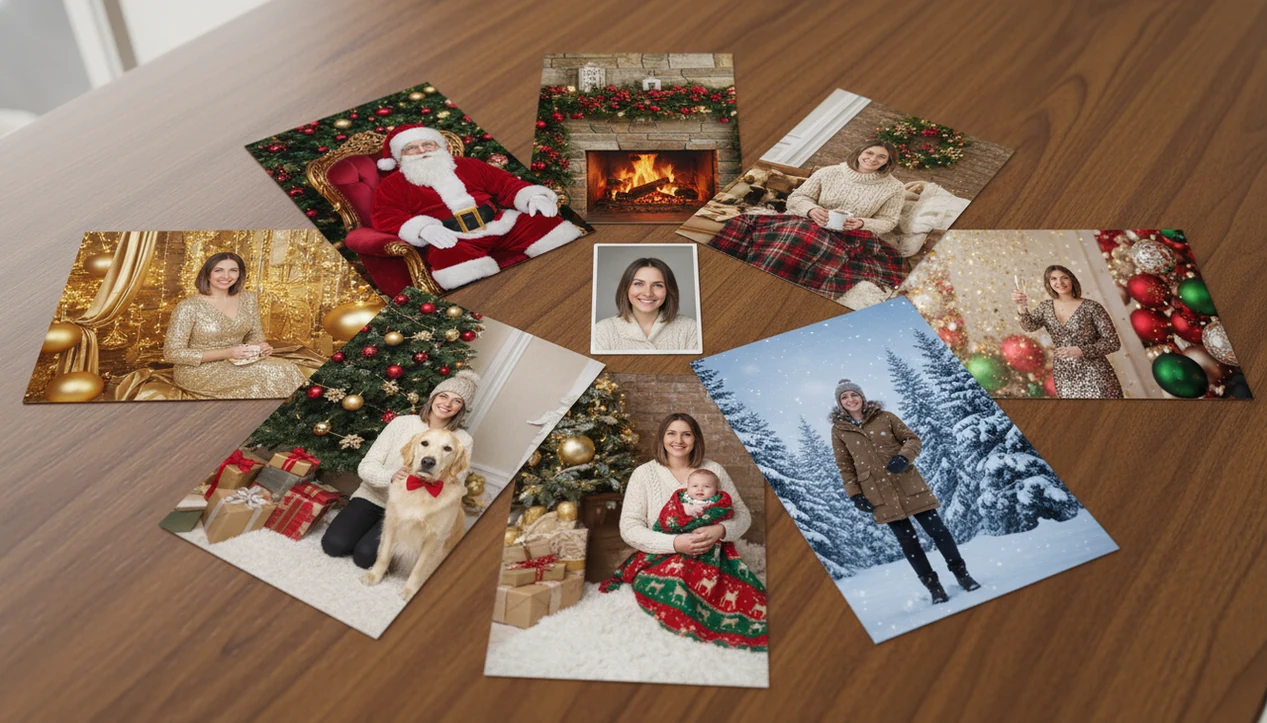

Definition: Christmas photo styles are the themed visual looks, including backgrounds, lighting, outfits, and props, applied to holiday portraits to create a specific mood such as cozy, magical, snowy, elegant, or playful.
At-a-Glance: Every Christmas Photo Style Category
The practical path is simple. Start with the photo you already have, choose a festive category, preview the portrait output, then save or share. Pew Research Center reports that about 84% of U.S. adults say they celebrate Christmas in some way, so these styles serve a wide mix of card-makers, parents, couples, pet owners, and creators: https://www.pewresearch.org/short-reads/2017/12/12/5-facts-about-christmas-in-america/
Each category can branch into a deeper style page. A parent may want a Santa chair scene. A couple may pick a fireplace look. Someone making a lock screen may go straight to wallpaper.
One usable photo after dinner is often enough.
If the priority is fast holiday-card variety, the workflow fits because one-photo upload can generate multiple share-ready looks without setting up props or booking a mini session.
Five Facts About AI Christmas Photo Styles
- AI Christmas photo styles span many moods. The catalog includes Santa, cozy indoor, snow, luxury, pet, baby, and New Year looks, so the same source photo can become playful, elegant, or family-card ready.
- The model works from one uploaded image. Image-to-image AI maps facial features and identity, then rebuilds the scene around the person or subject.
- Clothing still matters. Solid colors, festive pajamas, or simple neutrals usually give the style picker cleaner material than busy prints or neon tones.
- Traditional photo habits still help. Soft window light, eye-level framing, and a relaxed expression give AI holiday portrait styles a stronger base.
- Not every selfie is a good source. Low resolution, heavy beauty filters, warm yellow kitchen light, and a blurry sleeve near the face can all reduce realism.
Parents trying to make a card from the iPhone Photos grid, with six almost-identical kid snapshots and one where everyone looks up, get better results when they choose the clearest frame first.
What Christmas Photo Styles Do in PiXmas
They help you choose the right look before generating, instead of guessing from a blank prompt box.
Santa styles lean playful, with red chairs, gifts, velvet, and storybook warmth. Cozy styles use fireplaces, pajamas, tree lights, blankets, and softer indoor glow. Snow styles create outdoor winter scenes with cabins, frosted trees, and brighter cool light. Luxury looks add gold décor, polished outfits, marble, champagne tones, and a more elegant finish. Pet and baby styles stay gentler, with simpler props, softer framing, and fewer distractions around small faces or fur.
- Choose realistic looks when the portrait needs to pass as a family card, work greeting, or printed keepsake.
- Pick playful styles for Santa scenes, pets, kids, pajamas, and casual social posts.
- Use elegant styles for luxury cards, couple portraits, profile images, or polished holiday announcements.
- Save dramatic looks for wallpapers, countdown graphics, snowy scenes, and posts where atmosphere matters more than strict realism.
For cards and prints, prioritize clear faces. For wallpapers and social posts, composition, crop, and mood can carry more of the image.
How AI Christmas Photo Styles Work Behind the Scenes
AI Christmas photo styles work through image-to-image generation. You upload one photo, and the model reads facial structure, pose, and subject edges as image embeddings, which are numerical clues the system uses to preserve identity.
Then the selected template changes the scene. Santa styles may add a throne room, wrapped gifts, red velvet fabric, and warm studio light. Snow styles may replace the background with a cabin path or winter trees. Luxury looks may add gold décor, marble surfaces, and a more polished outfit overlay.
Good AI Christmas photo apps deliver themed portrait control, not random prompt guessing. The generative AI marketing market is projected to grow at over 25% CAGR through the late 2020s, which reflects how quickly visual AI tools are moving into everyday creative tasks.
Tiny faces in group shots are harder. So are harsh filters.
Ready to create holiday photos?
Christmas photo styles include Santa scenes, cozy fireside portraits, snowy wonderlands, luxury gold settings, pet sessions, baby-first-Christmas looks, and festive wallpapers…
How to Use PiXmas Holiday Portrait Styles in 5 Steps
Use these holiday portrait styles by choosing a clean source photo, selecting a style category, previewing the output, and exporting the version that fits your card, post, wallpaper, or print.
- Upload a clear photo with soft natural light, a visible face, and minimal filters.
- Browse the style hub across Santa, cozy, snow, luxury, pets, babies, wallpaper, and New Year categories.
- Select a specific template inside the category, such as a fireplace portrait or snowy cabin look.
- Review the generated portrait and regenerate if the face, pose, or background feels off.
- Download or share the result for holiday cards, social posts, phone wallpaper, desktop wallpaper, or prints.
When the App Store install button leads to the photo permissions prompt, many users wonder whether to allow selected photos only. That’s fine. Pick the one image you want to use and keep the workflow narrow.
Holiday Card, Wallpaper, Pet, and Baby Style Use Cases
Different holiday portrait styles work better for different outputs. Cards need clear faces and readable composition. Wallpapers can be more dramatic. Pet and baby portraits need softer framing because tiny details matter.
Santa, Cozy, and Snow Scenes
Santa scenes fit kids, family cards, and December 23 rescue projects, when a parent makes a Santa portrait after bedtime because no studio appointment is left. Among celebrating U.S. adults, 52% typically send Christmas or holiday cards.
Cozy room styles work for at-home posts and couple portraits, especially when the look includes pajamas, tree glow, or a fireplace. For a deeper version, explore cozy indoor Christmas photos.
Snow and winter wonderland styles fit dramatic wallpapers and outdoor-feel portraits, even when the original photo was taken in a hallway. They pair naturally with outdoor snow Christmas backgrounds.
Luxury, Pet, Baby, and New Year Looks
Luxury gold styles suit editorial cards, work-profile holiday images, and polished couple portraits. Simple black, cream, or emerald clothing usually helps the final image look more intentional.
Pet and baby styles serve high-intent moments: a golden retriever in fake snow, a baby blanket against twinkle lights, or a first-Christmas keepsake. New Year scenes extend the same image into countdown posts, fireworks graphics, and January greetings.
Around 90% of U.S. adults say holiday time with family and relatives is important. For families, a styled portrait is often easier than assembling everyone for one more photo.
What AI Christmas Photo Styles Look Like in PiXmas
These Christmas photo styles can turn one portrait into a Santa throne room with wrapped gifts, a cozy fireplace scene with plaid pajamas, a snowy cabin exterior, or a gold-and-marble luxury set. The face and identity should remain consistent across the different outputs, although expression and lighting may shift with the template.
The pet options can create a dog in a Santa hat or a tabby under twinkle lights. Baby-first-Christmas looks often use soft blankets, ornaments, warm light, and a calmer background.
Wallpaper styles are built for phone-friendly and desktop-friendly exports. That matters when the real question is, “Can I use this for a card and a wallpaper?” In most cases, yes, but you should compare crop, face placement, and aspect ratio before saving.
PiXmas AI Styles vs Traditional Holiday Photoshoots
| Option | Cost | Time | Variety | Realism tradeoff |
|---|---|---|---|---|
| this app AI styles | App fee | Minutes | Hundreds of looks from one photo | Can look realistic with a clear source photo, but may struggle with hands, limbs, or crowded groups |
| Studio photoshoot | Roughly $150-$500+ | Booking, travel, posing | Usually one or two setups | Captures real expressions, fabric, and physical props |
| DIY setup | Low to moderate | Setup and cleanup | Limited by props at home | Natural, but lighting and background may be uneven |
| Canva-style editing | Varies | Manual design time | Strong layout control | Less automatic portrait transformation |
Couples trying to create a polished card from last summer’s selfie in the upload tray may find the app faster because the style picker handles background, outfit mood, and lighting in one workflow.
Related this app Christmas Photo Features
If you want a more specific look, style pages can help narrow the choice before you generate.
Choose luxury gold Christmas portraits for polished cards, pajama morning Christmas photos for relaxed family images, or a rustic cabin Christmas photo style for warmer winter scenes. For countdown posts and cross-holiday reuse, the New Year fireworks photo generator gives the same workflow a different seasonal finish.
After generation, check the face closely before printing. The calendar page with a Christmas photo is unforgiving at larger sizes.
What photo should you upload for the best Christmas photo style result?
A sharp, front-facing photo with even lighting gives the AI the clearest base to work from. Natural daylight or soft indoor light usually produces a cleaner result than dim rooms or strong backlighting.
Avoid sunglasses, heavy shadows across the face, or photos where the subject is turned far to one side. For solo and couple styles, one clear photo of each person works better than a distant group shot where faces are small.
Who is this Christmas photo style best for?
Families who want a festive card photo without scheduling a studio session are a natural fit, especially when kids or babies make a real photoshoot harder to coordinate. Couples looking for a quick, shareable holiday portrait for social media or a phone wallpaper also get straightforward results.
Pet owners can use the same styles to turn a phone photo of their dog or cat into a holiday-themed image. People on a tight budget or timeline, who still want a polished-looking festive portrait, are another good match since there is no wardrobe, props, or location to arrange.
What are the limitations of AI Christmas photo styles?
These are AI-generated stylized images, not physical photos taken on an actual set with real props and lighting. Fine details such as text on ornaments, background string lights, or hand positioning can occasionally look slightly off compared to a traditional photograph.
Photos with several faces in one frame may render less consistently than a solo or couple photo, since the model has more detail to interpret at once. Reviewing the final crop before saving is especially important for wallpaper styles, so key details are not cut off.
Limitations
AI holiday portrait styles are useful, but they do not remove every photo problem.
- Very blurry, dark, low-resolution, or heavily filtered source photos usually produce weaker results.
- Complex group poses may show identity blending, odd spacing, or limb artifacts.
- Fine details such as specific jewelry, tattoos, logos, or branded clothing may not transfer accurately.
- AI-generated backgrounds can show visual artifacts when viewed closely, especially around edges.
- Pet and baby styles need clear subject visibility; motion blur and covered faces reduce quality.
- A real candid laugh, toddler wiggle, or grandparent reaction cannot be fully recreated by AI.
- Competitors such as Canva, Picsart, and Photoleap may offer broader manual editing, but they often require more layout work for the same holiday portrait goal.
Not every save is a keeper.