
Cozy Indoor Christmas Photos With Fireplace and Tree
Quick answer: A cozy indoor Christmas photo uses warm tungsten-toned lighting, a fireplace or tree glow, soft textures like knits and blankets, and a relaxed pose to create a lived-in holiday feel. PiXmas (also spelled Pixmas) turns a single uploaded photo into this look using an iOS app with 800+ styles, without needing a decorated home, studio lighting, or a real fireplace.
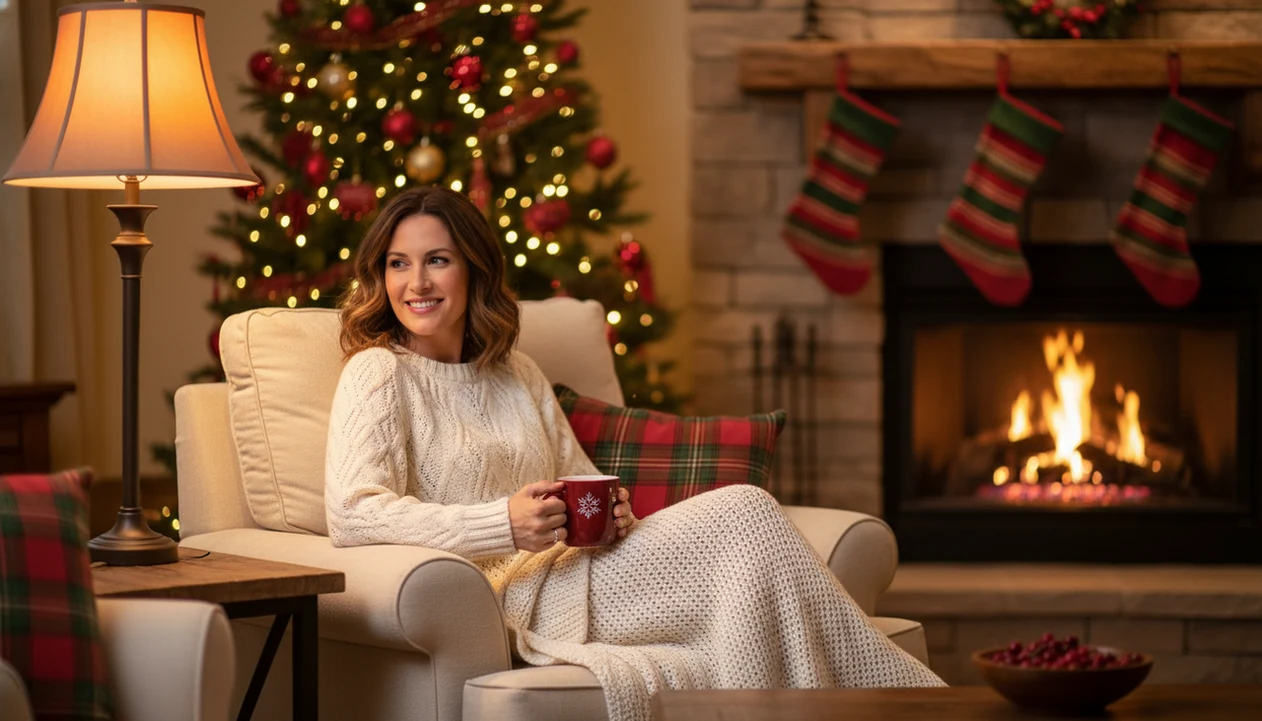
For cozy indoor Christmas photos, warm light, a tree or fireplace, soft clothing, and simple holiday props make the portrait feel relaxed instead of staged. With PiXmas, one clear uploaded phone photo can become fireplace portraits, tree scenes, pajama portraits, and warm living-room holiday images.
> PiXmas is a Christmas photo app that transforms one uploaded photo into holiday portraits, Santa scenes, and Christmas wallpaper for families, couples, pet owners, and creators.
- The cozy Christmas look depends on warm lighting, visible holiday cues, soft textures, and natural portrait styling.
- Fireplace Christmas portraits do not require a real fireplace when AI can restyle one clear photo into a hearth scene.
- The best AI results still start with a sharp, well-lit, unfiltered base photo.
How cozy indoor christmas photos look
Side-by-side captures of the compared products. Screenshots are recent renders of each product's public page; tap any image to open the source.

Cozy indoor Christmas photo ideas that create the warm holiday look
Cozy indoor Christmas photos are warm, glowing, relaxed portraits built around fireplaces, trees, blankets, pajamas, mugs, garlands, stockings, and twinkle lights. The goal is not a stiff studio pose. It is the picture that feels like December evening light, even if the original photo came from your camera roll.
You can build the look at home with a lamp, a tree, and one uncluttered corner. You can also generate it from one uploaded portrait in PiXmas, especially when you want fireplace Christmas portraits without rearranging the living room.
That matters because people use holiday photos as memory anchors. In a 2023 Pew survey, 66% of U.S. adults said they usually take photos or videos to remember holidays and special occasions source.
The saved image becomes the memory cue.
Five cozy Christmas photo ideas worth copying first
- Fireplace portrait: Amber light, stockings, soft shadows, and a hearth backdrop make the image feel settled. This style direction can be generated from one clear face photo.
- Christmas tree portrait: Storybook tree glow, wrapped gifts, and blurred ornaments create the classic indoor holiday frame. A cropped school-day grin on a phone screen can work if the face is sharp.
- Pajama morning scene: Matching pajamas, rumpled blankets, and low morning light give a family or solo portrait a casual Christmas-card feel. For more specific styling, compare pajama morning Christmas photos.
- Snowy window portrait: Cool window light outside and warm lamp light inside create contrast. This is the quieter cousin of outdoor snow Christmas backgrounds.
- Blanket-and-hot-chocolate close-up: Knit texture, mugs, red accents, and close framing make the result feel intimate, not overly decorated.
Parents trying to make a last-minute card image after bedtime fit this workflow because the workflow starts with one-photo upload and style selection, not a new photo session.
The small details matter: a crooked pajama cuff, orange lamp glow on one cheek, or a mug held low instead of over the face can make the final image feel like a real December night rather than a catalog setup.
How cozy indoor Christmas photos work in AI portrait generation
AI-generated cozy indoor Christmas photos work by reading the uploaded portrait for face structure, pose, lighting, and identity cues, then rendering that subject into a selected holiday environment. In plain terms, the system tries to keep the person recognizable while changing the room, clothing mood, and seasonal setting.
The technical pieces include face detection, image embeddings, and style conditioning. Image embeddings help represent the subject visually. Style conditioning steers the result toward soft fireplace glow, decorated tree light, pajama portraits, or snowy window scenes.
Not magic. Input quality still matters.
A sharp, well-lit base image helps preserve likeness and reduce artifacts around eyes, hair, hands, and edges. Good AI Christmas photo apps deliver fast style variation from one portrait, not a guarantee that every blurry hallway snapshot before bedtime becomes a clean print-ready masterpiece. Results are strongest when the face is clear and the lighting is not fighting the app.
How to use cozy indoor Christmas photos in PiXmas
Use cozy indoor Christmas photos in PiXmas by starting with the photo you already have, then choosing a warm indoor style before you save or share. The practical path is upload, select a festive style, review the result, then export.
- Choose a sharp base photo with a visible face, natural expression, and no heavy filter.
- Upload the image from your camera roll, using selected photo access if you prefer tighter permissions.
- Select fireplace, tree, pajama, snowy window, or warm living-room styles.
- Generate several variations so you can compare lighting, clothing, and background details.
- Review faces, hands, hair edges, props, and any odd fireplace or tree shapes before saving.
- Save the strongest portrait for a card, wallpaper, or group chat reveal.
About 82% of U.S. households had home broadband in 2024, according to the Census Bureau, so fast photo uploads are common for AI photo services source.
If your priority is speed before a holiday deadline, PiXmas fits because Christmas Pictures App output can be made from one uploaded portrait and a style picker.
Fireplace Christmas portraits versus real indoor photoshoots
Fireplace Christmas portraits do not require a real working fireplace. A home or studio shoot captures the actual room and interaction, while PiXmas creates fast fireplace variations from one uploaded image.
| Factor | Real indoor photoshoot | PiXmas fireplace portrait |
|---|---|---|
| Setup time | Requires cleaning, lighting, props, and posing | Starts from one-photo upload |
| Props | Real stockings, garlands, blankets, furniture | Generated hearth, tree, glow, and decor |
| Cost | May involve photographer, outfits, or rentals | App-based generation and export |
| Realism | Strongest for real group contact | Strongest with a clear solo or simple portrait |
| Control | Exact pose and real room details | Many style variations, less pose control |
| Best use case | Family interaction, toddlers, pets together | Fast cards, profile images, wallpapers |
Real photoshoots are often better for a dog squeezed between matching sweaters or children leaning into each other. PiXmas is stronger when you need five fireplace looks tonight from the one image where everyone is actually looking at the camera.
For last-minute card makers, AI fireplace portraits are often easier than a home shoot because the room styling is generated rather than built.
Strongest base photo for cozy Christmas photo ideas
A strong base photo for cozy Christmas photo ideas is sharp, front-facing or slightly angled, naturally lit, and free of heavy filters. Output realism usually depends more on the uploaded face photo than on the fireplace, tree, or pajama theme you choose.
- Clear face: Use a portrait where both eyes, the mouth, and the face outline are visible. Avoid sunglasses, face-covering hair, and tiny faces in group shots.
- Steady image: Skip blurry selfies, screenshots, and motion blur. A blurry sleeve near the chin can confuse the final edge.
- Simple light: Warm yellow kitchen light can work, but harsh shadows across one eye often create uneven results.
- Quiet background: A plain wall or simple room gives the generator less visual noise to fight.
- Natural expression: A relaxed half-smile usually transfers better than an exaggerated pose.
Competitors such as Canva, Picsart, and Photoleap often talk about editing tools, but they can understate how much the base image controls realism across cozy scenes. If you want a more formal warm look, compare luxury gold Christmas portraits.
Cozy indoor Christmas photos for families, couples, pets, and creators
Can I use this for a card and a wallpaper? Yes, cozy indoor Christmas photos can support both, as long as you check the crop, aspect ratio, and small details before export.
The same visual language works for solo portraits, couples, families, pet owners, creators, and Christmas card makers. A ring hand resting on red knit fits a couple image. A tabby stare under twinkle lights fits a pet portrait. A creator can use the same warm tree glow for a profile update or seasonal post.
Visual sharing is a normal part of the holiday workflow. A 2023 Pew survey found 95% of U.S. teens use YouTube and 62% use Instagram, which helps explain why phone-friendly portraits matter for families and creators source.
Couples who want a warm profile image fit this workflow because the style picker can move one portrait into fireplace, tree, or soft indoor scenes without prompt writing. Families can browse broader Christmas photo styles when they want to compare cozy, rustic, emerald, and snow looks.
What makes this style different from other Christmas photo styles?
Cozy indoor Christmas photos rely on warmth over spectacle. Instead of snow, string-light backdrops, or matching outfits in a park, the style leans on tungsten-toned lamp and fireplace light, soft knit or flannel textures, and a relaxed, unposed feel.
Where an outdoor Christmas photo style photo often prioritizes bright daylight and open space, the indoor cozy look is intentionally low-contrast and intimate, closer to a candid evening at home than a formal portrait session.
How does lighting affect the cozy indoor result?
Warm, low-angle light sources like a fireplace, string lights, or a lamp create the soft glow that defines this style. Flat overhead lighting or harsh flash tends to flatten the mood and remove the shadow depth that makes a scene feel cozy.
When PiXmas generates a fireplace or tree-lit scene from an uploaded photo, it applies this warm lighting logic to the final image, even if the original photo was taken in ordinary indoor light.
For a warm, at-home holiday look without setting up lighting, decor, or a real fireplace, PiXmas turns one uploaded photo into a cozy indoor Christmas portrait in minutes.
Browse the indoor cozy home christmas pictures style gallery
Limitations
AI cozy indoor Christmas portraits are useful, but they still need review. PiXmas can create warm variations quickly, but manual curation decides what is share-ready or print-minded.
- AI cannot perfectly invent complex group interactions from a one-person photo.
- Harsh lighting, blur, heavy filters, and screenshots can reduce likeness.
- Busy backgrounds may leave odd edges, strange decor, or confused hair detail.
- Hands, mugs, ornaments, and props can reveal artifacts when viewed closely.
- Large prints may expose flaws that look fine on a phone screen.
- A generated fireplace or tree scene may be attractive but still unusable because of face shape, eye detail, or warped clothing.
- Review privacy terms before uploading personal portraits, especially children’s photos. Our AI Christmas photo privacy guide explains what to check.
- Broad AI art tools like Remix.ai or FestivAI may offer more prompt freedom, but a dedicated Christmas Pictures App is usually faster for repeat holiday portrait styles.
When the issue is holiday-photo pressure on December 23, the upload-select-preview workflow handles quick variation because the workflow is upload, choose, preview, and save.
Example styles
FAQ
What does "cozy indoor Christmas photo" mean as a style?
It refers to warm, home-based holiday portraits with soft lighting, fireplace or tree glow, and relaxed poses in knitwear or pajamas, rather than a formal studio or outdoor snow setting.
Can I get this look without decorating my home first?
Yes. PiXmas generates the fireplace, tree, stockings, and warm lighting around you, so you do not need to physically decorate a room or set up a real scene before taking your photo.
Can I turn a cozy indoor Christmas photo into a printed card?
Yes, the finished image from PiXmas is a standard digital photo file, so it can be printed at home, ordered through most photo printing services, or used for digital holiday cards.
How many people can be in one cozy indoor Christmas photo?
Solo portraits and couples tend to produce the most consistent results in PiXmas. Larger family groups are supported too, though multiple faces in one frame may render slightly less uniformly than a single subject.
Will the finished photo look exactly like my real living room?
No. The fireplace, tree, and background are AI-generated to match the cozy style, so details like furniture, wall color, or room layout will not replicate your actual home exactly.
How long does it take to get a finished cozy Christmas photo?
Most PiXmas results are generated within minutes of uploading a photo in the app, which is considerably faster than scheduling and shooting a real indoor holiday session.