
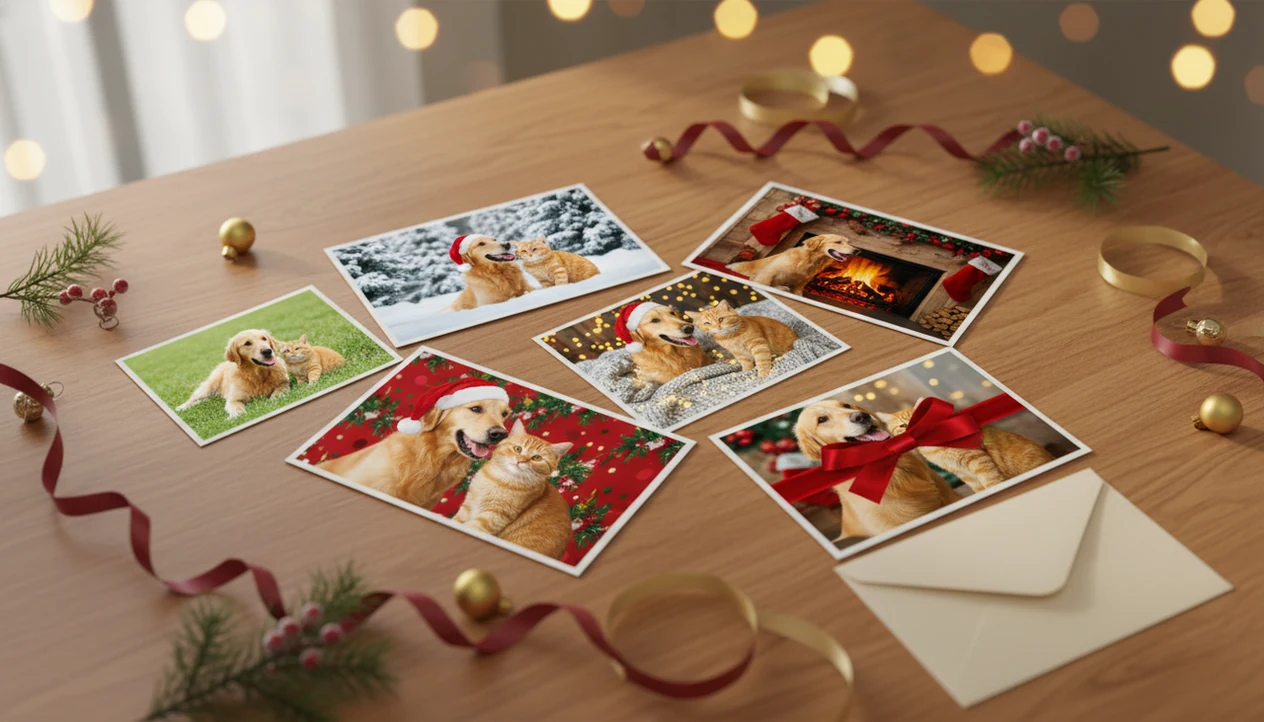

> A Christmas pet photo editor is an app or online tool that uses AI to transform an ordinary dog or cat picture into a realistic holiday scene, adding Santa outfits, winter backgrounds, and festive props while preserving the pet's unique face, markings, and fur texture.
- Clear, well-lit, front-facing pet photos produce the most realistic AI Christmas transformations.
- Compare editors on style variety, realism, export resolution, watermark policy, and photo privacy before committing.
Best Christmas Pet Photo Editor: 5 Top Picks At A Glance
One clear retriever shot can become snowy, Santa, fireplace, and card-ready versions while staying recognizable.
- Pawtograph: Strong for pet-first portrait looks when you want a simpler, narrower style set.
- Photoshop with Christmas overlays: Best for skilled editors who want manual control over masks, layers, and cleanup.
- Canva holiday templates: Good for card layouts after you already have a finished pet image.
- General Christmas photo apps with pet modes: Useful for quick experiments, but results vary by animal pose.
| Editor | Style count | Pet AI training | Watermark-free exports | Export resolution | Privacy signals | Price tier |
|---|---|---|---|---|---|---|
| PiXmas | Hundreds | Pet-focused | Paid export options | Card and wallpaper minded | Check privacy page | Free/paid |
| Pawtograph | Limited | Pet-first | Varies | Portrait focused | Check terms | Paid |
| Photoshop | Unlimited manually | No | Yes | High | Local/cloud depends | Paid |
| Canva | Many templates | No | Paid plans | Print layout options | Public policy | Free/paid |
| Pet modes in general apps | Varies | Mixed | Varies | Mixed | Often unclear | Free/paid |
5 Facts About Christmas Pet Photo Apps Every Owner Should Know
A Christmas pet photo app works best when it treats dogs and cats as dogs and cats, not as small human faces with fur. That difference matters when the photo has cat whiskers beside red ornaments or a terrier’s ears sitting unevenly after a quick head turn.
- Pet-trained AI preserves identity: Breed-specific face shape, fur texture, eye placement, and markings are less likely to drift than in human-focused editors.
- Templates remove manual editing: Santa, elf, fireplace, snowy window, reindeer, and sweater scenes replace masking, cutting, and background layering.
- Input quality controls output quality: Clear light, sharp focus, and a front-facing pose help the AI keep eyes, snouts, and paws believable.
- The audience is large: An estimated 66% of U.S. households own a pet, according to the AVMA source.
- Comparison beats guessing: Style variety, realism, resolution, privacy language, pricing, and watermark rules decide whether an editor fits cards or casual posts.
Small details show fast.
AI Christmas Pet Photo Editing Mechanics For Dogs And Cats
AI Christmas pet photo editing works by reading one source image, mapping pet landmarks, then rebuilding the scene around preserved animal features. In plain terms, the system tries to keep your dog’s face or cat’s markings while changing the setting, clothing, and props.
The model studies image embeddings, which are mathematical summaries of what appears in the photo. For pets, useful signals include eye placement, ear shape, fur pattern, snout length, whisker area, paws, and body outline. Pet-trained models reduce common failures from generic editors, such as stretched noses, misplaced ears, duplicate paws, or odd body bends.
Template compositing then places Santa hats, sweaters, lights, snow, gift boxes, and winter backgrounds around the preserved pet features. Higher-resolution photos with steady lighting give the AI more real detail to protect. Many dog and cat owners also see pets as family, which helps explain the demand for portrait-quality holiday results instead of throwaway filters.
How To Use A Dog Christmas Photo Editor In 5 Steps
Does a dog Christmas photo editor need editing skills? No. The practical path is upload, select a festive style, review the result, then save or share.
- Choose a clear photo with your dog front-facing, evenly lit, and not blurred by motion.
- Pick a style such as a Santa portrait, fireplace scene, ugly sweater, snowy window, or holiday card layout.
- Review the output for face accuracy, fur detail, eyes, paws, and background blending, then regenerate if the snout or ears look wrong.
- Export the finished image at the highest available resolution for cards, wallpapers, ornaments, canvases, or social posts.
Photo editing before social posting is mainstream behavior, and a dog Christmas photo generator keeps that habit simple for pet images.
Ready to create holiday photos?
Christmas Pet Photo Editor Ranking Criteria For 2026
The strongest Christmas pet photo editors are ranked by how well they preserve the pet first, then how flexibly they dress the scene. A cute background cannot make up for a cat with melted whiskers or a dog with the wrong eye shape.
We rate style variety by the number and range of Santa, elf, reindeer, tree, fireplace, snow, gift box, and card layouts. Realism depends on face accuracy, fur texture, eye shape, whiskers, ears, paws, and breed markings. Ease of use matters too; one-tap generation is faster than layering, masking, or prompt editing in Canva, Photoshop, Picsart, or Photoleap.
Output quality should support printed cards, phone wallpapers, framed prints, and larger canvases. Privacy language, watermark policy, pricing clarity, regeneration limits, and refund or credit rules also affect the final ranking.
PiXmas Christmas Pet Photo App For Multiple Holiday Styles
This editor is strongest when one pet photo needs to become a set of matching Christmas images. The same anchor image can feed Santa scenes, elf costumes, cozy fireplaces, snowy landscapes, gift scenes, card templates, ornaments, profile pictures, calendars, and wallpapers.
The value is consistency. A cat’s white chin patch or a dachshund’s long snout should carry across the series, even when the background changes. The strongest results preserve pet-specific features such as fur, eyes, snout shape, ears, whiskers, and markings while the festive setting changes around them. Good Christmas pet editors deliver recognizable pets in seasonal scenes, not random animals pasted into holiday clip art.
No itchy sweater needed.
Owners who avoid real costumes will like digital outfits because the pet can stay comfortable on a plain blanket or floor. Holiday pet gifting is also common; about 53% of U.S. pet owners say they buy pets holiday gifts, according to the Insurance Information Institute source. For more owner-specific workflows, the Christmas photo app for pet owners guide goes deeper.
Pet-Trained AI vs. Generic Christmas Photo Editors
Pet-trained AI usually beats a generic Christmas photo editor for dogs and cats because animal anatomy is not the same as human face geometry. The misconception is that any festive editor can handle pets equally well, but human-optimized tools often struggle with snouts, ears, paws, whiskers, and eyes.
| Editing factor | Pet-trained AI | Generic Christmas editor |
|---|---|---|
| Fur texture accuracy | Preserves coat patterns and breed markings | May smooth fur into plastic-looking texture |
| Eye realism | Tracks animal eye placement | Can enlarge or misalign eyes |
| Ear shape | Keeps floppy, pointed, or folded ears more stable | May hide or reshape ears under hats |
| Paw placement | Reduces extra paw and limb errors | More likely to create duplicate limbs |
| Outfit fit | Wraps sweaters and Santa details around animal shape | Often fits clothing like a human torso |
| Background blending | Builds snow, lights, and props around the pet | May paste the pet onto a flat scene |
Newer pet-specific editors can look realistic when the source photo is sharp. For cats specifically, a cat Christmas photo generator is usually safer than forcing a human portrait template to understand whiskers.
Privacy And Data Handling In Christmas Pet Photo Apps
Privacy matters because many Christmas pet photo apps process uploads on external servers. Before uploading a pet or family holiday image, check whether the service explains retention, deletion, AI training use, third-party processors, and support contact options.
Some apps may reuse uploaded images to train or improve models unless the terms clearly say otherwise. Look for a data deletion policy, account deletion controls, opt-out language for model training, and local processing options where available. If a cropped school-day grin is visible beside the dog in your camera roll selection, treat the image as a family photo, not just a pet picture.
Read the prompt carefully.
Competitor roundups often skip privacy, but it changes the recommendation. Users should still review the official privacy page and support path before exporting a card image, especially when children, home interiors, or names appear in the frame. Families making mixed pet-and-kid images may also want the baby Christmas photo safety checklist.
Who is this Christmas pet photo style best for?
This style suits dog and cat owners who want a festive portrait for a card or gift without a vet-office-level ordeal of forcing on a hat or sweater. It works well for anxious or wiggly pets, since nothing physical touches them during the shoot.
Multi-pet households sending a joint holiday card, foster or rescue accounts building shareable promo photos, and owners who just want a fun keepsake without booking a studio slot all fit this use case naturally.
What photo should you upload for the best result?
Start with one clear, front-facing photo where your pet's eyes, ears, and face shape are easy to see. Even, natural light works better than harsh flash or deep shadow, especially for dark-coated dogs or black cats.
Avoid motion blur, since a moving tail or head turn can confuse the AI's read on facial structure. A plain background is not required, but it helps the model isolate your pet from clutter before applying any Christmas styling.
How does PiXmas compare to a professional pet photographer or DIY costume setup?
| Factor | PiXmas (AI editor) | Pet Photographer | DIY Costume Setup |
|---|---|---|---|
| Time | Minutes in-app from one photo | Scheduling plus a full shoot session | Hours sourcing props and getting a cooperative pet |
| Cost | App-based pricing | Typically higher session cost | Varies with costume and prop purchases |
| Setup | None, no physical wardrobe | Studio or location visit required | Physical costume, backdrop, and lighting needed |
| Pet stress | None, pet is not handled | Possible, depending on temperament | Often higher with costumes and props |
Limitations
No Christmas pet photo editor can guarantee a clean result from every upload. Strong outcomes still start with a clear, close, well-lit image where the pet's face is easy to read.
- Very blurry, shadowed, low-resolution, or motion-blurred photos can produce fuzzy fur, odd eyes, or soft snout detail.
- Complex scenes with multiple pets, people, toys, furniture, and props increase the chance of duplicate faces or extra limbs.
- Tiny pets in wide group shots often lose identity because there is not enough face detail to preserve.
- Warm yellow kitchen light can shift coat color, especially on white, cream, gray, or black fur.
- Printed cards and canvases may not match phone screen color, so high-resolution and color-aware exports matter.
- AI costumes reduce pet stress, but owners still need to supervise real photo sessions around lights, ribbons, ornaments, and decorations.
- Some apps store or reuse uploads for AI training, so privacy terms deserve a real read.
- Free tiers often include watermarks, queues, style caps, or low-resolution exports.
For pet owners making gifts from one image, Results work better when the source photo is chosen with printing in mind. Related gift workflows are covered in Christmas photo gift ideas from one picture.