
Christmas Photo Gift Ideas From One Picture
Christmas photo gift ideas from one picture include custom cards, framed prints, ornaments, mugs, calendars, photo books, and digital wallpapers made from a festive portrait. Start with a clear, well-lit source image, choose the result that best preserves the subject’s appearance, and check the final crop, resolution, privacy terms, and usage rights before printing or sharing.
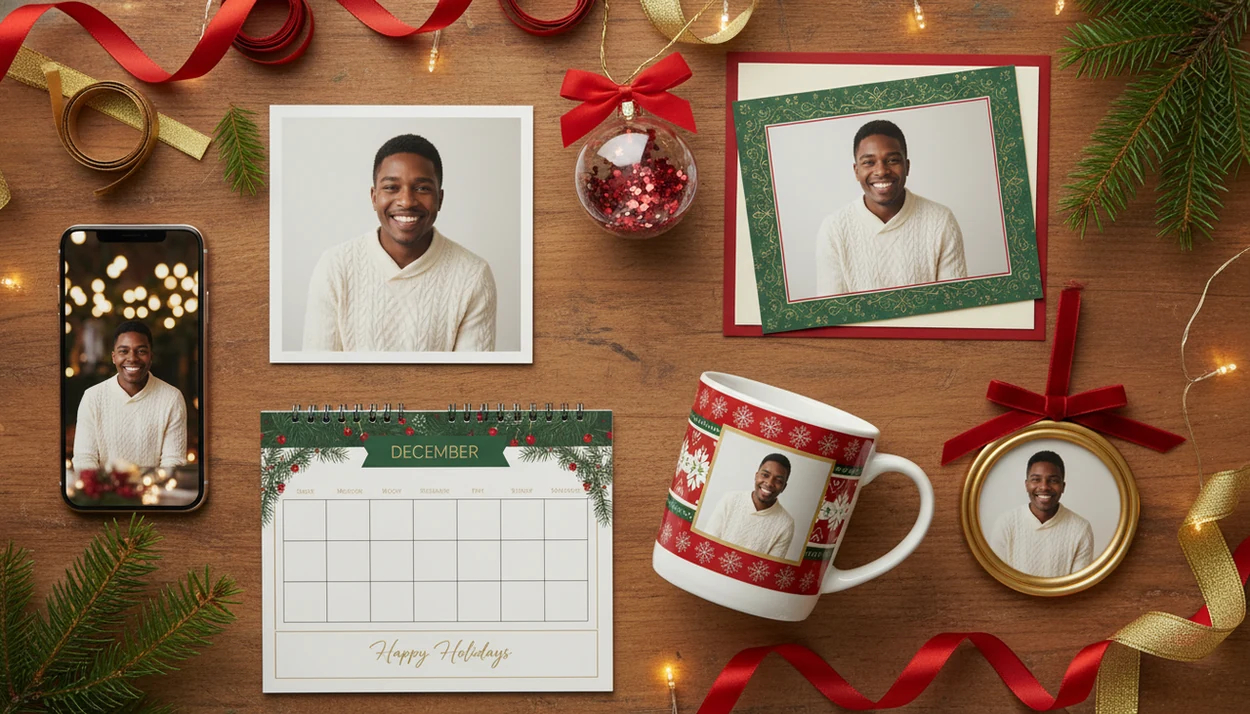
Christmas photo gift ideas from one picture include AI Christmas portraits, custom cards, framed prints, ornaments, calendars, mugs, phone wallpapers, and coordinated keepsake sets made from one clear source photo. The best results come from choosing a sharp, well-lit photo, generating several festive portrait styles, then matching each output to the right print or digital gift format.
Definition: Christmas photo gift ideas from one picture are personalized holiday gifts created by turning a single uploaded photo into multiple festive outputs, such as AI portraits, Santa scenes, Christmas cards, prints, ornaments, and wallpapers.
TL;DR
- One strong source photo can become many AI Christmas photo gifts, including portraits, cards, prints, ornaments, mugs, calendars, and digital wallpapers.
- The original photo matters most: use a sharp, well-lit, unfiltered image where faces are visible and skin tone is natural.
- Before printing or gifting, check image resolution, likeness accuracy, privacy terms, and usage rights for the AI Christmas photo app.
Christmas Photo Gift Ideas From One Picture: Best Uses
Cards, framed prints, ornaments, wallpapers, calendars, mugs, photo books, and keepsake sets are the most practical Christmas photo gift ideas from one picture. One AI-generated portrait can be reused across several physical and digital formats, as long as the crop and resolution fit each product.
That matters because holiday photo gifts are not a niche habit.
The practical path is simple: start with the photo you already have, create personalized AI Christmas portraits, then assign each output to a gift format. For last-minute family gifting, one strong portrait is often easier than trying to schedule a December studio session.
Five Facts About AI Christmas Photo Gifts From One Picture
- One uploaded photo can generate many holiday looks, including studio portraits, Santa scenes, snowy cabins, winter landscapes, and matching-pajama setups.
- One finished portrait can be reused for cards, framed prints, mugs, calendars, photo books, ornaments, and Christmas wallpaper.
- Source photo quality controls final likeness, so lighting, sharpness, visible eyes, and no heavy filters matter more than the background.
- Personalization depends on preserving facial features and skin tone, not turning the person into a generic festive avatar.
- Privacy, data retention, deletion options, and commercial rights vary by platform and should be checked before printing, selling, or mass-ordering gifts.
How AI Christmas Photo Gifts Work From One Uploaded Photo
AI Christmas photo gifts work by using one uploaded photo as the visual reference for likeness, pose, and facial structure, then generating festive portrait outputs in different holiday scenes. The basic flow is upload, detect face and pose cues, preserve recognizable details, create Christmas styles, and export the finished images.
Under the hood, these tools use image embeddings, which are compact visual patterns extracted from the source photo. In plain terms, the app is trying to remember what makes the person look like themselves while changing the setting, outfit, lighting, or background.
Realistic outputs can include studio-quality holiday portraits, Santa scenes, matching pajamas, snowy cabins, and Christmas wallpaper. Stronger apps generate many variations without requiring a full photoshoot, but you still need to review the face closely. Good AI Christmas photo apps transform one uploaded photo into studio-quality holiday portraits, Santa scenes, and Christmas wallpaper across many festive styles, not guaranteed studio portraits from a bad source image.
How to Use One Picture for Christmas Photo Gift Ideas
Use one picture for Christmas photo gifts by creating several festive outputs first, then choosing which image belongs on each gift. Don’t start with the mug or ornament. Start with the face.
- Choose a clear, front-facing, well-lit photo with visible eyes, a natural expression, and no heavy beauty filter.
- Generate several styles, such as Santa scenes, studio portraits, cozy cabins, snowy outdoor looks, and phone wallpapers.
- Match each output to cards, prints, ornaments, calendars, mugs, photo books, or digital wallpaper.
- Review likeness, cropping, resolution, print size, privacy terms, and usage rights before ordering or sharing.
A December 23 parent making a Santa portrait after bedtime has a different job than someone planning a framed family gift in November. The same workflow works for both, but the print deadline does not.
Best Source Photo Requirements for AI Christmas Photo Gifts
“What kind of photo should I use for AI Christmas gifts?” Use a sharp, recent, well-lit phone photo where the face is visible, the eyes are open, and the expression still looks like the person.
Avoid heavy filters, sunglasses, motion blur, extreme side angles, low resolution, and cropped faces. Warm yellow kitchen light can work, but it may shift skin tone. A blurry sleeve near the chin can also confuse the final crop. Small stuff counts.
For family photos, choose the frame where the smallest face is still large enough to read. For couples, avoid overlapping faces or hidden hands. For child and baby portraits, a clear face matters more than a cute background; the baby first Christmas photo app workflow has more detail on that use case. For pets, choose a shot with visible eyes, nose, and fur texture. A plain phone photo can work if it is clear and recent.
Holiday Photo Keepsake Ideas by Recipient and Format
Holiday photo keepsake ideas work better when the image style matches the recipient and the format. A grandparent may want a framed portrait, while a partner may actually use a phone wallpaper every day.
| Recipient | Best photo style | Gift format | Why it works |
|---|---|---|---|
| Parents and grandparents | Framed family portrait or classic studio look | Framed print, ornament, photo book, calendar | It feels personal and displayable without asking them to manage files. |
| Partners | Cozy couple portrait or soft winter scene | Phone wallpaper, framed print, card set | It turns one shared photo into something private and everyday. |
| Kids | Santa scene, snowy cabin, matching pajamas | Storybook-style keepsake, ornament, small print | The scene feels playful without needing a studio setup. |
| Pet owners | Pet Christmas portrait with clean face detail | Ornament, mug, desktop wallpaper | Pets make strong keepsakes when the eyes and fur stay recognizable. |
| Coworkers or creators | Polished holiday card or festive profile image | Shareable graphic, card, social avatar | It stays seasonal without feeling too intimate. |
For pet-specific formats, a Christmas photo app for pet owners can help narrow the style choices.
Coordinated AI Christmas Photo Gift Set From One Portrait
A coordinated AI Christmas photo gift set uses one source photo to create related gifts without handing everyone the exact same item. The trick is to keep the same visual identity, then vary the crop, background, layout, and format.
- Classic Studio Set: Use a clean studio portrait for cards, framed prints, calendars, and a photo book cover.
- Santa Keepsake Set: Use a Santa scene for ornaments, child keepsakes, greeting cards, and small framed prints. Wide eyes under a Santa hat can carry a whole set.
- Cozy Cabin Set: Use a fireplace or snowy cabin look for mugs, wall prints, calendars, and holiday card images.
- Digital-First Set: Use portrait and vertical crops for wallpapers, social images, profile pictures, and shareable holiday graphics.
This approach is useful when time is short or only one decent photo exists. The printer tray may still be warm with glossy paper, but each gift feels slightly different. For style planning, compare options in our Christmas photo styles guide.
Print-Ready Checks for Christmas Cards, Prints, and Ornaments
Images that look crisp on a phone can become soft when enlarged for cards, framed prints, canvases, mugs, calendars, or ornaments. Before ordering, check resolution, crop safety, face placement, border spacing, aspect ratio, and color brightness.
Different products need different layouts. A square ornament may cut off hair. A folded card needs safe margins near the crease. A mug wraps around a curved surface, so faces should not sit too close to the edge. For wall art, order a small proof first if the gift is important.
If you are ordering physical gifts, compare the same image preview across vendors such as Shutterfly, Mixbook, Snapfish, Walgreens Photo, and Canva, because each platform handles crop boxes, safe margins, and color previews differently.
Demand for printed photo products is real. The U.S. photo printing market, including photo gifts, generated about $2.44 billion in 2022, according to Statista source. For printed gifts, a proof is often safer than trusting a phone preview because small screens hide softness, color shifts, and tight crops.
Common Mistakes With Christmas Photo Gift Ideas From One Picture
The biggest mistake is starting with a blurry, filtered, dark, or outdated photo and expecting the final gifts to look polished. AI can change a background, but it cannot always recover missing facial detail.
Another mistake is assuming AI Christmas photos always look fake or cartoony. Many outputs can look realistic when the source photo is strong, but you still need to reject images where the face, skin tone, hands, pets, or children look wrong. A cropped school-day grin on a phone screen may be cute, yet too low-resolution for a framed print.
People also print too quickly. Check crop, resolution, aspect ratio, and color before buying cards or ornaments. Finally, don’t assume every generated image includes commercial rights, and don’t skip privacy policies or deletion options. AI photo-editing adoption is growing, but not every gift recipient will recognize how these images are made; explain the process if likeness, privacy, or authenticity matters.
Who is this Christmas photo style best for?
This gift approach works well for people who want a personal present but do not have time to plan a studio shoot before the holidays. Long-distance family members can send a finished portrait instead of a plain photo. Parents with young kids can skip a stressful in-person session, since the styling and background are generated after the fact from a single usable picture. Couples can get a matching festive portrait for a card without coordinating outfits in person. Anyone gifting to grandparents or older relatives can produce a warm, traditional-looking print without renting props or lighting.
It is less ideal for buyers who need a guaranteed studio-quality portrait for a large formal print, since results are AI-generated and can vary in fine detail compared to a professional shoot.
How does PiXmas compare to a photographer or DIY setup?
Each option can produce a nice Christmas gift, but the time, cost, and effort involved are different.
- Reporting in late 2025 notes that the AI Christmas selfie trend added a "magical holiday touch" to everyday photos and was spreading rapidly as users posted AI-retouched festive portraits on Instagram, Facebook and X. (Analytics Insight story on Christmas 2025 AI festive portrait trend, 2025)
- AI Christmas photo generators on Facebook typically work by users uploading a single selfie and choosing a Christmas style such as Santa scenes, cozy sweater portraits, snow globes, or festive wallpapers before posting results to their feed.
- By Christmas 2026, media coverage described a viral trend in which AI tools turned simple selfies into festive portraits that spread quickly across Instagram, Facebook and X. (Analytics Insight story on Christmas 2025 AI festive portrait trend, 2025)
Limitations
One-picture Christmas photo gifts are practical, but they still have real limits.
- Low-resolution, heavily filtered, or poorly lit source photos can produce distorted or inconsistent likenesses. - Some AI tools struggle with group photos, pets, babies, glasses, hands, teeth, and complex poses. - Highly specific cultural traditions, props, outfits, or backgrounds may not render accurately from one photo alone. - Print products still depend on resolution, crop, color, paper type, finish, and vendor quality. - Commercial usage rights vary by platform and should be checked before selling images or mass-printing merchandise. - Privacy policies and data retention rules vary, especially when uploading photos of children, relatives, or family groups. For family or child photos, check whether the service explains biometric data handling, deletion requests, model-training use, and account-level access before uploading. - Last-minute physical gifts may be limited by shipping deadlines, even if image generation is instant. - A tiny face in a group photo may work for a phone wallpaper but fail on a large framed print.
Check twice. Then order.