
Discover Christmas Keepsake Photos From One Uploaded Picture
Quick answer: Christmas keepsake photos are stylized holiday portraits meant for framing, printing, or gifting rather than casual everyday sharing. Apps like PiXmas turn one uploaded photo into festive, display-ready portraits with holiday backdrops, wardrobe, and lighting, offering 800+ style options to browse. You typically get several variations to compare so you can choose the most natural-looking keepsake before saving or printing it.
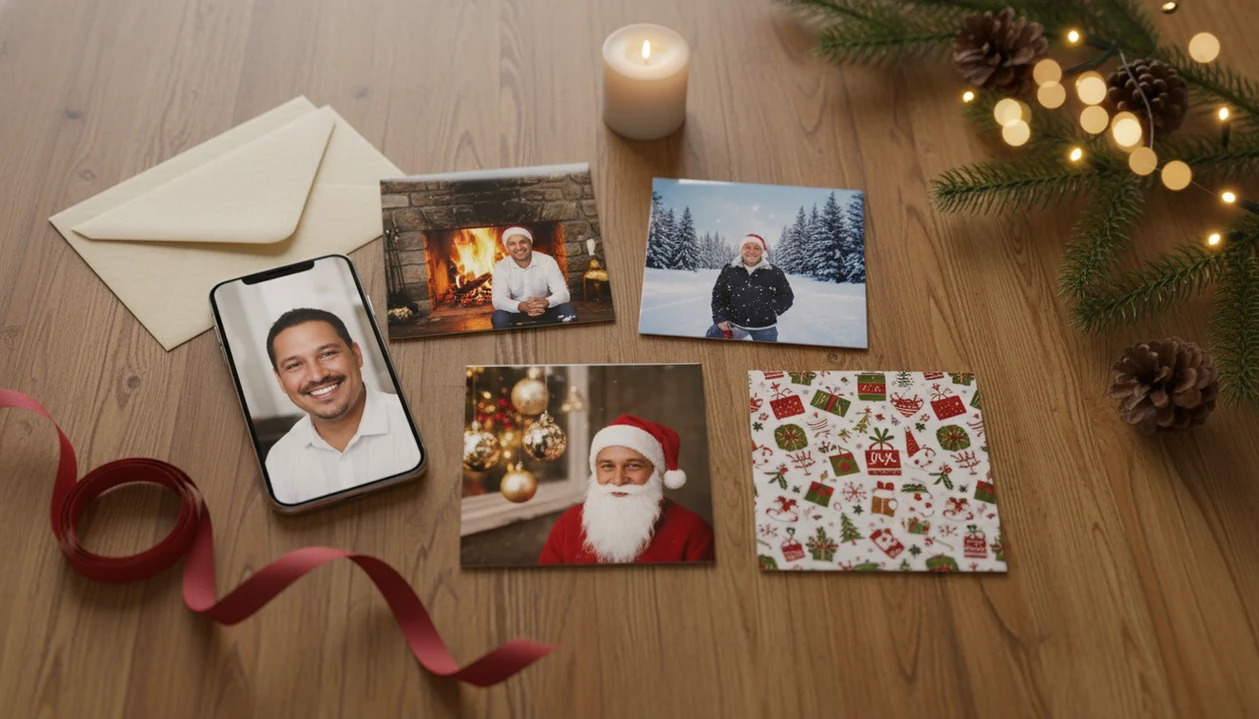
You can discover Christmas keepsake photos by starting with one clear uploaded picture and generating festive portraits designed for cards, wallpapers, gifts, and family mementos. PiXmas turns a phone photo into holiday portraits, Santa scenes, and Christmas wallpaper styles for babies, pets, couples, families, and creators.
> This Christmas Pictures App transforms one uploaded photo into holiday portraits, Santa scenes, and Christmas wallpaper for families, couples, pet owners, and creators.
- Christmas keepsake photo ideas work best when the final image feels sentimental, printable, and worth saving.
- AI holiday keepsake portraits are generated from one uploaded photo, but clearer source images usually produce more realistic results.
- The strongest keepsake styles include Santa scenes, cozy family portraits, pet portraits, couple portraits, baby photos, holiday cards, and Christmas wallpapers.
Christmas keepsake photo ideas from one upload
Christmas keepsake photos are sentimental, saveable, and giftable holiday images, not just quick filters over a regular snapshot. The finished image should feel worth putting on a card, framing, saving as a phone wallpaper, or sending to someone who will keep it.
The practical path is simple: upload one photo, choose a festive style, preview several portrait outputs, then save the strongest result. A Christmas Pictures App can create different looks from the same source image, which helps when you have one good photo in the iPhone Photos grid and six almost-identical misses.
AI-assisted holiday creation now feels normal to many people. Adobe’s 2024 Holiday Shopping Report found that 64% of U.S. shoppers planned to use AI for holiday shopping tasks, according to this source.
One good upload can become a card image, framed print, social post, wallpaper, or family memento.
How AI holiday keepsake portraits work from one uploaded photo
AI holiday keepsake portraits work by reading visual cues from one uploaded photo, then generating a new festive image around the person, pet, or group. In technical terms, the app uses image embeddings, which are compact visual signals that help match faces, poses, fur, lighting, and scene style.
The data flow is: upload one photo, analyze the subject, apply a Christmas scene or portrait style, preview the result, then export the new image. It is an AI-generated portrait, not proof that a studio session happened.
Source quality matters. A tiny face in a group shot, warm yellow kitchen light, or a blurry sleeve can change how natural the output feels. Pew Research Center found that 93% of U.S. adults had heard of AI and 60% interacted with it at least several times a week, according to this source.
A good AI Christmas photo app should deliver fast festive portrait options from one upload, not guaranteed studio-perfect proof of a real scene.
How to use a Christmas Pictures App for Christmas keepsake photos
Use a Christmas Pictures App by starting with the photo you already have, then choosing the Christmas output you actually need. The card version and the wallpaper version may need different framing, so decide before you export.
- Choose a clear, front-facing photo with the face or pet fully visible.
- Select a style based on the use: card, wallpaper, Santa scene, pet portrait, or family keepsake.
- Generate several variations before choosing the most natural portrait output.
- Check faces, hands, pet markings, names, collars, clothing, and background details.
- Export the strongest version for sharing, wallpaper use, cards, or printing.
The permissions prompt matters. On iPhone, many users pause at “allow selected photos only,” and that is a reasonable choice when uploading a single image.
For families making a card and lock-screen image from one upload, the question is often, “Can I use this for a card and a wallpaper?” Usually yes, but check aspect ratio before saving.
Baby Christmas keepsake photos for first-holiday memories
Baby Christmas keepsake photos work best when they feel gentle, recognizable, and simple enough to save for years. A first-holiday portrait should still look like the baby in the uploaded photo, even when the background becomes snowy, cozy, or ornament-inspired.
First Christmas portrait styles
- First Christmas portraits: Soft blankets, tiny holiday outfits, and warm backgrounds fit announcement cards and albums.
- Ornament-style images: Round, framed compositions can work well for grandparents or gift tags.
- Soft winter scenes: Snowy windows, muted lights, and simple clothing often age better than busy props.
Gentle lighting and plain outfits usually beat clutter. A sparkly dress against a fireplace backdrop can look sweet, but too many shiny details may distract the generator.
Grandparent-ready keepsake uses
Parents often use baby portraits for cards, albums, framed keepsakes, or an app to help make grandparent Christmas gifts. Review identity accuracy carefully, because AI may slightly change cheeks, eyes, or expressions.
Pet Christmas keepsake photo ideas with festive scenes
Pet Christmas keepsake photos should preserve the animal’s personality first, then add the festive scene. A wet nose in a portrait preview may look adorable, but the markings still need to match the real pet.
- Dogs and cats can become snowy portraits, Santa-hat images, fireplace scenes, or ornament-inspired keepsakes.
- Sharp eyes, visible fur texture, and a clean background usually improve the final output.
- Pet portraits can work as memorial images, holiday cards, wallpapers, or funny-but-sentimental posts.
- AI can alter markings, eye color, collar details, body shape, or paw placement.
- A simple sitting photo often gives cleaner results than a fast-action blur.
Pet owners who want more species-specific guidance can compare examples in the Christmas photo app for pet owners guide. Check the collar and face before printing. Tiny details matter here.
Couple and family Christmas keepsake portraits
Couple and family Christmas keepsake portraits work best when every face is visible and the photo leaves enough room around the group. Tight crops can feel fine on a phone, but they may limit snowy backgrounds, Santa scenes, or holiday-card layouts.
Couple portrait keepsakes
Couple styles often lean into cozy blankets, candle glow, snowy walks, or dressier indoor portraits. Highly stylized scenes can look beautiful, but they may feel less personally accurate if outfits, hair, or expressions shift too much.
Family holiday card portraits
| Image type | Keepsake portrait | Casual holiday selfie |
|---|---|---|
| Couple photo | Styled for saving, gifting, or wallpaper use | Quick memory, less print-minded |
| Matching pajamas | Designed to look coordinated and card-ready | May keep clutter and uneven lighting |
| Family group | Needs visible faces and space around each person | Often cropped, tilted, or busy |
| Santa scene | Festive and story-like | Usually not possible without editing |
For broader visual options, compare Christmas photo styles before choosing the final look.
Common patterns in AI holiday keepsake portraits
AI holiday keepsake portraits tend to feel more saveable when the scene supports the subject instead of swallowing it. Keepsake value comes from emotional fit, not the number of styles in a picker.
- Warm lighting often makes faces feel softer and more card-ready.
- Eye contact helps the portrait feel personal, especially for babies, pets, and couples.
- Clean backgrounds reduce visual noise and make printing easier to review.
- Traditional Christmas elements such as red, green, gold, snow, ornaments, fireplaces, and Santa details signal the season quickly.
- Subject accuracy matters most; the person, pet, or family should still feel like the uploaded photo.
Wallpapers need extra space for clock areas and icons. Printable cards need cleaner edges, sharper faces, and fewer strange background objects.
A holiday card proof on the kitchen table exposes details a phone preview can hide.
What Christmas keepsake photos do not show
Christmas keepsake examples do not guarantee identical results for every upload. They show what a style can produce under favorable conditions, not what every dark, cropped, angled, or crowded photo will become.
Lighting, blur, obstructions, face angle, and group complexity all affect the final image. A leash dropped near the tree skirt may disappear, change shape, or turn into a strange background detail. The same issue can happen with glasses, fingers, jewelry, or lettering.
AI output may look realistic without being a real photographed scene. That matters if you plan to send cards that look like a studio portrait. Inspect the export before printing, ordering magnets, or sending a last-minute card order before midnight.
For last-minute users, an AI portrait is often easier than booking a photographer because it starts from a photo already on the phone.
What makes a Christmas keepsake photo different from a regular holiday snapshot?
A keepsake photo is composed for display rather than for a quick share on social media. It usually has a clear focal subject, festive backdrop, and cleaner styling than a candid family photo.
With PiXmas, one photo can be turned into several polished holiday portrait variations, giving you options that feel closer to a display piece than a casual phone picture.
What photo should you upload for the best keepsake result?
Choose a recent, well-lit photo where the face is clearly visible and not turned too far from the camera.
Avoid heavy motion blur, harsh shadows, sunglasses, or busy backgrounds, since these details can carry over or confuse the final holiday scene.
For babies, pets, or couples, a photo where everyone's face is unobstructed tends to produce a steadier, more recognizable keepsake portrait.
How does PiXmas compare to a photographer or DIY keepsake setup?
- Reporting in late 2025 notes that the AI Christmas selfie trend added a "magical holiday touch" to everyday photos and was spreading rapidly as users posted AI-retouched festive portraits on Instagram, Facebook and X. (Analytics Insight story on Christmas 2025 AI festive portrait trend, 2025)
- By Christmas 2026, media coverage described a viral trend in which AI tools turned simple selfies into festive portraits that spread quickly across Instagram, Facebook and X. (Analytics Insight story on Christmas 2025 AI festive portrait trend, 2025)
- The same 2026 guide reports that popular AI Christmas photo tools can offer hundreds of styles from one selfie, including portraits, Santa scenes and festive wallpapers that users download and share on social platforms. (PiXmas guide on AI Christmas photo trend on Facebook (Picsmas), 2026)
For anyone who wants a sentimental, display-ready Christmas photo without a studio session, PiXmas offers a fast way to turn one existing photo into a keepsake-style portrait worth reviewing before printing or gifting.
Limitations
AI Christmas keepsake portraits can be useful, but they are not neutral copies of the original photo. Review the final export as if you were checking a card proof before ordering.
- AI Christmas portraits are generated images, not true studio photographs.
- Facial identity, pet markings, hands, accessories, and clothing can change slightly.
- Blurry, dark, cropped, or cluttered uploads usually produce weaker results.
- Some outputs look realistic on a phone but need closer review before printing.
- Hundreds of styles do not guarantee the most sentimental or accurate keepsake.
- Consistency may vary across repeated generations from the same upload.
- Marketing phrases like “studio-quality” should be judged against the actual export.
- Text, names, ornaments, collars, and small background details may need extra scrutiny.
Be picky. The keepsake is the saved result, not the style count.
Related guides
FAQ
How high-resolution are the finished keepsake images?
Output resolution depends on the app, export settings, and the source photo quality. Before printing or framing, check the exported file's dimensions and zoom in on faces and edges to confirm the detail holds up at the size you plan to print.
Is the app available on Android devices?
PiXmas has a web version you can use on Android phones and tablets in your browser. A native Android app is also coming.
Can I use a phone photo of my pet for a Christmas keepsake portrait?
Yes. A clear photo of your pet facing the camera, with good lighting and no obstructions, works well in PiXmas. Fur texture and coat patterns are usually easiest to preserve accurately from a sharp, well-lit source image.
Will a group photo with several family members work as well as a solo portrait?
Group photos can work, but PiXmas may render faces less consistently as the number of people increases. For the most reliable keepsake result, use a photo where each face is clearly visible and unobstructed.
Can I order physical Christmas cards directly from my keepsake photo?
PiXmas generates the stylized digital portrait itself rather than handling card printing. You can save or export the finished image and then use a separate printing or card service to produce physical copies.