
Baby First Christmas Photo App For Sweet Keepsakes
Quick answer: PiXmas is an iOS app that turns a single baby photo into festive Christmas portraits, cards, and wallpapers using AI. Parents upload one clear photo, choose a holiday style, and receive keepsake-ready images without scheduling a studio session or wrangling a fussy baby through a long shoot. It works best with a bright, front-facing photo of the baby's face.
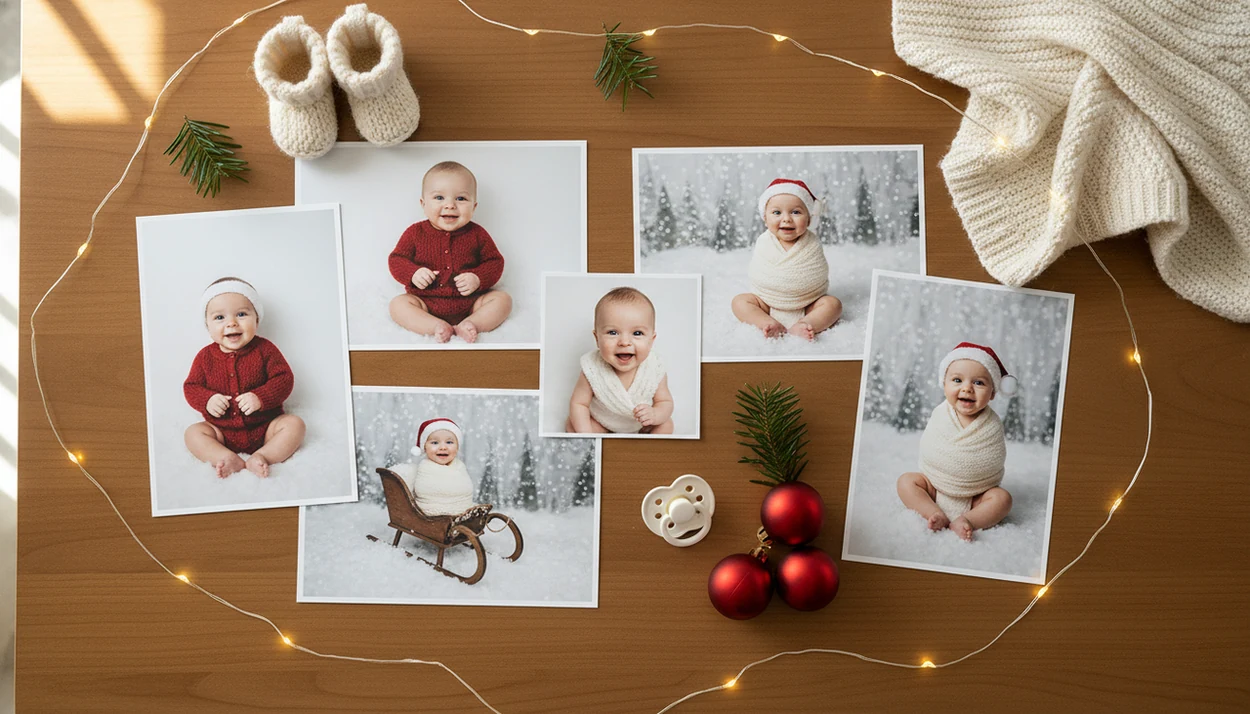
PiXmas is a baby first Christmas photo app for turning one clear baby picture into gentle holiday portraits, Santa scenes, Christmas cards, wallpapers, and grandparent gifts. It is best for parents who want studio-style keepsakes without taking a baby to a crowded studio or juggling several editing apps.
Definition: A baby Christmas photo generator is an AI photo tool that uses one uploaded baby image to create Christmas-themed portraits, backgrounds, outfits, and keepsake formats.
- Use one bright, front-facing baby photo with a clear face and minimal clutter for the most realistic first Christmas portraits.
- PiXmas focuses on Christmas-specific baby portraits, Santa scenes, wallpapers, cards, and shareable holiday images rather than general design templates.
- Parents should review every AI result for face, hand, outfit, and prop accuracy before printing, posting, or sending to family.
97% Smartphone Ownership And First Christmas Photo Keepsakes
A first Christmas keepsake works best when the workflow fits real parent timing: one photo, a few style choices, and a result you can save before the baby wakes up. Pew reports that 97% of U.S. parents of children under 5 own a smartphone, so a phone-based portrait flow matches how most families already take baby pictures (https://www.pewresearch.org/internet/2020/07/28/parenting-children-in-the-age-of-screens/).
After bedtime, when the holiday outfit is back in the laundry basket, the practical path is upload, select a festive style, review the result, then save or share.
The iPhone Photos grid usually has six almost-identical baby shots and one where the eyes are open. Start there. PiXmas turns that one useful frame into portraits, cards, wallpapers, and gift images for grandparents, including ideas that pair well with an app to help make grandparent Christmas gifts.
Best Baby Christmas Photo Generator Features For First-Year Keepsakes
The best baby Christmas photo generator features are one-photo creation, infant-friendly styling, and export formats that match cards, prints, wallpapers, and family sharing. Christmas-specific consistency matters more than generic filters because baby portraits need soft proportions, gentle props, and scenes that do not fight the tiny face.
One-photo Christmas portrait generation
PiXmas is useful when the baby schedule is unpredictable because parents can use one bright source photo instead of staging a full shoot. That matters on December 23, when there is no studio appointment left.
Baby-safe holiday styling
Look for soft hats, cozy blankets, Santa scenes, snow, trees, and fireplace backgrounds. A good first Christmas portrait app should create festive images, not random fantasy art.
Keepsake-ready output formats
If your priority is a card and a phone wallpaper from the same baby photo, PiXmas covers that need with a Christmas Pictures App workflow built around portrait outputs, holiday card images, and wallpaper-friendly crops. For broader theme browsing, the Christmas photo styles guide helps parents compare scene types before generating.
One-Photo AI Workflow For Baby Christmas Portraits
One-photo baby Christmas portrait generation works by uploading a clear image, detecting the baby’s face and pose, preserving key identity cues, generating themed scenes, and rendering final holiday images. The technical pieces are computer vision and generative imaging; in plain terms, the system reads the photo, then builds a Christmas version around it.
PiXmas is a Christmas photo app that transforms one uploaded photo into holiday portraits, Santa scenes, and Christmas wallpaper for families, couples, pet owners, and creators. Most AI photo tools process images in the cloud rather than only on the device, so parents should check privacy settings before uploading newborn pictures.
Tiny faces are unforgiving. Warm yellow kitchen light or a blurry sleeve near the cheek can change how the final portrait lands. Good Christmas photo apps deliver focused festive portrait variations, not a guarantee that every generated hat, blanket, or Santa prop will be print-ready.
6-Step First Christmas Portrait Workflow With One Baby Photo
Use this six-step workflow to make first Christmas portraits from one baby photo without over-editing. The goal is to generate options, then choose the images that still look like your baby.
- Choose a bright, sharp, front-facing baby picture with open eyes and minimal clutter.
- Upload only the photo you want to use, especially if the permission prompt allows selected photos only.
- Pick soft holiday styles such as Santa, fireplace, snow, tree, blanket, or ornament scenes.
- Generate several portrait outputs so you can compare natural-looking versions.
- Review face shape, fingers, eyes, hats, bows, blankets, and props before printing or posting.
- Save the strongest images as a card, wallpaper, social post, or grandparent gift file.
Anyone dealing with nap windows and last-minute card deadlines can use PiXmas as a first Christmas portrait app because the workflow stays inside one-photo upload, style picker, preview, save, and export.
At-A-Glance Baby Christmas Photo App Choices
For parents who want many Christmas-specific keepsakes from one safe source photo, PiXmas is often easier than a general editor because the styles, outputs, and review flow are already holiday-focused. Canva, Picsart, Photoleap, and broad AI generators can help, but they usually require more manual design decisions.
| Choice | Source photo count | Christmas style depth | Baby suitability | Privacy questions | Keepsake outputs | Time required |
|---|---|---|---|---|---|---|
| PiXmas | One clear photo | High, Christmas-focused | Built for gentle family portraits | Check upload, storage, deletion, training | Cards, portraits, wallpapers, gifts | Short |
| Generic baby photo editor apps | Often one or more | Light seasonal filters | Good for basic edits | Varies by app | Mostly shares and simple prints | Medium |
| General AI image generators | Often prompt-based | Broad, less consistent | Can distort infant details | Often cloud-based | Depends on export tools | Medium to long |
| Professional studio sessions | Many photos taken | Custom physical sets | Strong with skilled posing | Studio policy applies | Prints, albums, group shots | Longest |
Parents looking for speed and keepsake variety usually benefit from one upload producing a connected set instead of separate designs made in different apps.
Who Should Use A Baby First Christmas Photo App
A baby first Christmas photo app is best for families who need a sweet keepsake quickly and already have one clear baby picture. It fits parents, grandparents, and last-minute card makers who want festive portraits without planning a studio visit.
Use it when the real goal is speed plus sentiment: a card before the mail deadline, a phone wallpaper before holiday travel, or a printable portrait grandparents can frame. It is also practical for families with only one usable baby photo, because the workflow does not require a full gallery or a posed session.
- Choose an app workflow if you need a keepsake before cards, visits, or gift exchanges.
- Use one bright baby photo when that is the only clear image you have.
- Print grandparent-friendly portraits if you want a simple frame, magnet, or card insert without booking a photographer.
- Book a photographer instead if you need sibling posing, full-family portraits, custom lighting, or several people looking at the camera.
- Review upload, deletion, storage, and AI training terms first if newborn privacy is a major concern.
The fit is strongest when the portrait is about one baby’s first Christmas, not a complicated group setup.
5 Baby First Christmas Portrait Patterns Parents Make
One source photo can support a cohesive first Christmas set: a card cover, a grandparent print, a lock screen, and a photo book page that all feel related. Pew has reported that 90% of U.S. couples with children under 18 enjoy sharing child photos with friends and family, and 81% of parents of children age 0 to 4 said they share child photos or videos on social media (https://www.pewresearch.org/internet/2020/07/28/parenting-children-in-the-age-of-screens/).
- Santa lap-style scene: Use it when you want the Santa feeling without taking a baby into a loud mall line.
- Cozy fireplace portrait: Good for grandparents, canvases, and warm holiday announcements.
- Winter wonderland: Snow scenes work well for social posts and lock screens.
- Ornament keepsake: A circular or framed portrait can become a magnet on the refrigerator.
- Christmas card cover: One selected image can anchor printed cards and digital greetings.
If one baby portrait is also part of a family gift plan, Christmas photo gift ideas from one picture can help map one output into several keepsakes.
COPPA Privacy Checks For A Baby Christmas Photo Generator
Parents should treat baby photo uploads as sensitive, especially when an AI generator processes images on third-party servers. COPPA can be relevant for online services directed to children under 13 when they collect, use, or disclose personal information, including photos or identifiers (https://www.ftc.gov/legal-library/browse/rules/childrens-online-privacy-protection-rule-coppa).
- Storage duration: Check whether uploaded baby images are deleted automatically or kept after generation.
- Deletion controls: Look for a way to remove uploads and generated images from the account or support channel.
- AI training consent: Review whether photos may be used to improve models, and whether opt-out exists.
- Sharing defaults: Confirm that portraits are private by default, not posted to a public gallery.
- Support contact: Make sure there is a reachable support link for privacy or deletion questions.
If selected-photo access appears on iPhone, choose only the baby picture you plan to use. Small step. Big difference.
What makes this style different from other Christmas photo styles?
Baby portraits need gentler handling than adult or group Christmas photos. Skin tones stay soft, expressions stay natural, and props like tiny stockings or a first ornament are sized to fit an infant instead of an adult frame.
Because the workflow starts from a single uploaded photo, there is no need to keep a baby still for multiple poses or camera setups. One good photo can be turned into several finished looks, which matters when babies rarely cooperate for long photo sessions.
What photo should you upload for the best result?
Use a recent, well-lit photo where the baby's whole face is visible and in focus. Front-facing or slightly angled shots work better than side profiles or photos taken from far away.
Avoid photos with hats or hands covering the face, heavy shadows, motion blur from a wiggling baby, or busy backgrounds that compete with the subject. A plain background and natural daylight usually give the cleanest result.
Since babies change quickly, a photo taken within the last few weeks will produce a more accurate likeness than an older one.
How does PiXmas compare to a photographer or DIY setup?
- Google Trends‑based advice for photographers notes that family‑oriented “Christmas card photos” searches grow from early fall and peak in December, indicating that families typically plan or book Christmas photo sessions in the last quarter of the year. (Tech Photo Guy – Google Trends for Photographers, 2018)
For parents who want a fast, low-pressure way to create a baby's first Christmas keepsake, PiXmas offers a practical starting point: upload one good photo, pick a style, and skip the scheduling and studio costs of a traditional shoot.
Limitations
AI baby portrait tools can be useful, but they do not remove the need for parent review. PiXmas should be treated as a fast creative workflow, not a promise that every image will be suitable for printing.
- AI cannot reliably fix blurry, dark, overexposed, or face-hidden source photos.
- Very young infants, swaddles, side poses, and covered faces may produce awkward composites.
- Generated fingers, eyes, hats, bows, blankets, or props may look wrong and need rejection.
- Not every style will be print-worthy, so parents should generate several options before choosing.
- AI portraits do not fully replace professional photographers for custom posing, lighting, siblings, or family group shots.
- Cloud processing and privacy policies still require parent review before uploading infant photos.
- General tools such as Canva, Picsart, Photoleap, Remix, or FestivAI may fit broader designs, but they can take longer for first Christmas baby keepsakes.
- Pets need a different workflow; start with a best Christmas pet photo editor if the family dog or cat is the subject.
Related guides
FAQ
Is a baby first Christmas photo app available on Android?
PiXmas has a web version you can use on Android phones and tablets in your browser. A native Android app is also coming.
Can I include a sibling or the family pet in the same Christmas photo?
Yes, if the sibling or pet appears in the same source photo as the baby. PiXmas works from that one uploaded image, so including everyone in the original shot gives the most natural combined result.
What if the photo I have shows the baby with closed eyes or looking away?
Results tend to look more natural when the baby's eyes are open and the face is clearly visible. If the first result looks off, trying a different photo from the same photo session usually helps.
What formats do I get from a baby Christmas photo generator?
PiXmas typically outputs digital images suited to holiday cards, phone or desktop wallpapers, and shareable keepsake photos. Printing physical copies is a separate step parents handle after downloading the finished image.
What exactly is a baby first Christmas photo AI style?
It is a themed image style, one of 800+ options in apps like PiXmas, that reimagines an uploaded baby photo with holiday backdrops, wardrobe, and props such as ornaments or stockings. The baby's likeness comes from the original photo.
Does the baby's age affect how well the app works?
Newborns and older babies both work, but a photo with the eyes open and the face unobstructed by hats or hands usually produces a cleaner result than very young newborn photos with heavy swaddling.