
Upload
Pick one clear selfie from your camera roll.
Turn one uploaded selfie into holiday portraits, Santa scenes, greeting cards, and festive wallpapers — no photographer or Photoshop required.
Upload a clear photo, pick a style, and the app generates a stylized holiday image in minutes. No costume, tree, or studio setup is required, though results are AI-generated renderings rather than photos from a physical shoot.
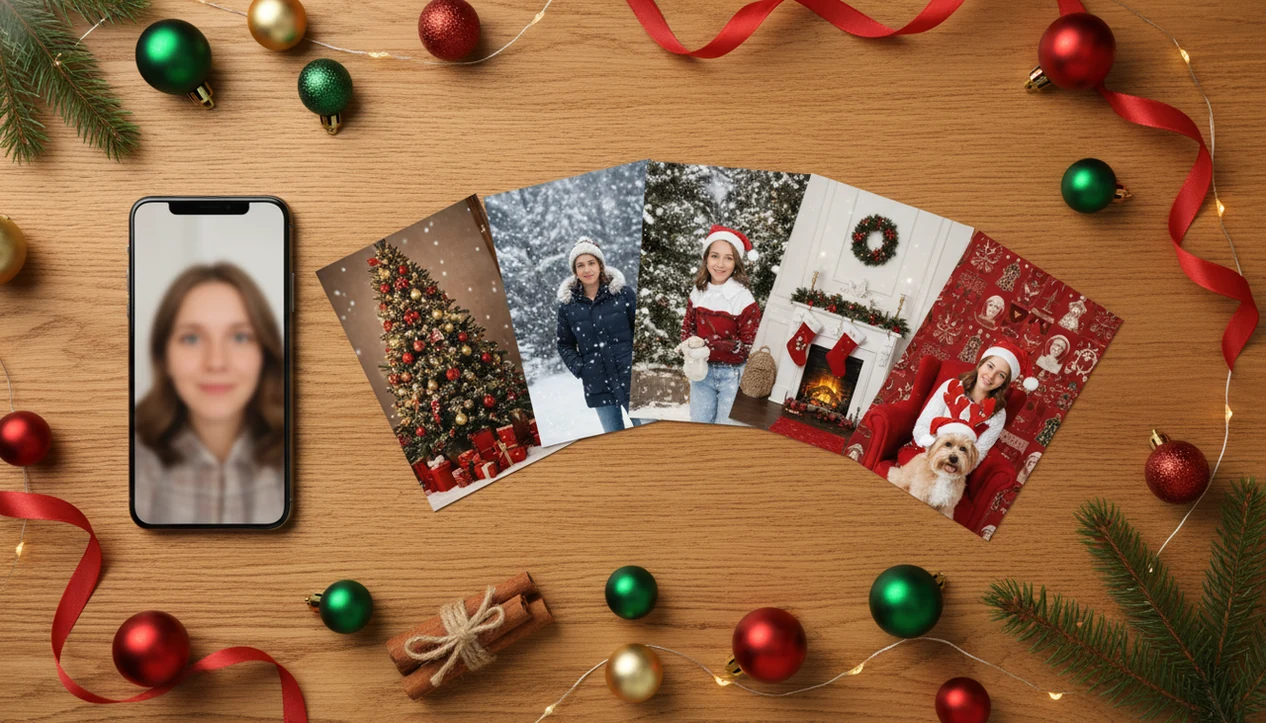
Pick one clear selfie from your camera roll.
Santa, snow, fireplace, card, or wallpaper.
AI builds a full festive scene around you.
Download cards, wallpapers, or social posts.
Upload a single selfie — no prompt writing or photo batches.
Snow, lights, props, and outfits — not stickers on top.
Export holiday cards, portraits, and lock-screen sizes.
Choose from hundreds of Christmas templates, preview the result, then save share-ready portraits, cards, and wallpapers.

It matters because most people already have the source image sitting in their camera roll.
The practical path is simple: upload, select a festive style, review the result, then save or share.
A Christmas Pictures App should turn an everyday phone photo into a polished holiday image set for cards, wallpapers, and social posts without making users learn prompt writing or manual design tools. The biggest benefit is consistency: the same source photo can become several Christmas outputs without rebuilding the look each time.
Stat callout: Global consumer spending on photo and video apps reached over $4.1 billion in 2022, which shows how normal phone-based image creation has become.
A parent can open the iPhone Photos grid, find six almost-identical kid snapshots, and choose the one where everyone is actually looking at the camera.
The strongest AI Christmas photo apps focus on fast Christmas image creation from one source photo, not manual layer editing. The core features are built around upload simplicity, seasonal scene variety, and usable export formats.
Upload one clear selfie or portrait.
Choose from AI-generated Santa scenes, snowy cabin settings, studio portraits, and festive interiors. Good AI Christmas photo apps deliver complete seasonal scenes, not sticker packs on top of the same old photo.
For families comparing layouts, the best family Christmas photo app guide explains card-focused workflows.
A good AI Christmas photo app should make polished holiday images from an ordinary photo while giving users enough control to judge the result before saving. The best options feel simple at upload, but serious at preview, export, and privacy.
Use this quick buyer check before choosing an app:
It is not just adding a frame, snow sticker, or warm filter over the original.
The system reads facial features and likeness from the input image, then uses image embeddings to understand the subject in a way the model can recompose. In plain language, it learns enough from the photo to place you into a new festive scene. Cloud-based processing runs the model, adds lighting, snow, decorations, background details, and returns finished outputs.
Stat callout: By August 2023, 54% of U.S. adults had heard at least a little about AI image-generation tools, according to Pew Research (https://www.pewresearch.org/short-reads/2023/08/28/growing-public-concern-about-the-role-of-artificial-intelligence-in-daily-life/). If you keep the generative AI market-size claim, add the exact source URL or remove it.
A high-resolution, well-lit photo usually matters more than the phone model.
Small checks matter.
A parent making a Santa portrait on December 23 after bedtime should choose the clearest photo first. No studio appointment left, no time to fix a bad upload.
It works especially well when the goal is a fast, festive, share-ready result from one photo.
Families can create matching holiday card photos. Couples can make seasonal portraits for cards, profiles, or a city balcony Christmas-light look. Pet owners can generate Christmas pet pictures, including cats and dogs, when the face is sharp and not hidden by motion. Content creators can build themed social media images without starting from a blank canvas.
For pet-specific tips, the best Christmas pet photo editor page covers upload quality and style choice.
We evaluate Christmas photo apps by checking whether they can turn ordinary uploads into believable, useful holiday images without hiding tradeoffs. The review focus is practical: output quality, privacy clarity, and whether the app saves time compared with manual editors.
Most Christmas photo styles rely on the same idea: swapping backgrounds, wardrobe, and lighting around a single uploaded portrait. What varies is how convincingly the AI blends the subject into the new scene, whether it's a snowy cabin, a red-and-gold studio set, or a minimalist card layout.
That gives more variety per upload than apps limited to a handful of templates.
A single, well-lit photo with the face clearly visible works best. Straight-on or slightly angled shots outperform extreme close-ups or photos taken in low light.
Avoid heavy sunglasses, strong shadows across the face, or motion blur, since these reduce how accurately the AI can render facial detail in the finished style. A recent, unfiltered photo tends to generate more natural-looking results than an old or heavily edited one.
AI Christmas photo generation is useful, but it has real limits.
Review before you print.
Anyone uploading children’s photos should read the AI Christmas photo privacy guide before generating or sharing images.
An AI Christmas photo app uses a generative model to reimagine an uploaded photo in a festive style, such as a Santa scene or snowy backdrop, without a physical photoshoot. The output is a new AI-rendered image based on your original photo's face and pose.
In this app, generation typically takes a few minutes per style once a photo is uploaded and a look is selected. Actual processing time can vary with server load and image complexity.
Group photos can work, but results are often less consistent than a solo or couple portrait, especially if faces are small, angled, or partly shadowed. For the most reliable output in this app, choose a group photo where every face is clearly lit and visible.
You can, but sharper and more recent photos generally produce cleaner results. this app works best with a well-focused image where facial features are easy to make out.
It's not required, but glasses with heavy glare or hats that cover the forehead can make it harder for the AI to render facial detail accurately. A plain, front-facing shot without obstructions usually gives the most natural-looking result.
this app exports images sized for typical sharing and standard print use. Check the preview resolution against your printer or card service requirements before ordering physical prints.