
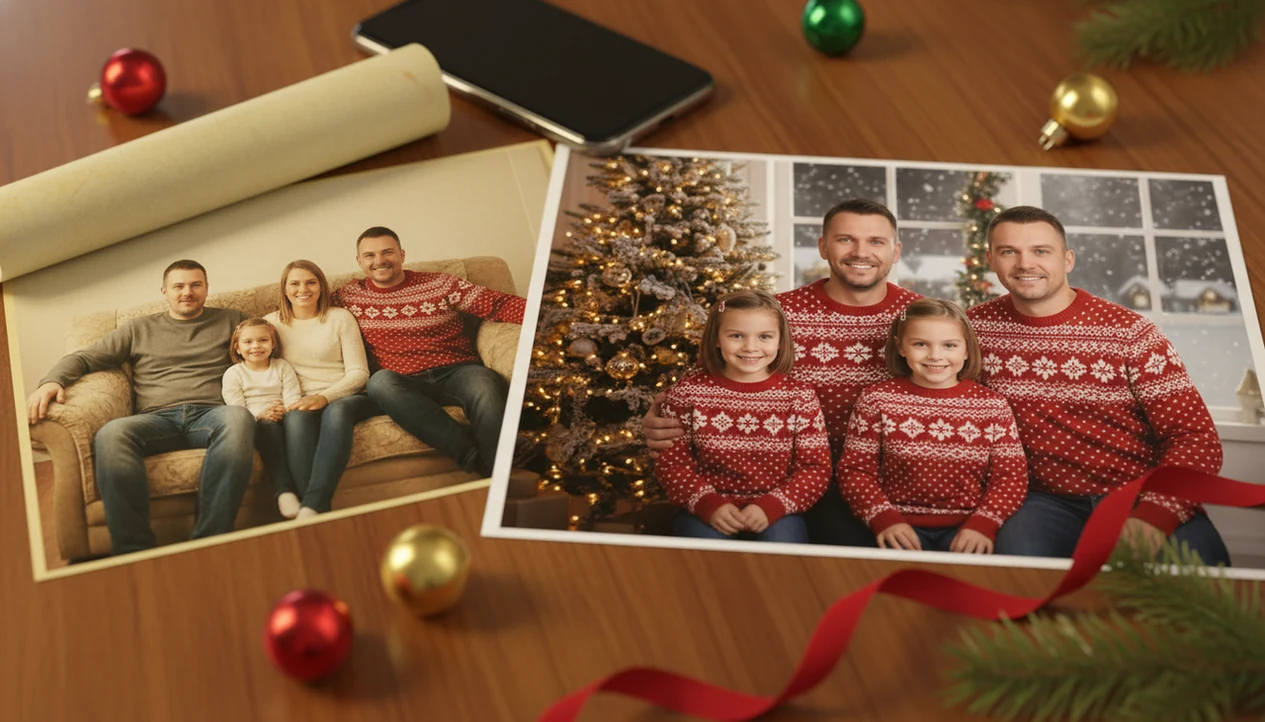

Definition: A Christmas family portrait generator is an AI-powered tool that analyzes an uploaded family photo and rebuilds it in a festive Christmas setting while preserving each person's face, expression, and likeness.
What a Christmas Family Portrait Generator Does With One Phone Photo
A Christmas family portrait generator turns one existing family picture into several festive outputs, such as holiday card images, Santa scenes, phone wallpapers, and social-ready portraits. It differs from manual editing because the AI rebuilds the scene around the family instead of asking you to cut out people, mask backgrounds, and place decorations by hand.
That matters when the iPhone Photos grid has six almost-identical kid snapshots and only one where everyone is actually looking at the camera. One clear photo is enough because the generator uses the faces, pose, and group layout as the input structure.
This workflow fits families who want card art, a wallpaper, and a shareable image from the same upload: upload a photo, select a festive style, review the result, then save or share. For broader app comparisons, our best family Christmas photo app guide covers related family workflows.
According to a holiday-card survey, 65% of U.S. adults who send holiday cards use personal photos. The workflow gap is real.
How AI Family Christmas Portrait Generation Works
AI family Christmas portrait generation uses image-to-image AI to read the uploaded photo, preserve recognizable people, and synthesize a new Christmas environment around them. In plain terms, the system studies the family first, then changes the setting.
- Image analysis: The model reads facial features, body position, composition, and lighting from the uploaded family photo.
- Likeness mapping: Face preservation helps keep each person recognizable before the Christmas scene is rebuilt.
- Scene synthesis: Holiday elements such as trees, fireplaces, snow, ornaments, sweaters, and Santa backdrops are generated around the preserved subjects.
- Lighting match: Color grading tries to make the original faces and the new background feel like they belong together.
- Market signal: Allied Market Research estimated the global AI image recognition market at $3.9 billion in 2020 and projected it to reach $21 billion by 2030 (https://www.alliedmarketresearch.com/image-recognition-market).
Face Preservation and Scene Synthesis Pipeline
A tiny face in a group shot, warm yellow kitchen light, or a blurry sleeve can still affect the output.
Good AI Christmas photo apps deliver recognizable family portraits with festive styling, not a guaranteed studio replacement for every print size.
How to Use a Family Holiday Portrait Generator in PiXmas
Use a family holiday portrait generator by starting with the clearest group photo you already have, then choosing the Christmas output you need.
- Choose a well-lit family photo where every face is visible and nobody is hidden behind glasses, hats, or motion blur.
- Select a Christmas portrait style such as cozy living room, Santa scene, snowy outdoor setting, fireplace backdrop, or matching sweater portrait.
- Review the AI-generated portrait and regenerate if a face, hand, ornament, or fabric fold looks wrong.
- Download the result in a card-ready, wallpaper, or social-share format.
If your priority is a fast holiday card image, this Christmas Pictures App fits because it turns one-photo upload into a style picker, portrait output, and export without a manual editing timeline. Adobe reported that 52% of U.S. consumers created or edited images or videos on smartphones weekly in 2023, so this sits inside a familiar habit.
Quick check before saving.
When to Use an AI Christmas Family Portrait Instead of a Photoshoot
Use an AI Christmas family portrait when time, distance, or budget makes a real photoshoot hard. It is especially useful for last-minute cards, digital greetings, and families who cannot gather in one place.
December 23 is the honest use case. A parent can make a Santa portrait after bedtime because there is no studio appointment left and the card order still needs an image. Families separated by distance can also use an existing group photo instead of trying to coordinate one session.
For card-specific timing, the last minute Christmas card photo app workflow is more focused.
Per Pew Research Center, 90% of U.S. adults reported owning a smartphone in 2024, so most households already have a usable input photo somewhere (https://www.pewresearch.org/internet/fact-sheet/mobile/).
Ready to create holiday photos?
A Christmas family portrait generator transforms a single casual phone photo into a polished holiday portrait using AI, without a photographer, coordinated outfits, or scheduling…
What a PiXmas Christmas Portrait Looks Like From a Phone Picture
The goal is a recognizable family image that feels styled for the season.
Some families use one output for a 5×7 card, another as a phone wallpaper, and a square crop for Instagram or a family group chat. If you need exact dimensions, the Christmas card photo size guide explains common card ratios and print crops.
Child likeness preservation is the detail that matters most here. Wide eyes under a Santa hat should still look like your child, not a generic holiday model.
Christmas Family Portrait Generator vs Professional Photography and DIY Editing
A Christmas family portrait generator is usually faster and cheaper than a studio session, but professional photography still wins for large prints, complex posing, and full creative control. DIY tools like Canva or Photoshop can work, but they take more manual effort.
| Option | Typical cost | Time needed | Strength | Tradeoff |
|---|---|---|---|---|
| PiXmas AI portrait | App-based pricing | Seconds to minutes | Many Christmas styles from one upload | Cloud processing and occasional regeneration |
| Professional studio | Often $150 to $500+ | Days to weeks | Strong posing, lighting, and large-print quality | Scheduling, wardrobe, and higher cost |
| Canva or Photoshop DIY | Free to subscription | Minutes to hours | Manual layout control | Background edits and face blending take skill |
| Broad AI tools like Picsart or Photoleap | App-based pricing | Minutes | Flexible image editing | Less focused on Christmas family card workflows |
A matching family Christmas photos app can also help when coordinated outfits are the main visual goal.
Evidence Behind AI Christmas Family Portrait Generators
The evidence is strongest for the category: families already own smartphones, edit images on phones, and use personal photos in seasonal greetings.
Read the signals in order:
- Separate category demand from product behavior. Pew’s smartphone ownership data supports the idea that most U.S. households have a usable camera-roll photo; Adobe’s mobile editing survey supports the habit of editing images on phones.
- Treat the AI market number as context. The Allied Market Research image-recognition estimate describes a broader AI vision market, not Christmas portrait generators specifically.
- Check the output against the use. Privacy claims should be verified on the service’s privacy or policy page before uploading children’s photos.
- Match resolution to the destination. Print-ready claims depend on export size, crop ratio, and the printer’s requirements; the print workflow guide on this page is the safer reference before ordering cards.
One caveat: the cited behavior signals are mostly U.S.-leaning and may not capture every country, family tradition, or December rush pattern. Seasonal urgency can make “good enough tonight” more valuable than studio-perfect control.
Photo Tips for the Best AI Family Christmas Portrait Results
The best input photo for an AI family Christmas portrait has clear faces, even lighting, and enough resolution for the generator to read details. One sharp group shot beats several low-quality uploads.
Use natural window light or soft indoor light when possible. Avoid harsh shadows across faces, heavy backlighting, sunglasses, hats covering eyes, and turned heads. Cropped screenshots are risky because the AI has less face and body detail to work from.
Blurry photos stay a problem. AI can improve styling, but it cannot reliably recover a face that is too soft, tiny, or dark. That warm yellow kitchen light may look cozy to you, but it can make skin tones harder to match against a snowy background.
What makes this style different from other Christmas photo styles?
A family portrait style has to solve for more than one face. Instead of styling a single subject, it needs to keep several people looking cohesive in the same scene, with matching lighting, a shared backdrop, and wardrobe that reads as a set rather than mismatched outfits.
Who is this Christmas photo style best for?
This style fits parents who want a holiday card photo without herding kids into a studio outfit and a shared pose. It also works well for multi-generation families, blended families, or relatives who live too far apart to get everyone into one room for a real photoshoot.
Families with a dog or cat who wants in the shot can often include the pet too, as long as its face is visible in the source photo. It is less suited to anyone who needs an exact, photographer-directed pose or expression, since the AI works from the composition already present in the uploaded picture.
For families who want a coordinated holiday portrait without scheduling a real photoshoot, PiXmas offers a fast, low-effort way to turn one existing family photo into a styled Christmas keepsake, provided expectations stay realistic for larger groups.
Limitations
A family holiday portrait generator can save time, but it is not a replacement for every kind of photography or editing. Check the output closely before printing or sharing.
- AI can introduce subtle distortions, including extra fingers, warped ornaments, uneven teeth, or odd fabric folds.
- Blurry or poorly lit input photos often produce distorted faces, especially for children in the back row.
- Professional photography is still better for large-format prints, complex group posing, and formal portraits.
- Results may reflect bias toward certain skin tones, depending on model training data and lighting assumptions.
- Cloud-based tools process images on servers, so check privacy policies before uploading children’s photos.
- Some portraits look artificial on close inspection and may need regeneration or a different style.
- A lighting mismatch between the original photo and the AI background can reduce realism.
- Competitors such as Canva, Picsart, Photoleap, Remix, or FestivAI may offer broader editing controls, but not always the same one-photo Christmas portrait path.
Privacy is not a decoration.