
Christmas Card Photo Size for AI Holiday Portraits
Quick answer: Standard Christmas card sizes use 300 dpi with common ratios of 5:7 (1500x2100px for a 5x7 card), 2:3 (1200x1800px for a 4x6 card), 1:1 for square cards, and 1:2 for panoramic layouts. The right pixel dimensions depend on the card template and print size. For AI holiday portraits, upload one clear, well-lit photo and choose an app-generated image sized to match your card format before ordering prints.
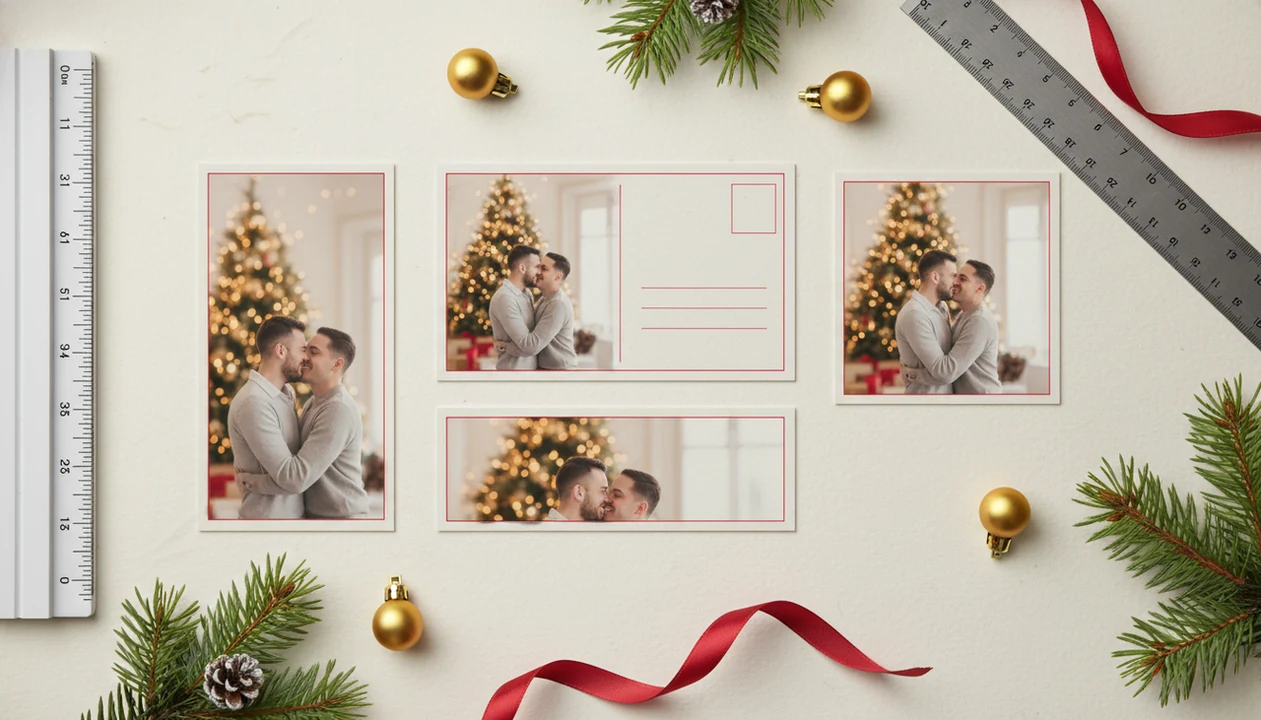
The best Christmas card photo size depends on the card template: use 1500×2100 pixels for a 5×7 print, 1200×1800 pixels for a 4×6 print, and 1500×1500 pixels for a square 5×5 card at 300 dpi. Keep faces, text, hands, pets, and Santa props inside a safe inner margin so your AI holiday portrait does not get trimmed or awkwardly cropped.
Definition: Christmas card photo size is the width, height, resolution, and aspect ratio of the image used inside a printed or digital holiday card.
- Match the photo crop to the card shape: 5×7, 4×6, 4×8, square, or mobile.
- Export print files at 300 dpi, such as 1500×2100 pixels for a 5×7 card.
- Leave background padding around AI portraits so faces and details stay inside the safe zone.
Christmas Card Photo Size Definition and Best Starting Dimensions
Christmas card photo size means pixels, inches, dpi, and aspect ratio working together. The inches describe the printed card, the pixels describe the file, dpi connects the two, and the aspect ratio controls the crop.
Common printed sizes include 5×7, 4×6, 4×8, and 5×5 square. For many portrait-style holiday cards, 5×7 is the safest default because it gives enough vertical room for faces, clothing, trees, and a short greeting. A 5×7 card at 300 dpi needs about 1500×2100 pixels.
For AI holiday portraits, leave extra background before you crop. AI portrait outputs work better for cards when the image includes room around shoulders, hair, pets, Santa props, and seasonal decor. The ring hand resting on red knit looks sweet until the template trims the fingers.
Holiday Card Photo Dimensions for Print, Digital, and Social Sharing
Use the card format first, then choose the pixel size. Many photo services commonly recommend 300 dpi for high-quality photo prints, For example, Shutterfly advises using 300 dpi as a photo-print quality target: https://support.shutterfly.com/s/article/photo-resolution-tips. but digital greetings can use lower dpi if the crop still matches the layout.
| Use case | Aspect ratio | Size in inches | Minimum pixels at 300 dpi |
|---|---|---|---|
| 5×7 card | 5:7 | 5×7 | 1500×2100 |
| 4×6 card | 2:3 | 4×6 | 1200×1800 |
| 4×8 card | 1:2 | 4×8 | 1200×2400 |
| 5×5 square | 1:1 | 5×5 | 1500×1500 |
| Email card | Flexible | Digital only | 1200 px wide or larger |
| Phone wallpaper-friendly | 9:16 | Digital only | 1080×1920 or larger |
Print-minded files need enough pixels for paper. Phone-friendly files need a crop that survives lock screens, message previews, and social apps. For a deeper print checklist, use the print ready Christmas photos guide before ordering.
Five Christmas Card Aspect Ratio Facts for AI Holiday Portraits
- A 5×7 Christmas card uses a 5:7 ratio and needs about 1500×2100 pixels at 300 dpi.
- A 4×6 Christmas card uses a 2:3 ratio and needs about 1200×1800 pixels at 300 dpi.
- A square 5×5 card uses a 1:1 ratio and crops vertical portraits more aggressively.
- A 4×8 card is panoramic, so it needs wider background space around people, trees, pets, and props.
- Bleed usually removes edge content, so faces, text, hands, ornaments, and Santa details need an inner safe margin.
One useful rule: make the master image larger and looser than the final crop. The phone preview may look fine under the tree, but the print template is less forgiving. Tiny faces in group shots also lose detail faster when cropped into small card windows.
Before You Choose a Christmas Card Photo Size
Before you choose a Christmas card photo size, start with the cleanest original image and the exact card shape you plan to order. A sharp source file gives you more room to crop, resize, and export without turning a sweet holiday portrait soft on paper.
- Use the original camera or phone photo, not a screenshot, text-message save, or social-media download. Those versions are often compressed before you ever open the card editor.
- Check the vendor template for bleed, trim, and safe-zone guidance before cropping. If the preview shows margin lines, treat the outer edge as disposable.
- Choose the final orientation early: vertical, horizontal, square, or panoramic. Each one protects a different part of the scene.
- Keep faces, hands, pets, names, greetings, and small props away from all edges, even if the preview looks centered.
- Save one larger master image before making smaller print, square, email, or mobile exports. That master is your backup if the first card layout feels too tight.
Christmas Card Photo Size Mechanics in Printers and Card Templates
Christmas card templates place your image into a fixed crop box. If the photo shape does not match that box, the editor either trims the image, adds blank space, or asks you to reposition it.
Bleed is the extra outer edge that gets printed past the final card size. The trim line is where the card is cut. The safe zone is the inner area where important details should stay. Borderless cards still need bleed because paper shifts slightly during cutting.
Small shift. Big annoyance.
Online printers, drugstore kiosks, home printers, and social platforms may all process the same file differently. One may sharpen it. Another may compress it. A third may silently crop the edges. For families building from a phone snapshot, the practical path is simple: upload, select a festive style, review the crop, then export the exact format needed.
How to Use Christmas Card Photo Size for AI Holiday Portraits
Use this workflow when you want one AI holiday portrait to work for cards, square posts, and mobile sharing. The same source photo can become several exports, but only if you plan the crop before saving.
- Choose the card format first, such as 5×7, 4×6, 4×8, or square.
- Upload a clear photo with faces visible and enough room around the subject.
- Select a festive style with extra background padding around people, pets, Santa, trees, and props.
- Preview the portrait inside the card crop before adding text.
- Export separate versions for print, square sharing, and mobile wallpaper.
This workflow works best when you start with one clear source photo, choose the card format early, preview the crop, and save separate files for print and sharing. If you are building a card late on December 23, the last minute Christmas card photo app workflow covers that tighter timing.
Crop-Safe Composition Tips for AI Christmas Card Photos
Leave headroom, side space, and bottom space around the subject before cropping. Faces, hands, pets, ornaments, stockings, and text should not sit near the edge of the frame.
Vertical cards favor full-body or waist-up portraits. Horizontal cards need more side background. Square cards cut from both the top and sides. Panoramic 4×8 layouts need the widest scene, especially if Santa, a tree, or a fireplace sits beside the subject.
A good ai christmas photo app that transforms one uploaded photo into studio-quality holiday portraits, santa scenes, and christmas wallpaper across hundreds of festive styles should deliver flexible festive outputs, not guaranteed studio-perfect print results.
One uploaded source photo can become portraits, Santa scenes, wallpaper, and card images, but the crop still needs checking before print. For family groups, the Christmas family portrait generator guide explains why six almost-identical kid snapshots often produce one clearly better card candidate.
Common Christmas Card Photo Size Mistakes Before Printing
Will a screenshot work for a printed Christmas card? Usually, it is a risk because screenshots and heavily cropped phone images may not have enough real pixels for a sharp 5×7 or 4×6 print.
Screen sharpness does not guarantee print sharpness. A backlit phone hides blur, compression, and tiny AI artifacts that paper may reveal. Warm yellow kitchen light, a blurry sleeve, or a small face in the back row can look acceptable on screen and soft in print.
Another common mistake is assuming all templates use the same Christmas card aspect ratio. They don't. A 4×8 panoramic card crops very differently from a 5×5 square card. Printed cards still matter at scale; the U.S. Postal Service handled more than 1.3 billion holiday greeting cards and letters during the 2023 peak holiday period. Source: USPS 2023 holiday shipping and mailing release, https://about.usps.com/newsroom/national-releases/2023/0919-usps-announces-2023-holiday-shipping-and-mailing-deadlines.htm. If you are starting from a phone image, the how to make Christmas card photo with phone guide is a safer first step.
Christmas Card Photo Size Verification Before You Order
Check the final pixel dimensions against the selected print size before you order. A 5×7 card should be about 1500×2100 pixels at 300 dpi, and a 4×6 card should be about 1200×1800 pixels.
Preview the crop twice: once at full size and once zoomed out like a real card on a table. Confirm that faces, names, greetings, hands, pets, and key decorations sit inside the safe margins. The gift tag tied to a portrait frame should not be half gone after trimming.
Export in the file type recommended by the card vendor, usually JPG or PNG. If timing allows, order a proof or a small batch before committing to a full set. For couple portraits, the best Christmas couple photo app guide also covers crops where two faces must stay balanced.
What photo should you upload for the best Christmas card result?
A clear, well-lit, forward-facing photo works best as the source image. Natural light or even indoor lighting without harsh shadows helps preserve facial detail across different holiday styles.
Avoid screenshots, heavily filtered photos, or images already cropped tight around the face. Starting from an uncropped original gives more flexibility when the final image needs to fit a 5:7, 2:3, or square card layout.
Who is this Christmas card photo size guide best for?
This is useful for anyone printing physical holiday cards, including families, couples, and individuals who want a portrait that fits a specific card template without last-minute cropping problems.
It also helps people creating digital greetings or social holiday posts, since digital formats have more flexible sizing than print, which requires exact dimensions and dpi.
How does PiXmas compare to a photographer or DIY photo setup?
- Raster-based digital files for 4×6 inch holiday cards should be created at 300 DPI in CMYK. (Behind the Scenes Charity Holiday Card Design Guidelines, 2025)
- Holiday card artwork scanned for a 4×6 inch card should be at least 300 DPI at actual size. (Behind the Scenes Charity Holiday Card Design Guidelines, 2025)
- Shutterfly publishes specific holiday shipping cut-off dates each year for customers ordering cards and gifts. (Shutterfly Christmas Ideas, 2026)
PiXmas can be a practical option when you want a holiday portrait quickly without booking a session or arranging props, then sizing the result to whichever Christmas card format you plan to print.
For a properly sized Christmas card photo, start with correct dimensions and dpi for your chosen template, then use PiXmas to turn a single uploaded photo into a holiday-styled portrait ready to crop into that format.
Limitations
Sizing rules reduce printing problems, but they cannot guarantee a flawless card. Check the vendor preview carefully, especially with AI holiday portraits and last-minute orders.
- Low-quality paper, cheap inks, or poor printer calibration can dull a correctly sized image.
- Some AI-generated details may look imperfect when printed large, especially fingers, fur, ornaments, and text-like decorations.
- Not all vendors disclose exact bleed and safe-zone requirements.
- Older kiosks or home printers may compress, sharpen, or downscale large files.
- Digital platforms recompress images differently, so one export may look cleaner in messages than on social feeds.
- A single print-optimized export may not look ideal on every phone, email app, lock screen, or square post.
- Tight crops leave little room to fix template changes later.
Annoying, but normal.
If you need multiple matching crops, a Christmas Pictures App workflow can help you save print, square, and wallpaper versions separately.
Related guides
FAQ
Can pets be included in an AI Christmas card photo?
Some users upload pet photos to PiXmas for standalone holiday-styled pet portraits. Results depend on the clarity of the uploaded pet photo, similar to how human portraits are processed.
How do I turn an instant film picture into a printable Christmas card?
Scan or photograph the developed picture, straighten it, correct the color gently, and place it in a card template sized for the printer. Capture the original under even, glare-free light if a scanner is unavailable. Keep an untouched master file, then export a separate print-ready copy using the printer’s requested dimensions and settings.
Can an original instant film photo be enlarged for a Christmas card?
Yes, but enlargement exposes softness, grain, dust, and focus problems that may be less noticeable on the original print. Start with the cleanest possible scan and enlarge conservatively. Image enhancement can reduce minor defects, but it cannot reliably recreate facial details or sharp edges that the film never captured.
What resolution does a photo need for a 4-by-6 or 5-by-7 Christmas card?
For a 4-by-6-inch card, use at least 1200 by 1800 pixels for 300 DPI output (FeetToPixels, 2026). A 5-by-7-inch design needs at least 1500 by 2100 pixels at the same resolution (Craftsuprint, 2026). Export at final size and avoid enlarging a small social-media copy.
What are the limitations of using instant film photos on printed cards?
Instant film images have limited detail, fixed framing, distinctive color shifts, and physical imperfections that become more visible when enlarged. Very dark exposures and blown highlights are difficult to repair convincingly. The white frame may also conflict with standard card proportions, requiring cropping, added background space, or a smaller image within the layout.
Is it safe to upload family photos for online Christmas card printing?
It can be reasonably safe, but review the service’s privacy, retention, deletion, and training policies before uploading. Avoid images showing house numbers, school names, travel documents, or other sensitive details. Use a strong unique password, share only necessary files, and delete stored projects or uploaded photographs after receiving the completed cards when that option is available.