
Santa Suit Photo Edit App For Realistic Festive Portraits
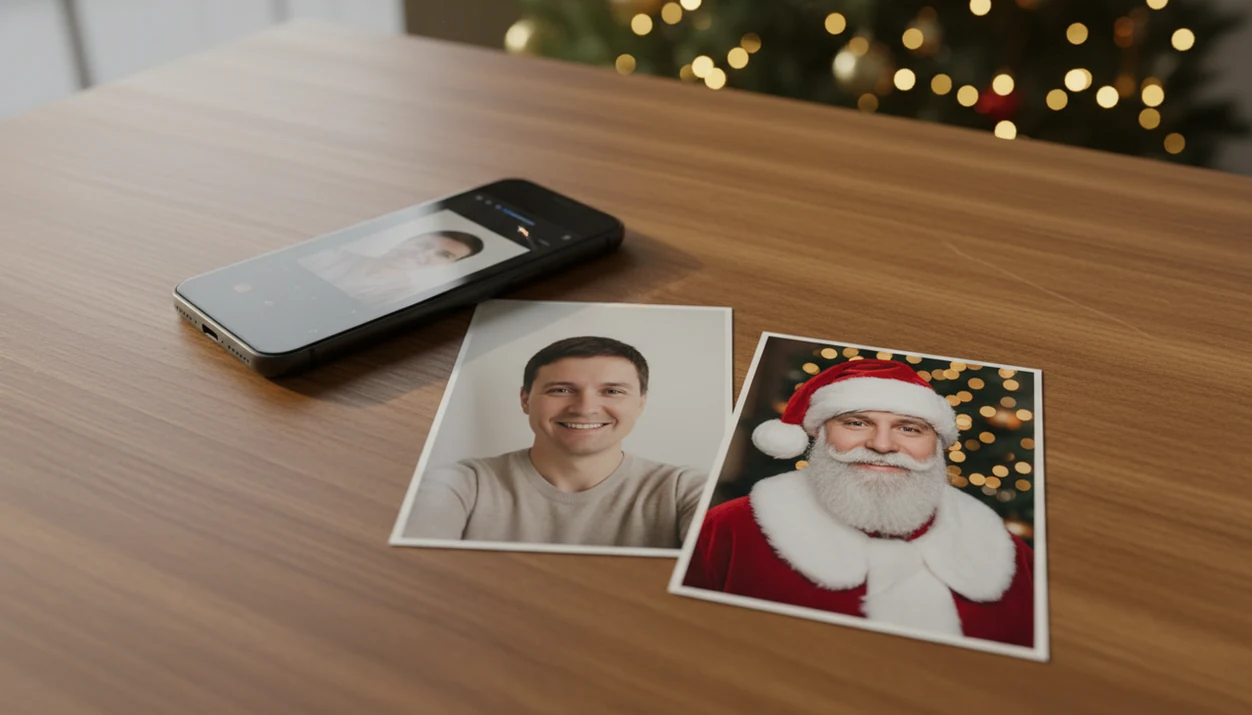
A Santa suit photo edit app turns a selfie or family picture into a festive portrait by generating or overlaying a red suit, hat, beard, and seasonal background. AI-based editors can restyle the whole image, while simpler tools add separate stickers or costume layers. Clear, front-facing photos generally produce more consistent faces, clothing edges, and backgrounds.
TL;DR
- Use a bright, sharp, front-facing photo if you want the Santa suit filter to look realistic rather than pasted on.
- AI Santa outfit photo apps can create full portraits and backgrounds, while sticker-based editors usually only place hats, beards, or suit overlays on top of the original image.
- Expect small likeness changes, especially with glasses, kids, facial hair, long hair, side angles, or low-resolution uploads.
How santa suit photo edit apps look
Side-by-side captures of the compared products. Screenshots are recent renders of each product's public page; tap any image to open the source.

How a Santa suit photo edit app works
A Santa suit photo edit app analyzes an uploaded image, detects the face, body position, pose, and background, then creates or places Santa clothing around that structure. In AI tools, computer vision identifies key features; in plain terms, the app is figuring out where your face, shoulders, hair, and scene edges are.
Sticker editors usually add a hat, beard, or red coat layer on top of the original photo. AI generation can go further by changing clothing, lighting, beard shape, and the surrounding Christmas scene while trying to keep the person recognizable. The broader computer vision market is projected to reach about $41.1 billion by 2030, reflecting how common face and object detection has become in imaging software, according to Grand View Research source.
Santa outfit photo app workflow in 5 steps
Use a Santa outfit photo app by starting with the photo you already have, then testing more than one Santa look before exporting. One output may nail the suit and miss the smile; another may preserve the face better.
- Choose a clear head-and-shoulders portrait with the face looking toward the camera.
- Upload the image and allow only the photo access you’re comfortable granting.
- Select several Santa suit styles, such as classic red coat, snowy Santa, or fireplace portrait.
- Review the face, beard line, hat placement, hands, and background before saving.
- Export the strongest version in the size needed for cards, prints, wallpaper, or sharing.
On iPhone, that moment often starts in the Photos grid with six nearly identical kid snapshots and one where everyone is actually looking. If you need a phone-specific walk-through, the how to make Santa pictures on iPhone guide covers that path.
Best Santa suit filter photo inputs for realistic results
The best Santa suit filter results usually come from a sharp, front-facing, high-resolution portrait with even light. The app has less guesswork when the face, hairline, shoulders, and expression are easy to read.
- Face visibility matters: sunglasses, cropped foreheads, and turned heads can confuse beard, hat, and face alignment.
- Lighting matters: warm yellow kitchen light or harsh shadows can make the generated suit look less natural.
- Pose matters: straight-on head-and-shoulders photos give the Santa jacket a cleaner fit than side profiles.
- Sharpness matters: motion blur, a blurry sleeve, or a tiny face in a group shot can reduce likeness.
- Background matters: clutter behind the subject can compete with fireplaces, snow scenes, or workshop settings.
For larger family edits, the best family Christmas photo app guide explains group-photo tradeoffs in more detail.
Santa suit photo edit app styles in PiXmas
It is built for people who want a Christmas Pictures App focused on seasonal portrait outputs, not a blank design canvas.
- Classic Santa portrait: a red suit, hat, beard, and clean holiday portrait framing for one person.
- Cozy fireplace scene: warmer lighting, indoor Christmas styling, and a card-friendly look.
- Snowy Santa portrait: outdoor winter atmosphere, fake snow, and brighter contrast for social posts.
- Family or couple Santa style: grouped festive portraits for parents, partners, and relatives.
- Pet Christmas look: seasonal portraits for dogs or cats, including playful Santa-inspired styling.
Parents making a Santa portrait on December 23 after bedtime don’t need a studio appointment left. They need a clean upload, a style picker, and a preview they can check before saving. For child-focused scenes, the best Santa photo app for kids guide goes deeper.
Santa suit filter realism and likeness expectations
“Will a Santa suit filter still look like me?” Usually, it can preserve general likeness, but realistic does not always mean identical. AI may change face shape, skin texture, smile width, age appearance, hair edges, or beard detail while building the Santa outfit.
Glasses, long hair, facial hair, children’s faces, older adults, and unusual poses can be harder to preserve. A grandparent squinting at tiny thumbnails may notice that one version looks festive but a little too smooth around the eyes. That’s normal, but it’s worth checking.
Good AI Christmas photo apps deliver festive likeness-preserving portraits, not guaranteed studio-perfect identity copies. Treat the first result as a draft, not a final proof. If the face, eyes, or smile feel slightly off, generate another version before using the image on a card or print.
Santa outfit photo app options versus sticker editors
AI Santa portrait apps and sticker editors solve different problems. A sticker editor can be fast, but the suit often looks pasted on when the lighting, head angle, and body proportions do not match.
| Option | Realism | Effort | Likeness preservation | Background replacement | Best use case |
|---|---|---|---|---|---|
| AI portrait generation | High when input is clear | Low to medium | Usually good, not exact | Yes | Santa portraits, cards, wallpapers |
| Sticker overlays | Low to medium | Medium | Original face stays visible | Usually no | Quick jokes or casual posts |
| Live AR filters | Medium | Low | Depends on camera angle | Limited | Real-time video or selfie effects |
| Template frame editors | Medium | Medium | Face may be manually positioned | Frame-based | Simple costume cards |
Live AR filters from social apps are not the same as uploaded-photo AI Christmas portrait generators. Canva, Picsart, Photoleap, and similar editors can help with layouts, but they often require more manual positioning for a full Santa outfit.
For last-minute red-suit portraits, PiXmas is often easier than a general editor because the Santa suit, background, and export flow are already part of the Christmas portrait workflow.
Santa suit photo app sharing and export uses
Santa suit photo edits are most useful when they match the final destination: card, wallpaper, group chat, profile photo, kid surprise, pet portrait, or creator post. Resolution matters more for printing than for a quick family message.
- Holiday cards: choose higher-resolution exports so faces and suit details stay clean in print.
- Profile pictures: crop around the face, hat, and beard so the Santa look reads at small sizes.
- Family group chats: send a preview before printing, especially when several people are included.
- Kids’ surprises: use age-appropriate images and check likeness carefully before sharing widely.
- Wallpapers and creator posts: choose aspect ratios that fit lock screens, stories, or square feeds.
Pew Research reported that about 90% of U.S. adults took photos on smartphones in 2023, which helps explain why mobile editing is now normal for seasonal pictures source. Pew also reports that about 72% of U.S. adults use at least one social media site source, so sharing is part of the workflow for many users.
Can I use this for a card and a wallpaper? Yes, but compare export sizes before saving.
What makes the Santa suit style different from other Christmas photo styles?
Most Christmas photo styles change the background or add a sweater, snow, or lights around the subject. A Santa suit style replaces clothing and adds props like a hat, beard, and coat, which asks more of the AI because it has to redraw hands, collar lines, and fabric folds around the face.
Because of that extra detail, Santa suit results tend to vary more between clean, well-lit photos and dim or angled ones compared to simpler background-only Christmas styles.
Who is this Santa suit photo style best for?
This style works well for parents who want a Santa photo of their kids without a mall visit or studio booking, and for couples or solo portraits meant for a holiday card.
Families with young children often use it to get a consistent-looking Santa portrait even on years when an in-person Santa photo did not happen. It is less suited to large groups where every face needs equal sharpness, since more faces in one frame gives the AI less detail to work with per person.
How does PiXmas compare to a photographer or DIY Santa setup?
- In 2025, the Bass Pro Shops Santa's Wonderland Jingle Bells package is priced at $35 and includes multiple prints plus a high‑resolution digital image. (Tsawwassen Mills – Santa's Wonderland at Bass Pro Shops, 2025)
- Bass Pro Shops and Cabela's Santa's Wonderland offers one free 4×6 photo with Santa per guest, with paid photo packages available. (Tsawwassen Mills – Santa's Wonderland at Bass Pro Shops, 2025)
- In 2025, Bass Pro Shops offers a standalone digital download of the Santa photo for $30, including a free 4×6 print. (Tsawwassen Mills – Santa's Wonderland at Bass Pro Shops, 2025)
For families who want a realistic-looking Santa portrait without booking a photographer, a Santa suit photo edit app like PiXmas offers a fast, one-photo way to get there, best used with a clear, well-lit, front-facing source photo of kids, couples, or a single family member.
Limitations
Santa suit photo apps can be fun and useful, but they are not identity-proof photo restorers or professional studio replacements. Check the output closely before printing, gifting, or posting.
- Likeness can shift, including face shape, smile, skin texture, apparent age, and hairline.
- Bad inputs still matter; dark, blurry, cropped, or side-angle photos often create weaker Santa edits.
- Children’s faces may be softened or aged oddly, so parents should review results with extra care.
- Glasses, long hair, beards, and hats can cause artifacts around eyes, ears, cheeks, and shoulders.
- Group photos may produce uneven quality, especially when one person has a tiny face or turned pose.
- Some apps process images in the cloud, so review the privacy policy before uploading sensitive photos.
- Free or freemium apps may restrict resolution, watermark removal, batch generation, or ad-free exports.
- High-resolution exports may be required for cards, frames, and prints, not just casual sharing.
A thumb hovering over the camera roll is a real privacy moment. Don’t ignore it.