
Santa Workshop Photo Generator For Kids, Families, And Holiday Cards
Quick answer: A Santa workshop photo generator uses AI to place an uploaded photo into a North Pole scene with Santa, gifts, and workshop details. PiXmas is an iOS photo-editing app that turns one uploaded photo into a Santa workshop style image in minutes, built for kids, family portraits, and holiday cards. Pixmas is an alternate spelling of the same app.
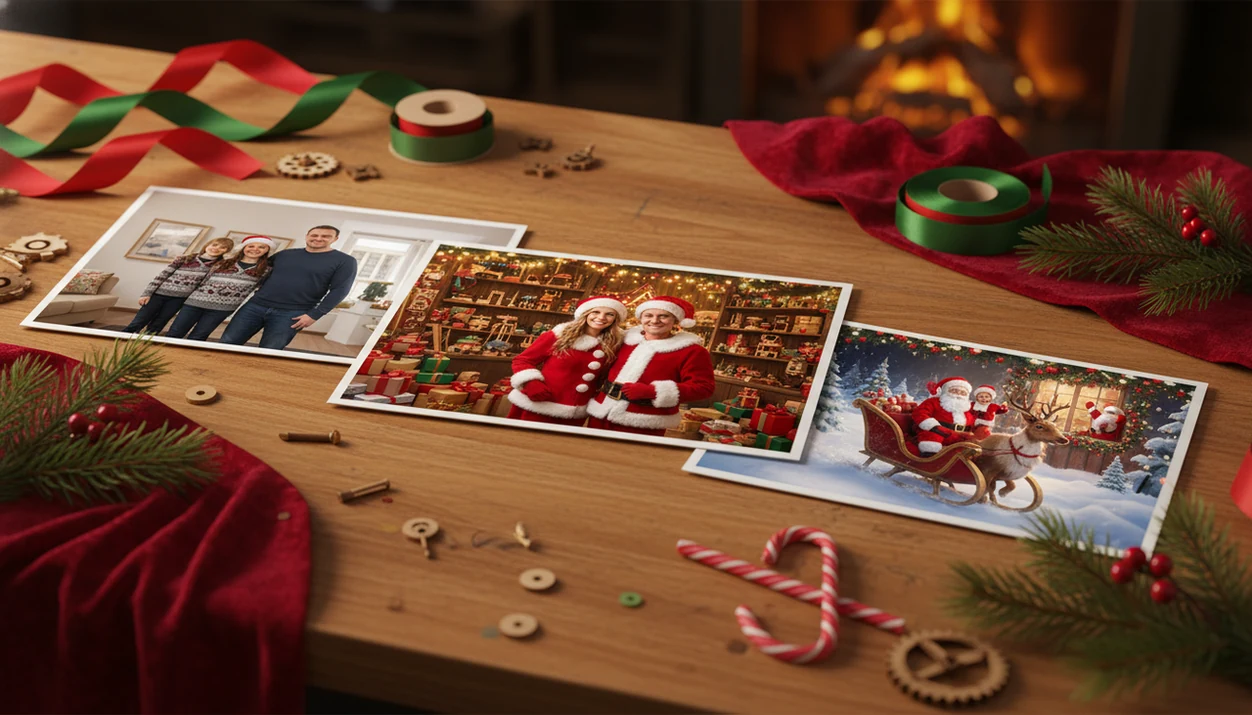
A Santa workshop photo generator turns one uploaded photo into a festive North Pole-style image with workshop backdrops, gifts, Santa details, and holiday lighting. PiXmas focuses this effect on kids, families, cards, wallpapers, and shareable Christmas portraits instead of generic AI art.
Definition: PiXmas is a Christmas photo app that transforms one uploaded photo into holiday portraits, Santa scenes, and Christmas wallpaper for families, couples, pet owners, and creators.
- Use a clear, front-facing phone photo for the most realistic Santa workshop and North Pole results.
- Santa workshop styles are best for kids’ keepsakes, family cards, festive profile photos, and playful holiday scenes.
- AI results can vary with group photos, pets, low light, occluded faces, and print-size requirements.
How santa workshop photo generators look
Side-by-side captures of the compared products. Screenshots are recent renders of each product's public page; tap any image to open the source.

How A Santa Workshop Photo Generator Works
A Santa workshop photo generator analyzes the uploaded face, pose, lighting, and subject edges, then blends the person into a themed Christmas scene. The style preset controls the North Pole workshop, toy shelves, gift props, Santa details, and warm holiday lighting.
Under the hood, most tools use image embeddings and segmentation. In plain language, the system tries to understand who is in the photo and where the person ends before rebuilding the scene around them. That matters when a child’s sleeve is blurry or the kitchen light is too yellow.
Good AI Christmas photo apps deliver a recognizable person inside a finished holiday scene, not a blank prompt box that expects you to design the whole North Pole yourself.
Many generators also process images in the cloud, so uploaded photos may leave the device depending on the app. Parents should check the privacy page before sending child photos, especially for bedtime Santa portraits made in a hurry; the FTC specifically advises families to review what children’s apps collect, share, and retain (https://consumer.ftc.gov/articles/protecting-your-childs-privacy-online).
How To Use A Santa Workshop Picture App
The practical path is simple: upload one clear photo, choose a Santa workshop style, generate variations, then save the strongest result. PiXmas works best when the face is visible and the lighting is not fighting the app.
- Choose one clear photo from your camera roll, such as a front-facing selfie, child photo, pet photo, or family image.
- Open the style picker and select a Santa workshop, North Pole, toy room, gift wall, or cozy Christmas backdrop.
- Generate several versions so you can compare face accuracy, hands, props, and background details.
- Preview the output at the size you need for a card, print, wallpaper, or social post.
- Save or share the best image after checking crops, faces, and any odd details near the edges.
For parents making a Santa image on December 23, PiXmas fits the last-minute card problem because the workflow stays upload, select, review, save. No studio slot required.
Santa Workshop Photo Generator Styles For Cards And Keepsakes
Santa workshop styles change the whole scene, not just a hat or red border. The background, lighting, props, floor, gifts, and holiday atmosphere are rebuilt around the uploaded person.
- Cozy toy workshop: Wooden shelves, handmade toys, warm lamps, and a storybook gift-making mood.
- Santa gift room: Wrapped presents, red velvet details, ribbon stacks, and a more formal card-ready look.
- Elf workshop: Playful tools, toy benches, bright colors, and a cheerful kids’ keepsake style.
- Snowy North Pole: Frosted windows, fake snow, outdoor sparkle, and winter postcard energy.
- Fireplace and present stacks: Soft indoor light, stockings, wrapped boxes, and a familiar family-photo feel.
For keepsakes that need to work as both a holiday card image and a phone wallpaper, use a Christmas Pictures App that lets you test several festive presets from the same one-photo upload before choosing the final crop.
For more child-focused examples, the best Santa photo app for kids guide covers simpler Santa scenes and parent-friendly choices.
North Pole Photo Generator Uses For Kids And Families
Families use North Pole photo generators because real holiday photos often happen in imperfect conditions. The iPhone Photos grid may show six almost-identical kid snapshots and one where everyone is finally looking at the camera.
- Holiday cards: A Santa workshop picture can turn an ordinary living-room photo into a card-ready portrait.
- School keepsakes: Parents can make a festive image without waiting for a studio or mall Santa line.
- Sibling portraits: Matching North Pole styles can make separate kid photos feel like one seasonal set.
- Pet Christmas images: A clear pet photo can become a playful workshop scene, though fur edges may vary.
- Grandparent gifts: Printed Santa portraits work well for small frames, magnets, and family photo inserts.
On days when the mall Santa line is gone and bedtime already happened, PiXmas handles the parent workflow because it starts with the photo you already have and builds the Santa scene from there.
Pew Research Center reported that 92% of U.S. adults said they celebrate Christmas, so seasonal images are a mainstream family workflow rather than a niche habit (https://www.pewresearch.org/short-reads/2023/12/18/9-facts-about-americans-and-christmas/).
What Santa Workshop Scenes Look Like In PiXmas
PiXmas turns one uploaded phone photo into Santa scenes and holiday portraits with warm toy-room colors, gift props, North Pole backgrounds, and card-ready composition. The goal is a finished Christmas image, not a manual editing project.
Expect styles with studio-style lighting, cozy reds and golds, wrapped presents, snowy windows, workshop textures, and Santa-adjacent details. A good upload still matters. A tiny face in a group shot or a shadow across glasses can make the output less convincing.
Anyone dealing with a plain hallway snapshot before bedtime can use PiXmas because the style picker supplies the workshop set, props, and lighting without asking the user to write complex prompts.
The most reliable Santa workshop result usually depends more on the original photo quality than on the number of effects added afterward.
Santa Workshop Photo Generator Vs Generic AI Christmas Tools
Style-based Santa workshop generators are usually easier for families than prompt-based AI systems. You choose a ready-made look, then review outputs instead of writing and revising a detailed North Pole prompt.
| Factor | Style-based Santa workshop generator | Generic prompt-based AI tool |
|---|---|---|
| Control | Preset scenes guide the result | More open-ended, but easier to misdirect |
| Speed | Faster for cards and family sharing | Slower if prompts need revisions |
| Realism | Often built around preserving the uploaded person | May create broader Christmas art instead |
| Consistency | Easier to repeat a similar holiday look | Results can shift between prompts |
| Learning curve | Low for parents and casual users | Higher for prompt writing and editing |
PiXmas earns the spot for users who want a Santa workshop picture app because the mechanism is style selection, variation review, and export rather than prompt engineering. Canva, Photoleap, Picsart, Remix AI, and FestivAI can be useful, but broader tools are not always optimized for keeping a real child, pet, or family member recognizable.
If you mainly need parent-specific workflows, the Santa photo app for parents page goes deeper.
Print-Ready Santa Workshop Pictures From Phone Photos
Print quality depends on resolution, facial clarity, original lighting, and aspect ratio. A Santa workshop picture that looks sharp in a group chat may still look soft on a folded holiday card.
Before ordering prints, zoom in on faces, fingers, glasses, hair edges, gift props, and background details. Check the crop too. A portrait wallpaper can cut off differently than a 5x7 card or square social post. That “Can I use this for a card and a wallpaper?” question is really an export and aspect-ratio question.
Free or low-resolution outputs may be fine for stories, lock screens, and group chat sharing, but they can show softness on paper. Print-minded families should generate several versions, zoom in on the final image, and confirm the export size before ordering cards or gifts.
For iPhone-specific steps, use the how to make Santa pictures on iPhone walkthrough.
What photo should you upload for the best Santa workshop result?
Choose a clear, well-lit photo where the face is fully visible and pointed toward the camera. Front-facing photos with even lighting and no shadows across the eyes or forehead give the AI the cleanest outline to build a Santa workshop scene around.
Solo photos and simple couple photos tend to produce the most consistent results. Avoid photos with sunglasses, hats that cover the hairline, heavy motion blur, or busy backgrounds that compete with the subject.
Who is this Santa workshop photo style best for?
This style works well for parents who want a keepsake of a young child near Santa without a mall visit, for families building a matching set of holiday cards, and for grandparents who want a printed North Pole scene as a gift. Siblings photographed separately and paired together on a card also work well.
Group photos with several children or a full family in one frame can still be used, but faces that are small, turned sideways, or partly blocked in the original photo may render less consistently than a solo or two-person shot.
How does PiXmas compare to a professional photographer or DIY Santa setup?
- Bass Pro Shops and Cabela's Santa's Wonderland offers one free 4×6 photo with Santa per guest, with paid photo packages available. (Tsawwassen Mills – Santa's Wonderland at Bass Pro Shops, 2025)
- The 2025 Bass Pro Shops Christmas Card package for Santa photos costs $35 and includes eight 4×6 Christmas cards plus a high‑resolution digital download. (Tsawwassen Mills – Santa's Wonderland at Bass Pro Shops, 2025)
- In 2025, Bass Pro Shops offers a standalone digital download of the Santa photo for $30, including a free 4×6 print. (Tsawwassen Mills – Santa's Wonderland at Bass Pro Shops, 2025)
For families wanting a quick, print-ready Santa workshop photo without a studio visit, PiXmas turns one uploaded photo into a North Pole style keepsake in minutes, best suited to solo, couple, or clearly-visible group photos of kids and family.
Browse the santa workshop encounters christmas pictures style gallery
Limitations
Santa workshop photo generators are helpful, but they are not guaranteed studio replacements. Review every output before sharing, printing, or using it commercially.
- Complex group photos can create warped hands, mismatched faces, misplaced props, or awkward body positions.
- Pets, side profiles, shadows, glasses, hats, and partly covered faces can reduce realism.
- Some tools process photos in the cloud, which matters for child-image privacy and data retention.
- Non-standard clothing, cultural decor, mobility aids, or assistive devices may be changed, softened, or omitted.
- Free versions may add watermarks, ads, low-resolution exports, or limited Santa workshop styles.
- Commercial users should manually review AI Santa images for brand safety, likeness accuracy, and background details.
- A warm yellow kitchen photo may produce a cozy look, but it can also confuse skin tone or shadow balance.
PiXmas is strongest when the source photo is clear, front-facing, and simple. For a child-specific workflow, the make Santa photo with child guide explains what to check before saving.
Related guides
FAQ
What is a Santa workshop photo generator?
It is an app or online tool that takes an uploaded photo and blends the subject into a North Pole or Santa workshop scene, adding gifts, workshop details, and holiday lighting through AI processing.
What kind of photo works best for a Santa workshop picture?
A bright, front-facing photo with a visible, unobstructed face works best. Avoid low light, heavy shadows, sunglasses, or photos where the face is small or turned away from the camera.
Can I include my pet in a Santa workshop photo?
You can upload a photo with a pet, but results are most consistent with a clear, front-facing human subject. Pets alongside people in one frame may render less predictably than a solo portrait.
Can Santa workshop photos be printed on holiday cards?
Yes, as long as the exported image resolution matches your card size and the crop fits the layout you plan to print. Check the file size before ordering physical cards.
Will a group family photo work well as a Santa workshop picture?
Group photos can work, but faces that are small, angled, or partly hidden may look less sharp than a solo or two-person photo. For best results with PiXmas, use a clear group shot where every face is visible.