Life Moments Christmas Photo Ideas
Updated 2026-09-16 · PiXmas Editorial Team
Life moments Christmas photo ideas work best when a clear, well-lit snapshot centers on a meaningful milestone, relationship, or tradition. Photos of a new baby, marriage, pet, home, reunion, or annual celebration can become festive keepsakes through a holiday background, seasonal clothing, or simple decorative details.
When should you plan a life-moment Christmas photo?
If the image is intended for a card, announcement, or gift, begin planning in early fall. Google Trends-based guidance for photographers reports that interest in family-oriented “Christmas card photos” rises from early fall and peaks in December (Tech Photo Guy – Google Trends for Photographers, 2018). Preparing early leaves time to find the best original image, compare holiday treatments, review facial details, and arrange printing. For a milestone that happens later in the season, prepare the wording and card format in advance, then create the final image after the event. Keep the plan flexible when working with babies, pets, travel, or family members whose schedules may change.
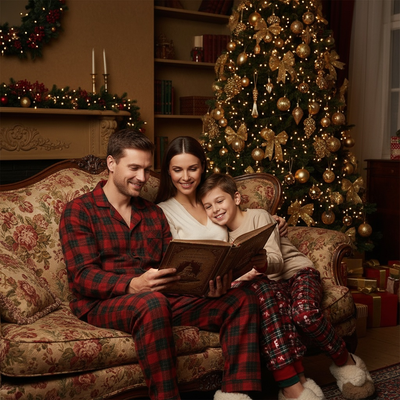
Christmas is a natural checkpoint for life moments. A baby's first holiday, a couple's first Christmas together, a new home, a new pet, or simply another year with the whole family gathered around the tree.
Turning these moments into shareable photos used to mean booking a photographer or setting up lights and a backdrop at home. Now a single phone photo and an AI app can produce the same festive look.
What life moments work best for Christmas photos?
Almost any recent phone photo can become a Christmas keepsake. The moments that translate best are ones with a clear focal point, like a face, a couple, or a pet.
- Baby's first Christmas or first year milestones
- New couples, engagements, or anniversaries near the holidays
- Growing families adding a new member or pet
- Long-distance family members who cannot gather for a photo session
- Friend groups wanting a matching festive picture for cards or group chats
- Solo portraits for profile pictures, wallpapers, or personal keepsakes
How do you turn a regular photo into a Christmas photo?
- Choose one clear, well-lit phone photo of the person, couple, family, or pet.
- Download the result for cards, wallpapers, or sharing with family.
What are the options for capturing a life moment for Christmas?
| Method | Time needed | Cost | Best for |
|---|---|---|---|
| Professional photographer | Days to weeks (booking, editing) | High | Formal family portraits |
| DIY setup and manual editing | 1-3 hours | Low to medium | People comfortable with photo editing tools |
| PiXmas AI app | Minutes | Low | Turning any existing phone photo into a festive scene |
Limitations
AI-generated Christmas photos work best from clear, single-subject or small-group images. Group photos with many people, poor lighting, or heavy motion blur may produce less accurate results. PiXmas is a native iOS app with a web version that also works on Android browsers, and a dedicated native Android app is coming soon.
Why use PiXmas for life moment Christmas photos?
It skips the need for props, outfits, or studio time, which matters most for moments that already happened, like a baby's first smile or a pet's first holiday at home.
Frequently asked questions
What life moments make the best Christmas photos?
Meaningful, easy-to-recognize milestones usually make the strongest Christmas photos. Consider a new baby, engagement, marriage, adoption, new home, family reunion, pet arrival, graduation, or annual family tradition. The best choice is personal to the recipient and supported by a clear photo in which the important people or animals are easy to see.
Can I use an old phone photo for a Christmas portrait?
Yes. An older phone photo can work if the subject is sharp, visible, and not heavily cropped. Choose the highest-quality original you can find rather than a screenshot or compressed copy. AI styling cannot reliably restore facial details that are missing, blurred, hidden, or washed out in the source image.
How do I choose a photo for an AI Christmas scene?
Choose a photo with even lighting, a clear face, and enough space around the subject for a new background or outfit. Avoid strong filters, deep shadows, motion blur, and objects covering key features. For a group, favor an image where everyone faces the camera and appears at a similar scale.
Can a group photo be turned into a Christmas scene?
Yes, but group images are generally less predictable than portraits with a simple focal point. Start with a well-lit image in which every face is distinct and unobstructed. Check the generated result carefully for altered expressions, hands, clothing details, or missing people before using it in a card or keepsake.
How can I make an AI Christmas photo look natural?
Start with a natural-looking source photo and select a holiday scene whose lighting and camera angle resemble the original. Subtle backgrounds and familiar clothing often feel more believable than elaborate costumes. Review faces, hair, hands, glasses, jewelry, and text closely, since generative tools can change small identity details.
What should I do if the result does not resemble us?
Try a different source photo with clearer facial detail and more even lighting, then choose a simpler style. If the face, body, or relationship between subjects still looks wrong, do not treat the image as an accurate record of the moment. Keep the original photo and use manual editing instead.
Are AI Christmas photos suitable for printed cards?
Yes, provided the final image is large and clear enough for the intended card format. Order a proof or inspect a sample before committing to printing, especially when faces sit near an edge. Also check hands, eyes, clothing, and generated decorations, because screen-sized previews can hide visual errors.