Christmas Photo Ideas & Prompts to Try
Christmas photo prompt ideas are easiest to build by combining a subject, setting, wardrobe, lighting, mood, and intended use. Start with a familiar theme such as Santa, a cozy fireside, matching sweaters, or a snowy outdoor scene, then specify the details that matter most. You can stage the idea yourself, give the description to a photographer, or use it with an AI image tool.
How to Adapt Christmas Prompts for Social Media
Christmas prompts meant for social sharing should keep the subject easy to recognize and the scene readable at a glance. The festive selfie trend spread across Instagram, Facebook, and X during Christmas 2026, showing that simple source photos can be adapted into holiday portraits for different feeds (Analytics Insight, 2025). Write the prompt around a clear focal point, then choose decorations that support rather than crowd it. For a profile image, ask for a closer crop and an uncluttered background. For a feed post, allow more room for a tree, snow, gifts, or lights. Review the result for altered facial features, stray objects, and text-like artifacts before posting.
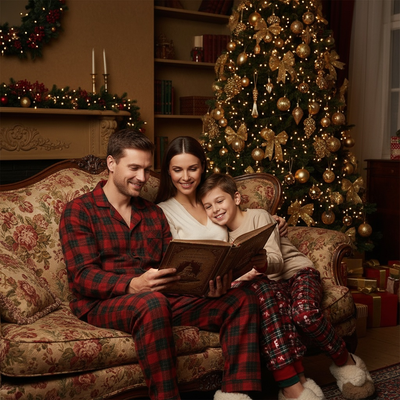
What Makes a Good Christmas Photo Prompt?
A strong Christmas photo prompt names a clear setting.
It also names a mood, a wardrobe cue, and a lighting style.
Vague prompts like "Christmas photo" produce generic results.
Specific prompts like "Santa's workshop, red velvet coat, warm candlelight" produce sharper, more usable images.
Which Christmas Photo Themes Are Most Popular?
Classic Santa portraits remain the most requested theme, especially for kids and pets.
Cozy fireside scenes with stockings and mugs come second.
Ugly-sweater group shots are popular for family cards and office parties.
Winter wonderland backdrops with snow and string lights work well for couples and solo portraits.
Holiday wallpapers, cropped tighter and brighter, are trending for phone lock screens.
Each theme can be built as a text prompt if you are using an AI photo tool.
How Do You Turn a Prompt Into a Photo With PiXmas?
- Upload one clear phone photo of yourself, your family, or your pet.
- Let PiXmas generate the AI Christmas portrait using that single source photo.
- Download the results and pick your favorites for cards, wallpapers, or social posts.
DIY Prompts vs a Photographer vs PiXmas
| Method | Setup time | Cost | Style variety |
|---|---|---|---|
| DIY props and editing | Hours | Low, but props add up | Limited to what you own |
| Professional photographer | Days to book, hours to shoot | High | Depends on session length |
| PiXmas (AI from one photo) | Minutes | Low | 800+ styles from one upload |
Limitations
AI-generated Christmas photos depend on the quality of the source photo you upload.
Blurry or poorly lit originals produce softer AI results.
PiXmas currently offers a native iOS app plus a web version that works in Android browsers.
A dedicated native Android app is coming.
Group photos with several people can be less consistent than solo portraits.
Frequently asked questions
What is a good Christmas photo prompt?
A good Christmas photo prompt clearly describes the subject, setting, clothing, lighting, mood, and composition. For example, specify a family in matching sweaters beside a decorated tree, with warm window light and a candid card-photo feel. Concrete visual details guide the result better than broad wording such as “make it festive.”
What are some easy Christmas photo prompt ideas?
Easy starting ideas include a Santa portrait, a cozy fireside scene, a snowy outdoor portrait, a matching-sweater family photo, or a pet beside a decorated tree. Choose a subject and setting, then add clothing, light, and mood. Keeping the first version simple makes errors easier to spot and revise.
Can I use Christmas photo prompts without a photographer?
Yes. You can stage a prompt at home with available decorations and natural light, or enter the description into an AI image tool. A photographer is useful when you need controlled posing, group consistency, or print-ready direction. AI results are easier to test repeatedly, but facial details, hands, and small objects may vary.
How do I keep my face accurate in an AI Christmas photo?
Start with a clear, recent photo taken in even light, with the face unobstructed and in focus. Ask the tool to preserve facial structure, skin tone, eye color, hairstyle, and age. Avoid heavy filters and extreme angles. These steps may improve resemblance, but no prompt can guarantee exact facial accuracy.
How do I write a Christmas photo prompt for a family?
Identify each person, describe the arrangement, and state the desired clothing, expressions, setting, and lighting. Mention whether the pose should look formal, candid, playful, or cozy. Keep elaborate props in the background so they do not compete with faces, and review whether every family member remains recognizable.
Can Christmas photo prompts work for pets?
Yes. Use a sharp photo that clearly shows the pet’s face, coat color, markings, and body shape. Describe a safe, simple scene such as sitting beside a decorated tree or wearing a loose festive bandana. AI may alter fur patterns, paws, or accessories, so check the result carefully.
How do I prevent strange hands or extra objects?
Keep the pose and composition simple, and clearly describe which people, props, and decorations should appear. If supported, request natural hands, correct anatomy, and no duplicate objects. Examine fingers, gift ribbons, ornaments, and background faces closely. Prompt changes can reduce mistakes, but they cannot eliminate them in every generated image.
Can Christmas photo prompts be written in another language?
Often, yes, if the image tool supports that language. Use concrete visual terms for the subject, location, clothing, lighting, colors, and mood rather than idioms or culturally specific shorthand. If the output misses important details, translate the prompt into English or simplify the wording before trying again.