Short AI Christmas Photo Prompts for Beginners
Updated 2026-09-16 · PiXmas Editorial Team
Quick answer: Short AI Christmas photo prompts work best when they name the subject, setting, and mood in one plain sentence, like 'cozy Christmas portrait by the fireplace in a red sweater.' Beginners get better results starting simple rather than writing long paragraphs.
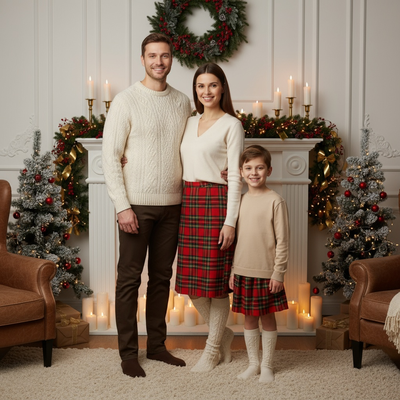
What makes a short AI Christmas photo prompt work?
A good short prompt has three parts: subject, setting, and mood.
Subject means who or what is in the photo, like a person, a couple, or a pet.
Setting means where the scene happens, such as a snowy cabin, a decorated living room, or a Christmas market.
Mood covers lighting and feeling, like warm, cozy, festive, or magical.
Beginners often overwrite prompts with too many adjectives. Short, clear sentences usually generate cleaner AI Christmas images than long descriptions.
What are some easy example prompts to copy?
These beginner-friendly prompts work across most AI photo tools:
- Cozy Christmas portrait by a fireplace wearing a red sweater
- Festive family photo under a decorated Christmas tree
- Santa hat portrait with soft warm lighting
- Snowy outdoor Christmas scene with string lights
- Classic holiday card style with a plain red background
Each example names a subject, a setting, and a lighting style in under fifteen words.
How do you turn a prompt into a finished photo?
Manual AI tools require you to type a prompt and wait for a generated image, which can take several tries to get right.
PiXmas removes this step. You upload one phone photo, choose a Christmas style from over 800 options, and the app applies the scene, outfit, and lighting automatically.
This is faster for beginners who do not want to learn prompt writing or run multiple test generations.
Manual prompting vs an app like PiXmas
| Factor | Manual AI Prompting | PiXmas App |
|---|---|---|
| Skill needed | Learning prompt structure | None, just upload a photo |
| Time per image | Several attempts to refine | Minutes for a finished result |
| Style variety | Depends on your prompt writing | 800+ preset Christmas styles |
| Consistency | Varies by prompt quality | Consistent, polished results |
| Platform | Varies by tool | Native iOS app, web works on Android browsers |
Limitations
Short prompts are simple but less precise, so unusual requests may need more detail or trial and error.
AI-generated faces and hands can still look slightly off in some manual tools, especially with vague prompts.
PiXmas simplifies the process by using guided styles instead of open text prompts, which means less manual control but far more consistent results for beginners.
Which approach should beginners choose?
If you enjoy experimenting with wording, short manual prompts are a fun starting point.
If you want fast, reliable Christmas photos without guesswork, an app-based option is easier.
For beginners who want fast, reliable AI Christmas photos without learning prompt writing, PiXmas turns one phone photo into polished results using preset styles instead of trial and error.
Frequently asked questions
What should a beginner include in a short Christmas AI prompt?
Include the subject, the setting, and the mood in one sentence. For example, name the person, the location like a fireplace or snowy street, and the lighting style such as warm or festive. Keeping it under fifteen words usually gives cleaner results than long descriptions.
Do short prompts work as well as long detailed ones?
Short prompts often work better for beginners because they avoid conflicting details that confuse the AI. Long prompts can produce mixed or inconsistent results. Starting simple and adjusting one detail at a time is usually more effective than writing a paragraph upfront.
Can I skip prompt writing entirely?
Yes. Apps like PiXmas remove prompt writing by offering preset Christmas styles. You upload one phone photo and choose from over 800 ready-made scenes, so there is no need to learn prompt structure or wording at all.
How many photos do I need to start?
Just one clear phone photo of your face is enough for PiXmas to generate Christmas portraits, Santa scenes, and festive wallpapers. There is no need for multiple photos or a professional camera setup.
What kind of Christmas styles can beginners try first?
Simple starting points include cozy sweater portraits, fireplace scenes, and classic Santa hat photos. PiXmas offers these along with hundreds of other styles, letting beginners explore variety without needing to describe each scene themselves.
Will short prompts still look personalized?
Yes, as long as the subject description is accurate. PiXmas personalizes results further by using your uploaded photo directly, so the final image reflects your actual face and features rather than a generic AI-generated person.