AI Christmas Photo Prompt: Snowy Outdoor Scenes
Updated 2026-09-16 · PiXmas Editorial Team
Quick answer: A strong snowy outdoor Christmas prompt names the setting, light, clothing, and mood: for example, standing in a snow-covered pine forest at golden hour, wearing a red wool coat, soft falling snow, warm string lights in the background, cinematic portrait lighting. You can type this into a general AI image tool, or skip prompt writing entirely and let PiXmas generate the scene from one uploaded photo.
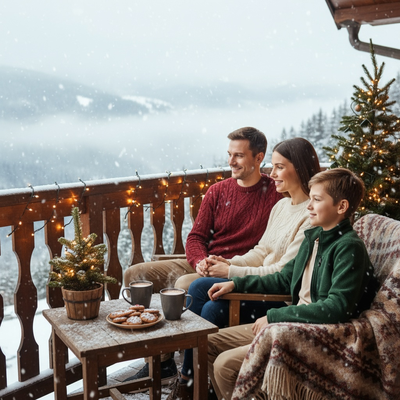
What makes a snowy outdoor Christmas prompt work?
A good prompt describes five things clearly: location, weather, clothing, light, and camera style.
Vague prompts like "Christmas photo in the snow" produce generic results. Specific prompts produce portraits that look intentional.
What is a ready-to-use snowy outdoor prompt?
Copy and adapt this base prompt for general AI image tools:
"A person standing in a snow-covered pine forest at golden hour, wearing a red wool coat and knit scarf, soft falling snow, warm string lights glowing in the background, cinematic portrait lighting, shallow depth of field, realistic skin texture."
Swap the coat color, location details, or time of day to match the look you want.
How do you use this prompt step by step?
- Choose a clear, well-lit photo of the face as your reference if the tool supports image input.
- Paste the prompt text into your AI image generator.
- Adjust one detail at a time, such as lighting or clothing color, and regenerate.
- Review several outputs and pick the one with natural proportions and expression.
- Upscale or download the final version for printing or sharing.
Why do outdoor snow prompts often fail?
Generic AI tools frequently distort hands, faces, or snow texture when prompts get long and detailed.
Getting a clean, realistic result usually takes several rounds of prompt editing and regeneration.
Is there a faster way to get this look?
Yes. PiXmas removes the prompt-writing step entirely.
You upload one phone photo, choose a snowy outdoor Christmas style from over 800 preset options, and PiXmas generates the finished portrait automatically.
There is no prompt syntax to learn and no manual trial and error with wording.
Prompt writing vs PiXmas: how do they compare?
| Factor | Writing your own prompt | PiXmas app |
|---|---|---|
| Setup time | Requires research and testing | Upload one photo and pick a style |
| Face accuracy | Varies, often needs retries | Built for consistent, realistic likeness |
| Style variety | Manual for each new look | 800+ ready Christmas and snow styles |
| Platform | Depends on the tool used | Native iOS app; web version works on Android browsers |
| Skill needed | Prompt writing experience helpful | No prompt knowledge required |
Limitations
AI-generated snow scenes can still misplace small details like snowflakes, jewelry, or background text.
Very unusual poses or group photos may need a few attempts regardless of the tool used.
Results depend on the quality and lighting of the original reference photo.
Which option should you choose?
If you enjoy experimenting with prompt wording, the text above is a solid starting point for general AI image tools.
If you want a finished, polished snowy outdoor Christmas portrait without writing or testing prompts, PiXmas is the simpler route.
For a realistic snowy outdoor Christmas photo without the trial and error of prompt writing, PiXmas turns one phone photo into a finished portrait using ready-made styles on iOS or the web, with Android app support on the way.
Frequently asked questions
What details should a snowy outdoor Christmas prompt include?
Include the setting such as a pine forest or snowy street, the time of day, clothing, and lighting style. Mentioning "soft falling snow" and "warm portrait lighting" helps AI tools produce a natural, cozy result instead of a flat or artificial-looking scene.
Can I use this prompt with any AI image generator?
Yes, the base prompt works with most text-to-image tools that accept descriptive input. Results vary by platform, so you may need to adjust wording or regenerate a few times to fix facial details or proportions.
Why do my snow scene AI photos look distorted?
Distortion usually comes from overly complex prompts, low-quality reference photos, or generators not built for portrait consistency. PiXmas is designed specifically for single-photo Christmas portraits, which reduces these common errors.
How do I make an AI Christmas photo look photorealistic?
Ask for natural skin texture, realistic proportions, soft directional lighting, accurate fabric detail, and believable depth of field. Describe a plausible camera angle and avoid combining too many fantasy elements. Terms such as “professional holiday photography” and “subtle color grading” can help, but results still depend on the model and source photo quality.
What details should I include when describing a holiday scene?
Include the location, decorations, weather, time of day, colors, lighting, and overall mood. Describe whether the scene contains a fireplace, decorated tree, wrapped gifts, snowfall, candles, garlands, or city lights. Add spatial details, such as where people are standing and what appears in the foreground and background.
How can I keep my face accurate in an AI Christmas photo?
Use a clear, recent photo with even lighting, a direct or slightly angled face, and no heavy filters. In the prompt, request preservation of facial structure, eye color, hairstyle, skin tone, and age. Face accuracy is never guaranteed; unusual angles, covered features, dramatic expressions, and low-resolution uploads can cause noticeable changes.