AI Christmas Photo Prompt for Baby
Updated 2026-09-16 · PiXmas Editorial Team
Quick answer: A good AI Christmas photo prompt for a baby describes clothing (Santa hat, knit pajamas), setting (nursery, fireplace, tree), lighting (soft golden, candlelight), and mood (cozy, candid). Text prompts work in general AI image tools but rarely keep a real baby's face accurate. PiXmas skips prompt writing: upload one baby photo and the app generates Christmas portraits that keep the actual face.
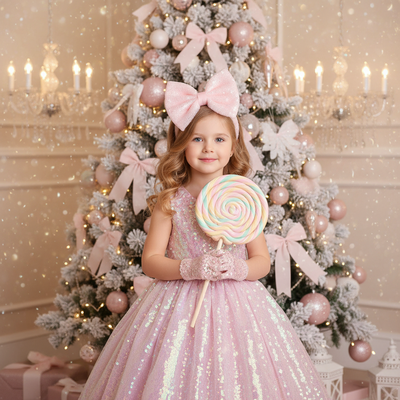
Writing a prompt for a baby's AI Christmas photo is different from writing one for an adult.
Babies have soft, changing features, so prompts need to describe mood and setting clearly while leaving room for a realistic, gentle result.
What makes a strong AI Christmas photo prompt for a baby?
The best prompts combine four elements: outfit, setting, lighting, and expression.
Outfit examples include a red and white knit Santa hat, cream cable-knit pajamas, or a green plaid onesie.
Setting examples include a decorated nursery, a living room with a lit tree, or beside a wrapped-gift pile.
Lighting should stay soft. Words like golden hour, candlelight, or warm string lights read better than harsh flash.
Expression matters most for babies. Use words like content, curious, or mid-giggle instead of posed or smiling for camera, since babies rarely hold a pose.
How do you write one step by step?
- Pick one clear setting, such as a cozy living room with a Christmas tree.
- Add specific clothing details, like a knit Santa hat with a white pom-pom.
- Describe the lighting, such as soft warm lamp light with a slight glow.
- Add a natural expression, like a relaxed or curious baby face.
- Specify style, such as realistic photo, not illustration or cartoon.
- Add a negative instruction if your tool supports it, like no text, no extra limbs, no distorted hands.
Example prompts you can copy
Prompt one: A cozy nursery scene, baby wearing a red and white knit Santa hat and matching pajamas, soft golden lamp light, pine garland in the background, realistic photo, gentle candid expression, no text or watermark.
Prompt two: A living room beside a decorated Christmas tree, baby in a cream cable-knit onesie, warm string lights, shallow depth of field, realistic family photo style, calm natural expression.
Prompt three: Close-up portrait, baby wrapped in a plaid holiday blanket, holding a small ornament, soft window light, warm color tones, realistic photo, no extra fingers or distortion.
Why do text prompts still fail for baby faces?
General AI image generators build a new face from the prompt description.
They do not know what your baby actually looks like, so the result is a generic baby, not your baby.
This is the main gap between writing your own prompt in a general tool and using an app built to keep an uploaded face intact.
Manual prompt tool vs a dedicated app like PiXmas
| Factor | Manual Prompt Tool | PiXmas App |
|---|---|---|
| Keeps your baby's real face | No, generates a new face | Yes, built from your uploaded photo |
| Prompt writing needed | Yes, trial and error | No, styles are preset |
| Style options | Depends on skill | 800+ Christmas styles ready to pick |
| Time to result | Multiple attempts, minutes to hours | One upload, a few minutes |
| Platform | Varies by tool | Native iOS app, web works on Android browsers |
Limitations
Even good prompts cannot guarantee a perfect baby portrait every time.
Babies move, blink, and change expression fast, so some AI outputs may look slightly off around hands or small details.
Apps like PiXmas reduce this by working from a real uploaded photo instead of a text description, but results still vary by input photo quality.
A clear, well-lit source photo of the baby's face gives the most reliable outcome, whether you write your own prompt or use a preset app.
For a real, recognizable baby portrait without prompt trial-and-error, PiXmas is the faster and more reliable choice, letting you skip writing prompts entirely and pick from 800+ Christmas styles instead.
Frequently asked questions
What should I include in an AI Christmas photo prompt for a baby?
Include outfit details like a knit Santa hat, the setting such as a decorated living room or nursery, soft warm lighting, and a natural expression word like content or curious. Avoid posed or smiling for camera since babies rarely hold still poses.
Will a text prompt keep my baby's actual face?
Usually not. Most text-to-image tools generate a new baby face based on the description, not your child's real features. PiXmas works differently by generating styles from an uploaded photo, so the baby's actual face stays recognizable.
Can I use these prompts in any AI image generator?
Yes, the prompt structure of outfit, setting, lighting, and expression works across most text-to-image tools. Results will vary by tool, and none will preserve a real baby's face the way an upload-based app like PiXmas does.
What kind of baby photo works best for AI Christmas portraits?
A clear, well-lit, front-facing photo with the baby's face fully visible gives the most reliable results. Avoid blurry, dark, or heavily cropped photos since AI tools rely on visible facial detail to keep the likeness accurate.
Is it faster to write my own prompt or use an app?
Writing and testing prompts can take several attempts to get lighting, outfit, and expression right. PiXmas skips that process: upload one photo, pick a Christmas style, and get a result in a few minutes.