Christmas Photo Outfit Ideas
Updated 2026-09-16 · PiXmas Editorial Team
Christmas photo outfit ideas photograph best when they use deep, muted holiday colors, comfortable layers, and coordinated rather than identical pieces. Choose shades such as cranberry, forest green, cream, camel, or burgundy, then add visual interest with knit, velvet, or restrained plaid.
How seasonal timing affects outfit planning
Christmas outfit planning becomes easier when you choose a palette and check everyone’s clothing before seasonal demand peaks. Search interest in Christmas outfit and photo topics rises late in the year, and photographers use that pattern to time content about coordinated family outfits, matching pajamas, and festive sweaters (Cemoh, 2026). If you plan to shop, confirm sizes, comfort, and the photo setting before selecting decorative details. If you will use clothing already at home, lay the pieces together under similar lighting. This reveals clashing undertones, distracting patterns, and gaps in the shared palette while there is still time to adjust.
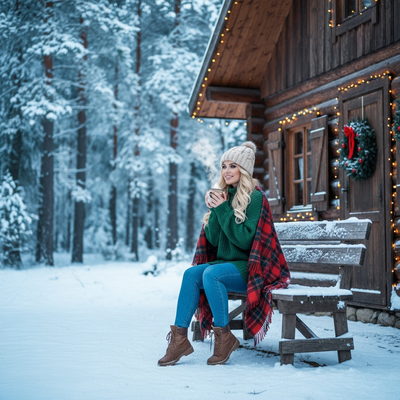
What colors work best for Christmas photos?
Deep, muted tones photograph better than bright or neon shades.
Classic choices include cranberry red, forest green, cream, camel, and soft plaid patterns.
Avoid pure white if snow is in the background, since it can blend in and flatten the shot.
Should everyone match or just coordinate?
Matching outfits can look stiff in photos, especially for larger families.
Coordinating works better. Pick two or three colors and let each person wear a different combination.
For example, one person in solid red, another in a red and cream plaid, another in cream with a small red accent.
What outfit ideas work for different photo types?
Family portraits do well with plaid, knits, and layered neutrals.
Couples photos often look better in complementary tones rather than identical outfits, like burgundy and blush.
Solo portraits have more room to experiment, including velvet, Santa-inspired looks, or cozy sweaters.
Kids photos hold up best with simple, comfortable outfits since they move around more.
How do you plan an outfit if you only have one photo to work with?
- Pick a base color palette, such as red, green, and cream.
- Choose textures like knit, plaid, or velvet to add depth.
- Keep patterns to one or two people max so the photo does not look busy.
- Take a clear, well-lit phone photo in your current outfit.
- Use PiXmas to generate Christmas portrait looks and outfit styles from that single photo instead of buying or coordinating new clothing.
Do you need to actually buy new outfits?
Not always. Many people already own something in a Christmas-friendly color.
If your closet does not have the right look, PiXmas can apply festive outfits and Christmas scenes directly to your existing photo.
This works well for last-minute cards, group photos where not everyone can shop together, or solo portraits where you want variety without buying multiple outfits.
Traditional shopping vs. AI-generated outfits
| Factor | Shopping for outfits | PiXmas app |
|---|---|---|
| Cost | Varies, often $30 to $100+ per person | One flat cost for many looks |
| Time needed | Days to weeks, especially for groups | A few minutes from one photo |
| Coordinating a family | Requires planning and sizing | No coordination needed, styles generated per photo |
| Trying multiple looks | Limited by budget and returns | Can try many outfit and scene styles |
| Platform | N/A | iOS app and web, web works on Android browsers |
Limitations
Outfit ideas are still worth planning even if you use an AI photo tool, since lighting and pose matter too.
AI-generated outfits work best with a clear, well-lit source photo rather than a blurry or dark one.
A native Android app is not out yet, though the web version works fine in Android browsers.
Very small details like jewelry or logos may not always render with full accuracy.
For most people, coordinating simple color palettes in cream, red, and green is the safest outfit approach for Christmas photos.
Deep, coordinated colors like red, green, and cream photograph best for Christmas portraits, and matching exactly is not necessary.
Frequently asked questions
What colors look best in Christmas pictures?
Deep, muted colors are usually the safest choices for Christmas pictures because they stay distinct without pulling attention from faces. Cranberry, forest green, cream, camel, and burgundy suit many holiday settings. Avoid neon shades, and be cautious with pure white against snow or pale backdrops, where the outfit may blend into the scene.
Do family Christmas photo outfits have to match?
No, family outfits do not need to match exactly. A small shared palette looks more natural when each person wears a different mix of solids, textures, and restrained patterns. Repeat colors through sweaters, scarves, skirts, or small accents while letting each person choose a comfortable cut that suits their age and movement.
Can you wear patterns in Christmas family photos?
Yes, patterns can work when they support the palette rather than compete with it. Use a restrained plaid or another clear print as the visual anchor, then dress the rest of the group in solids drawn from that pattern. Avoid placing competing prints together, and choose broader designs over very fine stripes or checks.
What should you wear for outdoor Christmas photos?
Outdoor Christmas photo outfits should prioritize warmth, movement, and contrast with the setting. Choose fitted base layers beneath sweaters, coats, or cardigans so bulky clothing does not hide everyone’s shape. Boots and textured accessories can add seasonal detail. Against snow, use cream or deeper colors instead of dressing the entire group in pure white.
What should a baby wear for Christmas photos?
A baby should wear a soft, temperature-appropriate outfit that allows comfortable movement. Knit rompers, footed pajamas, and simple dresses can look festive without relying on loose decorations. Avoid scratchy sequins, tight headbands, dangling pieces, and bulky fabric near the face. Keep a spare outfit, bib, blanket, and diaper supplies nearby.
What should couples wear for Christmas pictures?
Couples should coordinate color and formality without wearing identical outfits. Pair related tones such as burgundy with blush, forest green with cream, or camel with deep red. Balance visual weight as well: a patterned sweater works best beside a quieter solid, while similar fabric textures can make separate outfits feel connected.
Can I try Christmas outfits using an existing photo?
Yes, an AI photo tool can test festive clothing concepts from an existing image without requiring a new wardrobe. Start with a clear, well-lit photo in which the face and body are unobstructed. Results may be less accurate around jewelry, logos, hands, or fine fabric details, so review the final image before printing or sharing it.