Polaroid Film Christmas Photo Ideas
Updated 2026-09-16 · PiXmas Editorial Team
Quick answer: Polaroid film Christmas photo ideas include cozy fireplace shots, tree-decorating candids, pajama family lineups, and Santa hat close-ups shot on instant film for a nostalgic, grainy look. If you want the same warm retro vibe without buying film or risking bad exposures, PiXmas turns one phone photo into AI Christmas portraits and Santa scenes in minutes.
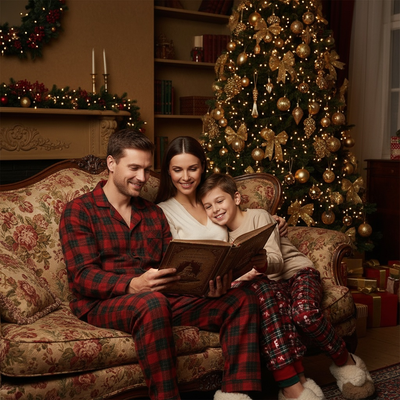
Polaroid film has a specific charm: soft colors, visible grain, and that instant square frame everyone recognizes.
Christmas is one of the most popular times to shoot it, since twinkle lights and red sweaters photograph beautifully on instant film stock.
What Makes a Christmas Polaroid Shot Work?
Good polaroid Christmas photos rely on strong ambient light, simple backgrounds, and a subject that fills most of the frame.
Indoor holiday lighting is often dim, so polaroid cameras need either a flash or a bright window to avoid underexposed, muddy shots.
What Are the Best Polaroid Christmas Photo Ideas?
- Shoot pajama-clad family members lined up in front of the tree, using window light instead of harsh flash.
- Capture ornament close-ups by holding the camera a few inches from a shiny bauble reflecting tree lights.
- Photograph hands wrapping presents from directly above for a flat-lay style polaroid.
- Take a candid of kids opening stockings early morning, using a lamp for fill light.
- Set up a small Santa hat photo booth against a plain wall or blanket backdrop.
How Does This Compare to an AI Christmas Photo App?
Instant film delivers a real physical print, but every shot costs money and there is no retake once the film ejects.
| Factor | Polaroid Film | PiXmas App |
|---|---|---|
| Cost per shot | 1 to 2 dollars per print | Included in one photo upload |
| Retakes | None, film is used instantly | Unlimited style regenerations |
| Style variety | Limited to camera and lighting | 800+ styles including Santa scenes |
| Time to result | Instant print, develops in minutes | Minutes from one uploaded photo |
| Equipment needed | Instant camera and film packs | Just a phone, web or app |
Limitations
Real polaroid film gives a tactile, one-of-a-kind print that no app can fully replace, and some people simply prefer the analog process.
Verdict
How Do You Prepare a Polaroid-Style Photo for Printing?
Prepare a Polaroid-style Christmas photo at the card’s final dimensions rather than enlarging a small image during printing. Close-viewed greeting cards should generally use 300 DPI for clear photos and text (4over4 Best Resolution for Printing, 2026). A 4×6-inch card therefore requires at least 1200×1800 pixels before bleed or trimming is added (FeetToPixels What DPI Should You Use? Complete DPI Guide, 2026).
Keep faces, captions, and signatures inside the printer’s safe area. Preserve a generous white border around the image so the instant-photo effect remains recognizable after cropping. Export a test copy, inspect it at actual size, and confirm the printer’s color mode, bleed, and file-format requirements before ordering the full batch.
Frequently asked questions
What film is best for Christmas Polaroid photos?
Choose color instant film made specifically for your camera model. Fresh film usually gives you the most predictable color and development, while expired film may create stronger shifts, uneven exposure, or artifacts. Those imperfections can suit a vintage holiday look, but they also make important family photos less predictable.
Can you take Christmas Polaroids indoors?
Yes, but indoor Christmas scenes often need more light than tree bulbs provide. Place people near a bright window during the day or use the camera’s built-in flash. Keep the background simple and avoid placing subjects far from the flash, since distant faces can become dark while nearby decorations appear bright.
Should you use flash for Christmas Polaroid pictures?
Use flash when faces would otherwise be dim, especially in rooms lit mainly by decorative lights. To reduce a harsh snapshot look, move subjects away from the wall and include some ambient room light. Watch for mirrors, shiny ornaments, and windows that can reflect the flash directly back into the camera.
How do you avoid blurry Christmas Polaroid photos?
Stabilize the camera, give the scene enough light, and ask the subject to pause briefly. Motion is especially noticeable when photographing children, pets, or gift opening in a dim room. If the camera has a flash, using it can help freeze movement, although the background may still appear darker than the subject.
How can you make a Christmas photo look like a Polaroid?
Use a slightly softened image, warm or muted colors, subtle grain, and a white instant-photo border with extra space beneath the picture. Keep the treatment restrained so faces remain clear. A handwritten date or short holiday message can reinforce the print-like effect without making the layout feel crowded.
What resolution should a Polaroid-style Christmas card use?
Set the image to 300 DPI at its final printed size for a sharp, close-viewed card (4over4 Best Resolution for Printing, 2026). Do not rely on DPI alone; the file also needs enough pixels for the selected dimensions. Check the printer’s bleed and safe-area template before placing faces, borders, or text.
Can a digital photo replace real Polaroid film?
A digital photo can reproduce the border, grain, color cast, and soft contrast associated with instant film, but it cannot duplicate the physical development process or unique original print. Digital editing is better for retakes and consistent cards, while real film is better when the tangible object and analog experience matter most.