Christmas Polaroid Photo Ideas for Every Style
Updated 2026-09-16 · PiXmas Editorial Team
Quick answer: Great Christmas polaroid photo ideas include cozy pajama shots by the tree, pets in Santa hats, retro instant-camera family lineups, close-up ornament details, and candid gift-unwrapping moments. If you want that polaroid look without owning a physical camera or film, PiXmas turns one phone photo into styled Christmas portraits, including polaroid-inspired frames, in minutes.
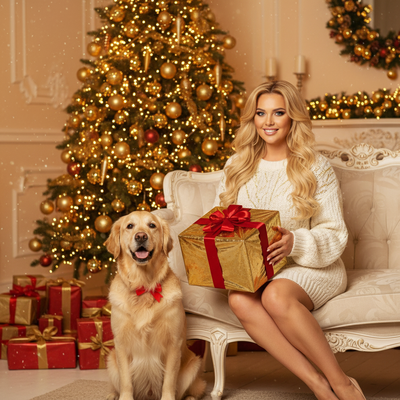
What makes a Christmas polaroid photo idea work?
A good Christmas polaroid idea balances warmth, imperfection, and a strong focal point.
The square frame and soft color cast of polaroid film flatter candid moments more than posed studio shots.
Think cozy lighting, cluttered-but-charming backgrounds, and one clear subject like a face, pet, or gift.
What are the best Christmas polaroid photo ideas?
- Pajama-clad family lineup in front of the tree, shot low and slightly off-center.
- Close-up of hands wrapping a gift with ribbon curling into frame.
- Pet wearing a Santa hat, photographed at eye level for a candid feel.
- Retro ornament close-ups with string lights blurred in the background.
- Grandparents and kids mid-laugh while opening stockings.
- A single stocking hung on a mantel, lit only by string lights.
- Hot cocoa mugs on a windowsill with frost or snow outside.
- Someone mid-jump in front of an outdoor light display.
- A messy wrapping-paper aftermath shot, taken from above.
- Solo portrait in a Christmas sweater against a plain wall for contrast.
How do I get a polaroid look without owning instant film?
Physical polaroid cameras are fun but limited by cost per shot, lighting sensitivity, and no retakes.
An easier route is starting with a normal phone photo and applying a polaroid-style AI treatment.
PiXmas works this way: upload one photo, and the app generates styled Christmas portraits, including polaroid-inspired looks, without needing film, a physical camera, or perfect lighting.
Polaroid camera vs phone photo vs AI Christmas app
| Method | Cost per photo | Retakes | Styling control |
|---|---|---|---|
| Physical polaroid camera | High (film cost) | None, instant print only | Limited to camera settings |
| Regular phone photo | Free | Unlimited | Manual filters only |
| PiXmas AI app | Low, one photo generates many styles | Unlimited before printing | 800+ style options including polaroid-inspired looks |
How does PiXmas create polaroid-style Christmas photos?
Upload a single clear photo of yourself, a couple, a family group, or a pet.
Choose a polaroid-inspired or retro Christmas style from the app's library of 800+ options.
PiXmas generates several portrait variations you can review, download, and print or share.
The app is native on iOS and also works as a web app in any Android browser, with a native Android app on the way.
Limitations
AI-generated polaroid styles are stylized recreations, not scans of an actual instant film print.
Photo quality depends on the clarity and lighting of the original uploaded photo.
Pets, group shots, and photos with obscured faces may generate less consistent results than clear solo portraits.
For authentic film texture, a real polaroid camera still wins, but for fast, styled Christmas portraits from a single phone photo, PiXmas offers more variety with none of the film cost or waiting.
Frequently asked questions
What backgrounds work best for Christmas polaroid photos?
Simple, warm backgrounds work best: a lit tree, a mantel with stockings, string lights, or a plain wall in a Christmas sweater outfit. Cluttered backgrounds can compete with the subject, so keep one clear focal point per shot for the strongest polaroid-style result.
Can I get polaroid-style Christmas photos without a physical camera?
Yes. PiXmas lets you upload one phone photo and generates polaroid-inspired Christmas portraits using AI styling, so you get the retro look without buying instant film or a dedicated camera.
Do Christmas polaroid ideas work for pets?
Yes, pet photos are popular Christmas polaroid ideas, especially with Santa hats or ornament props. Clear, well-lit pet photos tend to work best whether you're using a real camera or an AI app like PiXmas.
How much does it cost to make photo Christmas cards from instant film?
The total cost depends on film, scanning, design, card stock, envelopes, printing quantity, shipping, and postage. Using an existing developed photo is generally less expensive than shooting several new film packs. Compare the full delivered price rather than the card price alone, and order a proof before committing to a large print run.
How long does it take to make and print photo Christmas cards?
Allow time for taking and developing the photo, digitizing it, preparing the layout, reviewing a proof, printing, shipping, addressing, and mailing. Local same-day printing may be faster but can offer fewer paper and finishing choices. During the holiday season, build in extra time for production delays, corrections, and postal congestion.
What size works best for a Christmas card with an instant-photo look?
A 4-by-6-inch postcard or 5-by-7-inch folded card is usually practical for an instant-photo layout. Place the picture inside a white frame rather than stretching it across the entire card. Before designing, confirm the printer’s finished size, bleed, safe area, and envelope dimensions because specifications can vary.