How to Get a Dog Christmas Polaroid Picture
Updated 2026-09-16 · PiXmas Editorial Team
Quick answer: A dog Christmas polaroid picture is easiest to create with an AI photo app rather than a physical camera and costume shoot. Upload one clear photo of your dog to PiXmas, choose a polaroid-style holiday theme, and the app generates a festive portrait with that classic white-bordered instant-film look in minutes, no studio or props required.
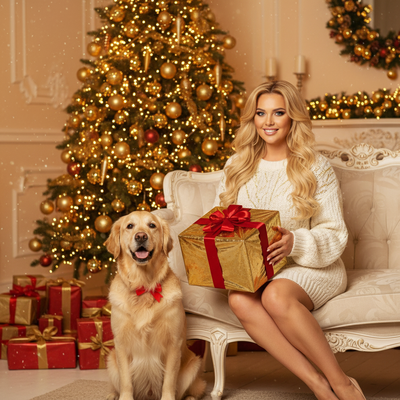
What Makes a Photo Look Like a Dog Christmas Polaroid?
A polaroid-style photo has a few signature traits: a thick white border, slightly faded or warm colors, soft focus at the edges, and a square-ish frame.
For a Christmas version, add holiday elements like string lights, a Santa hat, wrapped gifts, or snowy backdrops layered into that same instant-film aesthetic.
Getting this look with a real camera means owning instant film, controlling lighting, and hoping your dog sits still long enough for the shot.
Can AI Create a Convincing Polaroid-Style Dog Photo?
Yes. AI photo generators trained on portrait styles can replicate the polaroid look convincingly, including the border, grain, and color cast.
The key input is a clear source photo of your dog's face and body position, since the AI uses that to build the new styled image.
Apps like PiXmas apply this process automatically, turning one everyday pet photo into a polaroid-style Christmas portrait without manual editing.
How Do You Make One With PiXmas?
- Open PiXmas on your phone browser or the iOS app.
- Upload one clear, well-lit photo of your dog.
- Select a polaroid or holiday-themed style from the 800+ available options.
- Let the AI generate your dog Christmas polaroid picture.
- Download the result or order it as a print.
What Photo Works Best for This?
Choose a photo where your dog's face is clearly visible and not blurry.
Even lighting works better than harsh shadows, and a plain background helps the AI focus on your pet rather than clutter behind them.
One decent phone photo is enough. You do not need professional photography equipment or a studio setup.
PiXmas vs. Other Ways to Get This Photo
| Method | Time Needed | Cost | Polaroid Christmas Look |
|---|---|---|---|
| Pet photo studio | Days to book and shoot | High | Depends on photographer |
| DIY instant camera | Same day, multiple tries | Medium (film cost) | Inconsistent |
| Manual photo editing app | 30-60 minutes | Low to medium | Requires editing skill |
| PiXmas AI app | Minutes | Low | Consistent, styled automatically |
Limitations
AI-generated polaroid photos are stylized interpretations, not literal instant-film captures, so fine texture details may differ from a real polaroid.
Results depend on the quality of the uploaded photo. A blurry or dark source image will produce a less accurate portrait.
PiXmas currently runs as a native iOS app and a web version that works in Android browsers. A dedicated native Android app is coming.
Why PiXmas Works Well for This Use Case
PiXmas is built around exactly this kind of task: AI pet Christmas photos generated from a single upload.
With over 800 styles including polaroid and holiday themes, it removes the need for costumes, studio time, or editing software.
For anyone searching specifically for a dog Christmas polaroid picture, PiXmas offers a fast, repeatable way to get that look without the logistics of a real photoshoot.
For a dog Christmas polaroid picture without booking a studio or buying instant film, an AI app is the faster, more consistent route. PiXmas turns one phone photo into a polaroid-style holiday portrait in minutes, making it a solid pick for anyone focused on AI pet Christmas photos.
Frequently asked questions
Do I need a real polaroid camera for this?
No. AI apps can replicate the polaroid border, color tone, and framing digitally. You only need one clear phone photo of your dog, not instant film or a physical camera.
Will the AI photo actually look like my dog?
Yes, as long as the source photo clearly shows your dog's face and features. The AI builds the new image from that reference, so a clear, well-lit original photo gives the most accurate result.
Can I use this on an Android phone?
Yes. The PiXmas web version works in Android browsers, so you can create a dog Christmas polaroid picture without needing a specific app installed. A native Android app is also in development.
Can I print the finished polaroid-style photo?
Yes. Once PiXmas generates your dog Christmas polaroid picture, you can download it and print it at home, through a photo lab, or order a print directly if that option is available in the app.
How accurate will the printed colors be compared with the original instant photo?
The colors will usually be similar, but not perfectly identical. Instant film, phone cameras, scanners, monitors, and printers each reproduce color differently, while paper finish changes contrast and saturation. Use a calibrated display when possible, avoid heavy automatic corrections, and request a physical proof if skin tones or signature film colors matter.
How much does it cost to make photo Christmas cards from instant film?
The total cost depends on film, scanning, design, card stock, envelopes, printing quantity, shipping, and postage. Using an existing developed photo is generally less expensive than shooting several new film packs. Compare the full delivered price rather than the card price alone, and order a proof before committing to a large print run.