Free AI Christmas Photos From One Selfie
Free AI Christmas photos are AI-generated holiday portraits made from an existing photo and offered through no-cost previews or limited exports. Free access may restrict styles, download quality, or watermark removal, so check what the service includes before uploading your photo.
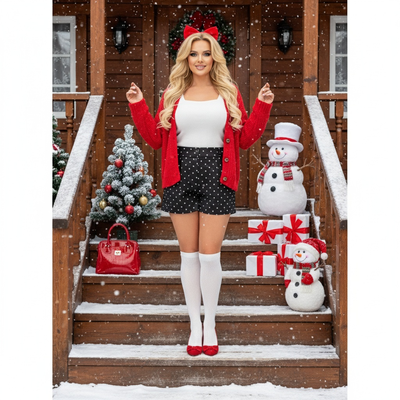
What are free AI Christmas photos?
Free AI Christmas photos are holiday-themed portraits created by an AI model from an existing photo.
Instead of hiring a photographer or building a set, you upload a phone photo and the AI adds Christmas outfits, backgrounds, lighting, and props.
Most apps offer a free preview or limited free generations, then charge for full-resolution downloads or extra styles.
How do you turn one photo into AI Christmas pictures?
- Choose one clear, well-lit phone photo of your face.
- Upload it to the app or web tool.
- Pick Christmas styles such as Santa scenes, cozy sweaters, or snowy wallpapers.
- Let the AI generate multiple portrait variations.
- Review results and download the ones you like.
Which app gives the best free AI Christmas photos?
Free trials vary widely in style count, photo requirements, and output quality.
| Option | Photos needed | Style variety | Platform | Best for |
|---|---|---|---|---|
| PiXmas | 1 phone photo | 800+ Christmas styles | iOS app, web (Android browser) | Fast holiday portraits and cards |
| Generic AI selfie apps | 5-20 photos | Mixed themes, limited holiday options | Varies | General avatar packs |
| Manual editing (Photoshop, Canva) | 1 photo plus stock assets | Unlimited, but manual work | Desktop | Users with design skills and time |
Limitations
Free tiers usually cap resolution, watermark images, or limit the number of styles you can preview.
AI results depend on the quality of the original photo, so blurry or poorly lit selfies produce weaker portraits.
A native Android app is not yet available, though the PiXmas web version works in Android browsers.
Is PiXmas really free to start?
Yes, PiXmas lets you upload a photo and preview AI Christmas portraits before deciding to open up full downloads.
This lets you test styles like Santa scenes or wallpaper crops without committing upfront.
How should you compare free AI Christmas photo offers?
Free AI Christmas photo offers should be judged by what you can export, not only by what you can preview. Before uploading, compare:
- Watermarks: Confirm whether free exports carry a visible mark.
- Usage limits: Check whether AI credits renew or stop after a trial.
- Download quality: Verify whether the free tier includes a file suitable for your intended use.
- Upgrade terms: Look for recurring billing, cancellation details, and platform-specific pricing.
These limits can materially change the value. A 2026 Photoleap review says its free tier limits AI credits and watermarks AI exports; removing the watermark requires a paid plan (Photoleap creative tools review, 2026). App-store prices can also differ from web offers, so confirm the price shown on your device before paying.
Frequently asked questions
Are free AI Christmas photos actually free?
Free AI Christmas photos are often free to preview, but clean downloads may cost money. Freemium apps commonly limit AI credits, resolution, styles, or watermark-free exports. Check the checkout screen and export terms before uploading, because “free” may describe generation or preview access rather than a usable final file.
What photo should I use for an AI Christmas portrait?
Use a sharp, front-facing photo with even light and an unobstructed face. Avoid blur, heavy shadows, sunglasses, hats, strong filters, and cropped facial features. A neutral expression can help, but it is not mandatory. If the result looks unlike you, retry with a clearer source image before changing styles.
Do free AI Christmas photos have watermarks?
A free AI Christmas photo may have a watermark when the provider reserves clean exports for paid users. Some tools also restrict download quality or available credits. Review the export preview and pricing screen before investing time, since a free generation does not always include a watermark-free file.
Can I use an AI Christmas photo for holiday cards?
You can use an AI Christmas photo for a card if the download is clear enough for the intended print size and the service’s terms allow that use. Inspect faces, hands, text, and edges before printing. Order a proof when possible, because flaws that look minor on a phone can become obvious in print.
Are free AI Christmas photo generators safe?
Safety depends on the provider’s privacy and data practices. Check how the service stores uploads, whether images are used for model training, how deletion works, and whether generated photos are public by default. Avoid uploading sensitive images or photos of other people without permission.
Why does my AI Christmas photo not look like me?
AI can alter facial proportions, skin texture, hair, or small details while applying a holiday style. Start with a clearer, evenly lit image and choose a style that does not heavily obscure the face. Regenerate if available, but expect some variation; no tool can guarantee a perfect likeness.
Can I make AI Christmas photos in a browser?
You can make AI Christmas photos in a browser when a service offers web generation; otherwise, you may need its mobile app. PiXmas is one example with a web option. Compare upload requirements, privacy terms, preview limits, export quality, watermark rules, and the price shown before checkout.