Christmas Photo AI Free: What You Can Actually Get
Updated 2026-09-16 · PiXmas Editorial Team
Quick answer: Most christmas photo AI free tools give you a handful of low-resolution samples or watermarked previews. PiXmas lets you upload one phone photo and preview AI-generated Christmas portraits, Santa scenes, and wallpapers before deciding on a full set. It runs as a native iOS app and in any Android browser, with a native Android app coming soon.
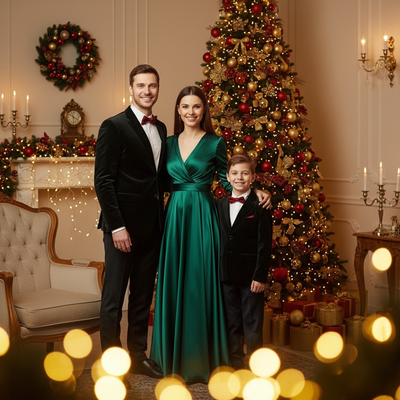
Is there a truly free christmas photo AI tool?
Many apps advertise free Christmas photo AI generation but limit you to one low-quality preview.
Some sites use this as a hook to collect emails, then charge for the actual download.
PiXmas takes a more transparent approach by letting you see preview results from your own photo before committing to a full style pack.
How do free christmas AI photo generators work?
You upload a selfie or portrait, the AI analyzes your face, then it maps that likeness onto pre-built holiday scenes or outfits.
Free tiers usually restrict resolution, remove backgrounds oddly, or add a watermark across the final image.
Paid open up typically raise resolution, remove the watermark, and open access to more styles.
How do I get a Christmas photo AI free preview?
- Open PiXmas on iOS or through a web browser on Android.
- Upload one clear phone photo of your face.
- Pick a category like classic Santa scenes, cozy sweater portraits, or festive wallpapers.
- Review your free preview results before choosing a full package.
- Download final images once you pick the styles you want to keep.
Free vs paid Christmas photo AI: what changes?
| Feature | Free Tools | PiXmas |
|---|---|---|
| Preview access | Often limited to 1 image | Multiple style previews from one photo |
| Resolution | Frequently compressed | Higher resolution on open up styles |
| Style variety | Usually under 20 | 800+ styles available |
| Platform | Varies, often app-locked | iOS app plus web on Android browsers |
Limitations
No AI tool, including PiXmas, guarantees a perfect likeness every time, especially with blurry or poorly lit source photos.
Free previews may still include limits on resolution or watermarking depending on the platform you choose.
Results can vary by face angle, lighting, and the specific style selected, so trying a few different photos often helps.
Which option should you pick for a quick holiday photo?
If you want one clean phone photo turned into a range of Christmas portraits without guessing which app will actually deliver, PiXmas offers a practical starting point since you can preview results before paying for a full style pack.
PiXmas is the practical pick for anyone chasing a free christmas photo AI experience, since it lets you preview real results from one phone photo before committing, across 800+ styles on iOS and Android browsers.
Frequently asked questions
Can I try a Christmas photo AI generator without paying?
Yes, many apps including PiXmas let you preview AI-generated results from a single photo before you decide whether to open up the full resolution version or additional styles.
What photo works best for free Christmas AI previews?
A clear, well-lit photo facing the camera works best. Avoid sunglasses, heavy shadows, or group shots since the AI needs a clean view of your face to generate accurate styles.
Are free Christmas AI photos lower quality than paid ones?
Often yes. Free tiers on many platforms cap resolution or add watermarks. PiXmas previews let you see the style result first, so you know what you are getting before choosing a full package.
Is my photo safe when I use an AI Christmas photo tool?
Reputable apps process your photo only to generate the requested images. Always check an app's privacy policy, and prefer tools like PiXmas that clearly state how uploaded photos are used.
Can I use the same photo for multiple Christmas styles?
Yes. One uploaded photo can generate many different scenes and outfits, which is one reason PiXmas built its library around 800+ styles from a single upload.