Best Free Christmas Photo App Options Compared
Updated 2026-09-16 · PiXmas Editorial Team
Free Christmas photo apps can create festive edits and AI portraits, but free access often comes with limited styles, credits, export quality, or watermark removal. Compare the final download terms, supported devices, and photo requirements before choosing an app for cards, wallpapers, or social posts.
What Should You Check Before Uploading a Photo?
Before uploading a personal photo, review how the app handles images, payments, and finished files. A useful comparison should cover more than the quality of its holiday templates.
- Export terms: Confirm whether free downloads include a watermark or reduced resolution.
- AI credits: Check whether previews, failed generations, and retries consume credits.
- Billing: Look for automatic renewals, trial expiration terms, and regional pricing differences.
- Photo handling: Read the privacy policy for retention, deletion, and AI training details.
For example, Photoleap’s free tier limits AI credits and applies a watermark to AI exports (Photoleap creative tools review (Sonary), 2026). This shows why testing an app does not always include a usable final download.
What Does "Free" Mean in a Christmas Photo App?
Free rarely means unlimited.
Most apps let you try a few edits or filters at no cost, then ask for payment when you want full resolution, no watermark, or extra styles.
Understanding this upfront saves time when comparing apps for holiday cards, wallpapers, or social posts.
What Should a Free Christmas Photo App Actually Do?
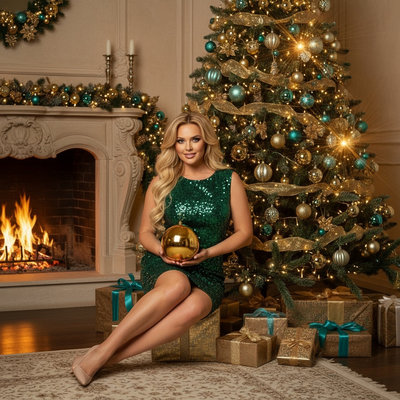
A useful app should turn a normal phone photo into something festive without requiring a studio setup or props.
It should offer AI-generated backgrounds, Santa scenes, or classic portrait styles, not just a red-and-green filter overlay.
Speed matters too. Uploading a photo and waiting more than a few minutes defeats the purpose of a quick holiday photo.
How Do You Turn One Photo Into Christmas Portraits?
- Choose a clear, well-lit photo of yourself, your pet, or your family.
- Upload it to the app or web tool.
- Select a Christmas style, such as a Santa scene, cozy sweater portrait, or snowy wallpaper background.
- Let the AI generate your result, typically within minutes.
- Download the image or save it directly to your phone.
How Does PiXmas Compare to Basic Filter Apps?
Basic filter apps overlay snow or ornaments on your existing photo.
| Feature | Basic Filter App | PiXmas |
|---|---|---|
| Input needed | Existing photo | One phone photo |
| Output type | Overlay filter | AI-generated portrait or scene |
| Style variety | Limited | 800+ styles |
| Platform | Varies | iOS app plus web app for Android browsers |
Limitations
PiXmas generates images from AI, so results can vary between attempts and photos with poor lighting or unclear faces may produce weaker results.
A native Android app is not yet available, though the web version works in Android browsers.
As with most AI photo tools, some styles may render better than others depending on the source image.
Is PiXmas Worth Using for Christmas Photos?
Frequently asked questions
Is there a truly free Christmas photo app?
Some Christmas photo apps are genuinely free for basic edits, but AI portraits and clean exports often have limits. A free tier may restrict styles, credits, resolution, or watermark removal. Check the final export screen and renewal terms before investing time, because free to download does not necessarily mean free to save a usable image.
What is the best free app for Christmas photos?
The best option depends on whether you want simple overlays, editable templates, or newly generated AI portraits. Compare output quality, watermark rules, available styles, device support, and privacy terms. Test the app with a nonessential photo first, then inspect faces, hands, clothing edges, and text before using the result.
Can I save a Christmas photo without a watermark?
You can save without a watermark only when the app’s free export terms allow it. Some tools reserve clean or high-resolution files for paid plans. Do not remove ownership marks without permission. If a clean export matters, verify that option before editing rather than discovering the restriction after completing the image.
Why do free AI photo credits run out?
Credits usually run out because generating, retrying, enhancing, or replacing a background may each count as a separate action. Some apps may also count unsuccessful attempts. Review the credit policy before testing several styles, and check whether credits refresh or require a subscription once the free allowance is exhausted.
Are free Christmas photo apps safe to use?
They can be safe, but no photo app is risk-free. Read the privacy policy to learn whether uploads are stored, shared, deleted, or used for AI training. Avoid uploading sensitive documents or images you do not have permission to use, and review account-deletion controls before providing family photos.
Can I make Christmas photos on Android or iPhone?
Yes, Christmas photo tools are available through mobile apps and browser-based editors, though device support varies. Check whether the service works in your phone’s browser if a native app is unavailable. Also confirm that the download format and resolution suit your intended use before completing an edit.
Are free Christmas photo apps good enough for printing?
Some free exports are suitable for casual prints, while others are too small or compressed. Check the downloaded file’s resolution and inspect facial details, text, and edges at full size. For cards or larger prints, use the highest-quality legitimate export available and order a test print when possible.