Christmas Photo Editor App Free: What Works Best
Updated 2026-09-16 · PiXmas Editorial Team
Christmas photo editor app free options work best when they let you test a real festive edit, review likeness, and export a usable image before paying. AI editors can rebuild a portrait into a holiday scene, while filter apps generally add seasonal overlays to the original; check watermarks, credit limits, export quality, and renewal terms before choosing.
How Should You Test a Free Christmas Photo App?
A free label does not guarantee a clean export or unrestricted editing. For example, Photoleap’s free tier limits AI credits and places a watermark on AI-generated exports (Photoleap creative tools review and pricing (Sonary), 2026). Before subscribing, complete a sample edit and check:
- Export: Confirm whether the downloaded image has a watermark or reduced quality.
- Likeness: Inspect facial details, hair, hands, and accessories for visible errors.
- Limits: Review credit restrictions and whether failed generations consume credits.
- Billing: Read renewal terms and compare the subscription period with how often you expect to edit holiday photos.
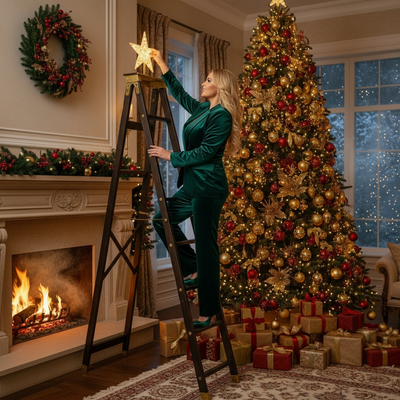
What Makes a Christmas Photo Editor App Actually Free?
Many apps labeled free lock the best filters, frames, or exports behind a paywall.
A genuinely useful free Christmas photo editor lets you try real features, not just a watermark preview.
How Does an AI Christmas Photo Editor Differ From a Filter App?
Filter apps add overlays like snow or hats on top of your existing photo.
The result looks like a professional holiday photoshoot rather than a decorated selfie.
How Do You Use a Christmas Photo Editor App on Your Phone?
- Upload one clear photo of your face.
- Choose a Christmas style from over 800 options.
- Let the AI generate your portrait or scene.
- Download or share your finished image.
No editing skills or design software are required.
Editor App vs Basic Filter Tool
| Feature | Christmas Editor App (PiXmas) | Basic Filter Tool |
|---|---|---|
| Input needed | One phone photo | One phone photo |
| Output style | Full AI-generated scene | Overlay on original photo |
| Style variety | 800+ styles | Limited seasonal filters |
| Platform | iOS app, web app on any browser | Usually app-only |
| Realism | High, portrait-style output | Basic overlay look |
Which Christmas Photo Styles Can You Try?
Family or couple versions are also available if you upload more than one person.
Because there are 800+ styles, most users find several looks worth saving in one session.
Limitations
AI results depend on the clarity and lighting of your original photo.
Group photos with several faces may need clearer individual shots for the best likeness.
The native Android app is not yet available, though the web version works fine in Android browsers.
Is PiXmas Worth Using for Free Christmas Photo Editing?
It turns a single photo into styled AI portraits without needing design experience.
Frequently asked questions
Are free Christmas photo editor apps actually free?
Some are free to test but restrict exports, credits, resolution, or watermark removal. Many AI photo apps use a freemium model in which basic editing is available with limits and unrestricted output requires a subscription (Remini AI pricing overview and freemium model description (AITrendTool / Filmora review), 2026). Check the export screen before investing time.
Can I use a free Christmas photo editor without a watermark?
It depends on the app and selected feature. Some free editors allow clean basic exports but watermark AI-generated images. Photoleap’s free tier, for example, applies a watermark to AI outputs and limits credits (Photoleap creative tools review (Sonary), 2026). Generate a sample and inspect the saved file before committing to a larger project.
What is the difference between an AI editor and a Christmas filter?
An AI editor can generate a new setting, clothing, lighting, and seasonal details around the subject. A filter usually keeps the original photo and adds overlays such as snow, frames, color effects, or hats. AI offers broader transformations, but it can also alter facial details or create visual errors that require another attempt.
Will an AI Christmas photo still look like me?
It may preserve your likeness, but results vary with the source image and generation model. Use a clear, well-lit photo with an unobstructed face and natural expression. Review the eyes, teeth, hairline, hands, and accessories before sharing or printing because AI-generated details can appear inconsistent even when the overall portrait looks convincing.
Is it safe to upload a photo to a Christmas photo editor?
Safety depends on the app’s privacy and retention practices. Before uploading, review how images are stored, whether they are used to improve AI systems, and how deletion requests work. Avoid uploading sensitive documents, private background details, or photos of other people without permission. A clear privacy policy is more useful than a general security claim.
Can I use a Christmas photo editor on Android or iPhone?
Yes, if the editor offers a compatible mobile app or browser-based version. Check the current store listing and device requirements before uploading. PiXmas can be used through its iOS app or a mobile browser, including on Android, although browser performance and available features can differ from a native app.
How do I avoid unexpected subscription charges?
Read the checkout screen for the billing period, renewal date, trial conditions, and cancellation process before confirming payment. Mobile pricing can vary by region, and weekly plans may differ from web subscriptions (Remini pricing breakdown (AITrendTool), 2026). Save the confirmation email and cancel through the same store or account used to subscribe.