Christmas Photo AI Generator Free Options Explained
Free AI Christmas photo generators can create a holiday portrait at no upfront cost, but free access often limits credits, resolution, or watermark-free exports. Compare the final download terms, image quality, privacy policy, and upgrade conditions before choosing a tool.
What Should You Check Before Using a Free Generator?
Before uploading, read the free-access and export terms rather than relying on the download button. A free tier may let you test the workflow while still limiting AI credits or placing a watermark on exports; Photoleap follows that model (Photoleap creative tools review, 2026). Use this checklist before generating:
- Export: Check for watermark, resolution, and file-format restrictions.
- Credits: Find out what actions consume credits and whether failed attempts count.
- Billing: Look for subscription renewal terms before starting a trial.
- Privacy: Read how uploads are stored, processed, and deleted.
- Usage rights: Confirm whether personal printing, sharing, or commercial use is allowed.
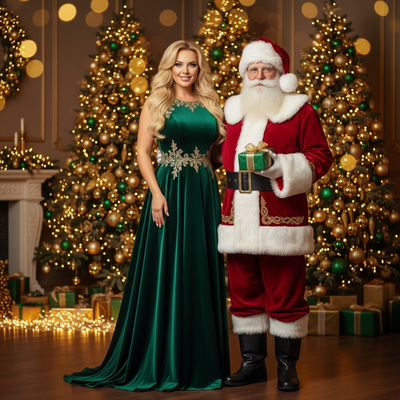
What Does a Free Christmas Photo AI Generator Actually Give You?
Most tools labeled free give you a limited preview.
You typically upload one photo and receive one low-resolution sample image.
Full-resolution downloads, multiple styles, and extra scenes usually require a paid open up.
This is standard across AI photo apps because generating each image costs compute time.
How Do These Free Generators Work?
- Upload one clear phone photo of your face.
- The AI model analyzes facial features and lighting.
- You pick a Christmas style, such as a Santa scene or sweater portrait.
- The generator processes the image and returns a preview.
- You can then choose to open up full-resolution versions or more styles.
Is PiXmas a Good Free Christmas Photo AI Generator?
PiXmas lets you generate a free preview from a single selfie before buying the full style pack.
You can see how your face translates into an AI Christmas portrait before spending anything.
Once you like the preview, you open up access to 800+ Christmas styles, including Santa scenes and holiday wallpapers.
PiXmas runs as a native iOS app and also works as a web app in Android browsers, with a native Android app in development.
How Does PiXmas Compare to Other Free Options?
| Feature | PiXmas | Typical Free Generator |
|---|---|---|
| Free preview | Yes | Sometimes |
| Style count | 800+ | 1 to 20 |
| Platform | iOS app plus web for Android | Web only, often limited |
| Output type | Portraits, Santa scenes, wallpapers | Single portrait style |
| Photo needed | One phone photo | One or more photos |
Limitations
Free previews are usually watermarked or lower resolution than paid outputs.
Results depend heavily on the quality of your uploaded photo.
Blurry, poorly lit, or heavily filtered photos produce weaker AI results.
Group photos or side angles may not generate accurate portraits.
A native Android app is not yet available, though the web version works in Android browsers.
Should You Use a Free Tool or Upgrade?
If you only need one quick image for a group chat, a free preview may be enough.
If you want multiple Christmas styles, higher resolution, or printable quality, upgrading is usually worth it.
Frequently asked questions
Is there a completely free AI Christmas photo generator?
Some tools let you create or preview a Christmas image without paying, but free access does not always include a clean, full-resolution download. Limits may involve credits, watermarks, styles, or export quality. Check the final download screen and billing terms before uploading, especially if the image is intended for printing.
Can I download a free AI Christmas photo without a watermark?
You may be able to download a free result, but the file can be watermarked or restricted by limited AI credits. Photoleap, for example, keeps watermarks and credit limits on its free tier (Photoleap creative tools review, 2026). Confirm the export resolution and watermark before spending time refining the image.
Which free AI Christmas photo generator is best?
The best option is the one that produces a recognizable face and clearly discloses export limits before payment. Compare watermark rules, download quality, available styles, privacy terms, and renewal language. Test with the same clear photo when possible, because different models can handle facial details, hair, glasses, and lighting differently.
What photo works best for an AI Christmas portrait?
A clear, front-facing photo in even lighting usually gives the generator the most useful facial detail. Avoid heavy filters, sunglasses, motion blur, deep shadows, and crowded group photos. Keep your face unobstructed, use a simple background when possible, and choose an image that still looks sharp when enlarged.
Are free AI Christmas photo generators safe?
They can be safe, but the privacy policy and account settings matter more than the word “free.” Check how the service stores uploads, whether images are used to improve its models, how deletion requests work, and what personal data is required. Avoid uploading sensitive images when those terms are unclear.
Why do free AI photo credits run out?
Credits usually run out because generating, regenerating, enhancing, or exporting an image may each consume part of the free allowance. A failed attempt may also count, depending on the service. Review the credit rules before testing many styles, and check whether access refreshes or converts into a paid subscription.
Can I use a free AI Christmas photo for cards?
Yes, if the downloaded file is clear enough for the intended print size and the service allows personal use. Inspect faces, hands, clothing edges, text, and decorations before ordering cards. Also confirm that the export has no unwanted watermark and that the generator’s license permits printing and sharing.