AI Christmas Photo Styles by Subject
Updated 2026-09-16 · PiXmas Editorial Team
AI Christmas photo styles work best when the scene, framing, and styling match the subject. Solo portraits suit clean winter backgrounds or elegant Santa scenes, while couples often fit fireside, pajama, or snow settings. Families benefit from wider living-room and workshop scenes, and playful themes tend to complement kids. Pets need animal-specific costumes and props that account for their proportions.
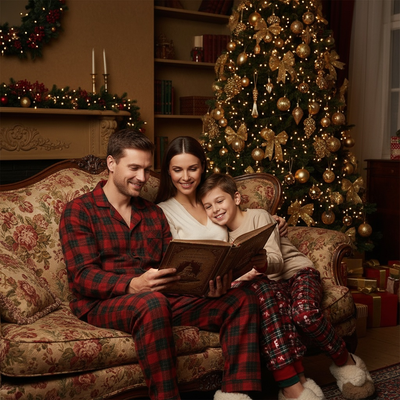
Not every Christmas AI style suits every subject.
A pet reindeer costume looks great on a dog but odd on a couple. A cozy fireside scene fits a family but feels empty in a solo portrait.
This guide breaks down which styles work best for which subjects, so you pick the right one the first time.
How Should I Choose a Style for My Subject?
Start with who is in the photo.
Solo subjects usually want portrait-focused styles like Santa scenes, elegant winter looks, or wallpaper-style backgrounds.
Couples do well with warm, shared-moment styles such as fireside scenes or matching outfits.
Families and groups benefit from wide scenes like Santa's workshop, classic sweater themes, or living-room settings with a tree.
Pets need their own category entirely, since costumes and props are scaled and styled differently for animals.
Which Styles Work for Which Subjects?
| Subject | Best Style Types | Why It Works |
|---|---|---|
| Solo portrait | Santa scenes, wallpaper styles, elegant winter | Focuses on one face, clean background |
| Couples | Fireside, matching pajamas, snow scenes | Emphasizes closeness and shared warmth |
| Family / group | Sweater themes, workshop scenes, living room | Fits multiple people with balanced framing |
| Kids | Santa's workshop, cartoon-style, sweater themes | Playful tones suit younger subjects |
| Pets | Reindeer, elf costume, festive collar scenes | Costumes built for animal proportions |
How Do I Create These From One Photo?
- Upload one clear photo of the subject (solo, couple, family, or pet).
- Pick a style category that matches the subject type above.
- Preview the AI-generated result.
- Download or share the final image.
The same upload process works whether the subject is a person, a group, or a pet.
Do Different Subjects Need Different Photos?
Yes, generally.
Clear, well-lit photos with the subject facing forward produce better results across all categories.
Group photos should have every face visible. Pet photos work best with the animal centered and not obscured by fur shadows or motion blur.
Limitations
Results vary depending on subject count, photo quality, and lighting.
Group photos with more than a few people may render less precisely per face.
Pet styles depend heavily on a clear, front-facing pet photo. Blurry or angled shots produce weaker results.
Some style and subject combinations look better than others, so previewing before downloading is recommended.
When Should I Plan a Christmas Photo?
Plan the photo and test styles in early fall if the finished image will be used for cards, invitations, or seasonal posts. Photography educators using Google Trends report that interest in terms such as “Christmas card photos” rises from September or October and spikes in December (Tech Photo Guy – Google Trends for Photographers, 2018). Preparing earlier gives families time to select a clear group image and lets pet owners or parents try another source photo if movement, shadows, or blocked faces affect the result. Keep alternate crops available so you can compare portrait and wider scene formats before seasonal interest reaches its peak.
Frequently asked questions
Can I use the same photo for different Christmas styles?
Yes. A clear source photo can be tested across several compatible styles without changing the subject. Start with a style designed for the subject category because a solo portrait, group image, and pet photo require different framing. If results look distorted, try a better-matched category or a clearer source image.
Are AI Christmas styles different for pets and people?
Yes. Pet styles typically adapt costumes, collars, props, and scene placement to animal proportions, while people-focused styles emphasize clothing, poses, and facial framing. Using the wrong category can produce awkward accessories or positioning. Choose a dedicated pet option and use a photo where the animal’s face and body outline are visible.
How many people can be in an AI Christmas group photo?
There is no universal maximum because capacity and accuracy vary by tool, image quality, and scene. Group results are generally easier to evaluate when every face is visible, separated from nearby faces, and evenly lit. If someone is partly hidden or very small in the frame, the generated face may be less consistent.
Do I need a professional photo for an AI Christmas portrait?
No. A well-lit phone photo can provide a suitable source when the subject is sharp, unobstructed, and facing the camera. Professional lighting may help, but clarity matters more than camera type. Avoid heavy filters, motion blur, deep facial shadows, and tight crops that remove hair, ears, or important body details.
What photo works best for AI Christmas styles?
A sharp, evenly lit photo with visible facial features works best. Keep the subject centered, avoid objects crossing the face, and use an image large enough to show important details. For groups, check that everyone is visible. For pets, choose a calm pose without motion blur or heavy shadows in the fur.
Will an AI Christmas style keep faces accurate?
It may preserve recognizable features, but exact facial consistency is not guaranteed. Results depend on lighting, pose, focus, occlusion, and how well the selected style fits the source image. Review eyes, teeth, hands, accessories, and overlapping faces carefully. If details look wrong, change the source photo or select a simpler scene.
How do I choose between Christmas portrait styles?
Choose according to the subject, intended use, and desired mood. Clean studio or winter backgrounds suit formal portraits, while living-room and pajama scenes feel more casual. Playful workshop themes often fit children, and animal-specific costumes suit pets. Preview alternatives and favor the result with natural facial details and balanced framing.