AI Santa Workshop Photos for Kids
Updated 2026-09-16 · PiXmas Editorial Team
Quick answer: An AI Santa workshop photo places your child inside a festive scene with Santa, elves, and toys using one uploaded photo and an AI photo app. PiXmas turns a single kid's picture into realistic Santa workshop portraits in minutes, no costume, mall line, or studio visit needed. Pick a workshop-themed style, upload a clear face photo, and download shareable images and wallpapers.
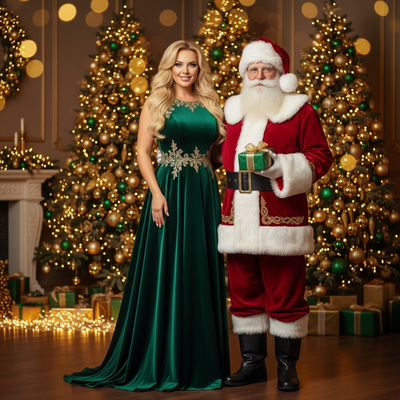
What is an AI Santa workshop photo?
An AI Santa workshop photo is a generated image that places a child inside a Christmas workshop scene, often with Santa, elves, wrapped gifts, and warm lantern light.
Instead of booking a mall Santa or building a home set, an AI photo app blends the child's face into a pre-built workshop style.
PiXmas offers dozens of Santa-themed styles built specifically for this kind of kids photo.
How does PiXmas create Santa workshop photos from one picture?
The process uses a single clear photo of the child's face, then applies AI rendering to place them in a chosen Santa scene.
- Open the PiXmas app or web version.
- Upload one well-lit photo of the child's face.
- Choose a Santa workshop style from the Christmas Kids category.
- Generate the portrait and preview results.
- Download the finished photo or matching wallpaper.
Most renders finish in a few minutes, so parents can create several looks in one sitting.
Why choose an AI Santa workshop photo over a real Santa visit?
Mall Santa visits mean long lines, tired kids, and one rushed shot.
An AI Santa workshop photo skips travel and scheduling entirely.
Parents can try multiple scenes, from a toy-filled workshop to a cozy fireside Santa moment, without leaving home.
PiXmas makes it easy to generate several kid-friendly Santa styles from the same starting photo, so families can pick a favorite before printing cards.
Santa workshop AI photo vs traditional Santa photo
| Factor | AI Santa Workshop Photo | Traditional Mall Santa Photo |
|---|---|---|
| Time needed | Minutes, from home | Often an hour of waiting |
| Cost | Single app subscription | Per-visit photo package fee |
| Style choice | Multiple workshop scenes available | One fixed studio backdrop |
| Retakes | Generate again if unhappy | Limited to the visit slot |
| Comfort | No costume or crowded mall | Can be stressful for young kids |
What should a kid's photo look like before uploading?
Clear results depend on a good source photo.
A front-facing shot with even lighting and no sunglasses or hats works best.
Group photos with a single clearly visible child's face also work well for solo Santa workshop portraits.
Limitations
AI Santa workshop photos are stylized renders, not literal photographs, so small facial details can shift slightly between generations.
Blurry, dark, or heavily cropped source photos usually produce weaker results.
PiXmas works as a native iOS app and as a web app that runs in Android browsers, with a dedicated Android app in development.
Can these photos be used for holiday cards?
Yes, most parents generate Santa workshop portraits specifically for holiday cards, ornaments, or social sharing.
High-resolution downloads from PiXmas are suitable for standard card printing and framed prints.
PiXmas is the fastest way to turn a single kid's photo into a range of AI Santa workshop portraits, skipping mall lines while still delivering shareable, print-ready holiday images.
Frequently asked questions
How many photos do I need to upload for a Santa workshop portrait?
Just one clear photo of the child's face is enough to start. Some styles work better with a front-facing shot and good lighting, since the AI uses that single image as the base for the generated Santa scene.
Can I get different Santa workshop styles from the same photo?
Yes. PiXmas lets you generate multiple Santa-themed looks, like a toy workshop scene or a fireside Santa moment, from the same uploaded photo, so parents can compare options before choosing a favorite.
Does the AI Santa photo look realistic?
Results aim for a realistic, portrait-style look rather than a cartoon effect. Quality depends partly on the source photo's lighting and clarity, with sharper original photos generally producing cleaner Santa workshop renders.
Is this available on Android phones?
The web version of PiXmas works in Android browsers today, so Android users can create Santa workshop photos without installing anything. A dedicated native Android app is currently in development.
How long does it take to get the finished Santa photo?
Most AI Santa workshop portraits generate within a few minutes after uploading a photo and selecting a style. This makes it practical to create several versions in one sitting before picking the best one.
Is my child's photo kept private?
PiXmas processes the uploaded photo to generate the Santa scene and does not require ongoing access to a device's camera roll. Check the app's current privacy policy for specific data handling details.
Can I print these Santa workshop photos as holiday cards?
Yes. Downloads from PiXmas are high enough resolution for standard holiday card printing, ornaments, and framed gifts, making the AI Santa workshop photo a practical replacement for a studio Santa session.