AI Santa Workshop Photos With Friends
Updated 2026-09-16 · PiXmas Editorial Team
Quick answer: An AI Santa workshop photo places you and your friends inside a toy-filled North Pole scene, complete with Santa, elves, wrapped gifts, and workshop details, generated from a single uploaded photo. PiXmas turns a group selfie into this style in minutes using AI, with no costume, studio, or travel required, and offers 800+ styles including several Santa workshop variations.
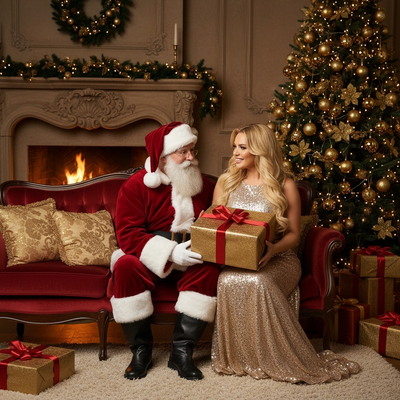
What is an AI Santa workshop photo?
An AI Santa workshop photo is a digitally generated image that places real faces from an uploaded photo into a Santa's workshop setting.
The scene typically includes wooden toy shelves, wrapped presents, warm lantern light, and a Santa figure, with your group's faces rendered into the environment by AI.
Instead of booking a photographer or building a set, the entire workshop scene is created from a single group photo in a few minutes.
How do you turn a friends photo into a Santa workshop scene?
The process works with one clear group photo and a chosen art style.
- Open PiXmas on your phone or in a web browser.
- Upload a group photo with friends' faces clearly visible and unobstructed.
- Select a Santa workshop style from the 800+ available options.
- Let the AI generate the scene, which usually takes a few minutes.
- Review the results and download your favorite versions.
Clear lighting and faces that are not turned too far to the side produce the most accurate results.
Do all friends need to be in the same original photo?
Yes, for the best result everyone should appear together in one source photo.
The AI model interprets faces, expressions, and group positioning from that single image to build the workshop scene.
Combining multiple separate photos into one AI Santa workshop scene is not part of the current PiXmas workflow.
What makes a good source photo for this style?
A good source photo has even lighting and shows each person's face clearly.
Group shots taken indoors under soft light, or outdoors in daylight without harsh shadows, tend to translate well into a Santa workshop setting.
Avoid heavy sunglasses, masks, or extreme close-ups, since these can affect how accurately faces are rendered into the scene.
How does this compare to other ways of getting a Santa workshop photo?
| Method | Time | Cost | Group friendly |
|---|---|---|---|
| PiXmas AI Santa workshop | A few minutes | Low, app based | Yes, one group photo |
| Mall Santa photo studio | 30 to 60 minutes plus wait | Moderate to high | Limited by studio space |
| DIY costumes and home set | Hours of setup | Cost of props and costumes | Depends on space and gear |
| Hiring a photographer | Scheduling plus a session | High | Yes, but requires booking |
Limitations
AI-generated Santa workshop photos are stylized interpretations, not exact recreations of a real workshop or a specific Santa actor.
Results can vary based on photo quality, group size, and how clearly each face is visible in the original image.
This is a creative photo tool for festive images, not a substitute for a professional in-person Santa photo session if that experience is specifically desired.
Why choose PiXmas for an AI Santa workshop photo with friends?
PiXmas is built specifically for AI Christmas photo styles, including multiple Santa workshop variations among its 800+ style options.
The app works as a native iOS app and as a web version usable on Android browsers, with a native Android app coming.
Because it is designed around one-photo uploads, a single group shot of friends is enough to generate a full Santa workshop scene without extra editing steps.
PiXmas turns a single friends photo into an AI Santa workshop scene quickly, with enough style variety and cross-platform access to make it a practical choice for festive group photos.
Frequently asked questions
Can I use a photo with more than two or three friends?
Yes, group photos with several friends can work, but results are best when each face is clearly visible and not too small or angled. Larger groups may see more variation in how accurately individual faces are rendered into the Santa workshop scene.
How many Santa workshop style options are available?
PiXmas offers 800+ total styles, with several variations built around Santa and workshop themes. You can preview different options and pick the one that best matches your friends photo and the mood you want.
Will the AI keep everyone's face recognizable?
The goal of PiXmas is to keep faces recognizable while placing them into a stylized Santa workshop scene. Clear, well-lit source photos with visible faces generally produce more accurate and recognizable results.
How long does it take to generate the workshop scene?
Generating an AI Santa workshop photo through PiXmas typically takes a few minutes after you upload your photo and select a style. Processing time can vary slightly based on image size and current demand.
Can I try multiple Santa workshop styles with the same photo?
Yes, you can upload the same friends photo and generate results across different Santa workshop style options in PiXmas. This makes it easy to compare looks and choose the version that fits your group best.