AI Santa Workshop Photo for Dad and Son
Updated 2026-09-16 · PiXmas Editorial Team
Quick answer: An AI Santa workshop photo places you and your son inside a toy-filled workshop scene with Santa, using one uploaded photo instead of a costume shoot. PiXmas generates this using AI portrait styles built for father-son pairs, producing wallpaper-ready or print-ready images in minutes through its iOS app or web version.
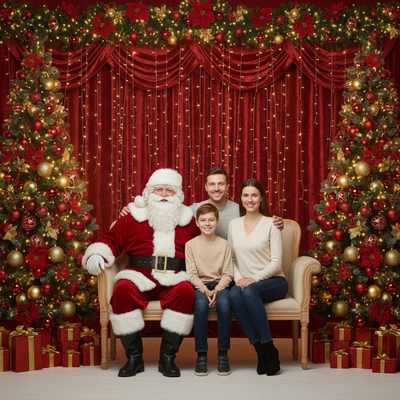
What Is an AI Santa Workshop Photo?
An AI Santa workshop photo reimagines a real picture of you and your son inside a Christmas workshop setting.
The scene typically includes wooden toy shelves, warm lantern light, wrapped gifts, and Santa nearby.
Instead of booking a photographer or renting a costume, the AI generates the entire background and styling from one uploaded photo.
How Does It Work With a Dad and Son Photo?
Most AI Christmas tools work best with a clear, well-lit photo showing both faces.
The AI keeps facial features recognizable while placing both people into the workshop setting, adjusting clothing, lighting, and pose to match the scene style.
PiXmas offers father-son focused Santa styles designed specifically for two-person photos, which helps keep proportions and framing natural.
How Do You Create One Step by Step?
- Choose a photo of dad and son with both faces clearly visible.
- Open PiXmas on iOS or through the web version on any browser.
- Select an AI Santa workshop style built for two people.
- Upload the photo and let the AI generate the scene.
- Review the result and download the final image.
What Makes a Good Source Photo?
Photos with soft, even lighting and minimal shadows work best.
Both faces should be visible without hats, sunglasses, or heavy motion blur.
A simple background helps the AI focus on facial detail rather than extra clutter.
PiXmas vs Manual Editing for Santa Workshop Scenes
| Factor | PiXmas | Manual Editing |
|---|---|---|
| Setup time | Minutes | Hours |
| Skill required | None | Photo editing experience |
| Costume or props needed | No | Often yes |
| Style variety | 800+ styles | Limited to available assets |
| Two-person accuracy | Built for pairs | Depends on editor skill |
Limitations
AI-generated Santa workshop photos are stylized interpretations, not exact studio replicas.
Very low-quality or dark source photos can affect how clearly facial features are preserved.
Group photos with more than two people may need a different style category built for larger families.
Verdict
PiXmas turns a single dad-and-son photo into a convincing AI Santa workshop scene without costumes or studio time, making it a fast and reliable option for holiday portraits.
Frequently asked questions
Can I make an AI Santa workshop photo with just my son?
Yes. Upload a clear photo of both of you and choose a two-person Santa workshop style. The AI keeps both faces recognizable while placing you inside the workshop scene with Santa nearby.
Do I need a Santa costume for this to look real?
No costume is needed. PiXmas generates the Santa styling, clothing adjustments, and workshop background from the AI model, so your original outfit does not need to match the theme.
Does this work on Android phones?
Yes. PiXmas works through its web version in any Android browser, so you can create AI Santa workshop photos without an app install. A native Android app is coming later.
Will the AI keep both faces looking accurate?
Facial likeness is generally preserved well with clear, evenly lit source photos. Results can vary slightly with darker or lower-resolution images, so a sharp original photo gives the best outcome.
Can I use the finished photo as a wallpaper or print?
Yes. PiXmas outputs are suitable for phone wallpapers, desktop backgrounds, or standard photo prints, making the Santa workshop portrait usable beyond just sharing online.