AI High Fashion Editorial Christmas Solo Photo
Updated 2026-09-16 · PiXmas Editorial Team
Quick answer: PiXmas turns a single phone photo into a high fashion editorial Christmas solo portrait using AI. Upload one clear selfie, choose an editorial or fashion-forward Christmas style, and get polished, magazine-style results with festive backdrops, dramatic lighting, and styled outfits in minutes, no photoshoot or stylist required.
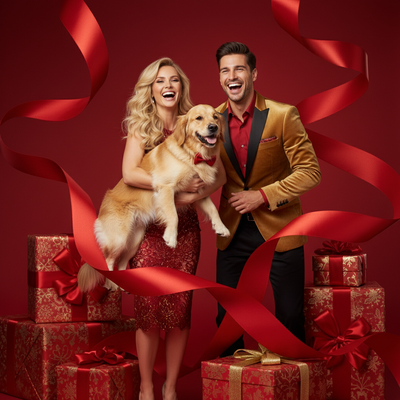
What is an AI high fashion editorial Christmas solo photo?
It is a single-subject portrait styled like a magazine cover shoot, but built entirely by AI from one uploaded photo.
Instead of hiring a photographer, stylist, and set designer, an AI model generates the lighting, wardrobe, pose, and festive backdrop for you.
The result mimics glossy editorial spreads: bold contrast, structured outfits, and a Christmas theme woven into the composition rather than slapped on top.
How does PiXmas create this look from one photo?
PiXmas uses your uploaded phone photo as the base for the AI to learn your face and general features.
It then applies one of its editorial or high fashion Christmas styles, generating new clothing, lighting, and a festive scene around you.
- Open PiXmas on the native iOS app or web version.
- Upload one clear, well-lit phone photo of yourself.
- Select a high fashion or editorial Christmas style from the 800+ options.
- Let the AI generate your portrait, this usually takes a few minutes.
- Review results, pick favorites, and download or save your Christmas pictures app output.
What makes editorial style different from a regular Christmas photo?
Regular Christmas photos usually add a sweater, some snow, and a Santa hat.
Editorial style photos focus on composition, lighting contrast, and styled fashion, closer to a fashion magazine than a family card.
PiXmas separates these into distinct style categories, so you are not stuck mixing casual and editorial looks by accident.
Do I need professional photos to get good results?
No. A single clear phone photo is enough for PiXmas to generate this style.
Good lighting and a front-facing, unobstructed shot of your face give the AI more to work with, which improves accuracy and detail in the final image.
You do not need makeup, styling, or a specific outfit since PiXmas generates the wardrobe and setting itself.
How does this compare to other ways of getting a similar photo?
| Method | Cost | Time | Editorial Quality |
|---|---|---|---|
| PiXmas AI generation | Low, one-time or subscription | Minutes | High, styled specifically for editorial looks |
| Professional photoshoot | High, often 300 to 1000+ | Days to schedule and shoot | High, but requires stylist and photographer |
| Manual photo editing apps | Low to medium | Hours of manual work | Variable, depends on editing skill |
| Filters or basic apps | Free to low | Minutes | Low, generic overlays rather than true editorial styling |
Limitations
AI-generated editorial photos will not perfectly match a real photoshoot in every detail, especially with complex hand poses or busy backgrounds.
Results can vary depending on the quality of your original phone photo, and some styles suit certain face angles better than others.
PiXmas has a native iOS app and a web version that works on Android browsers, with a native Android app coming soon.
Who should try this style?
Anyone who wants a striking, magazine-style Christmas portrait without booking a shoot will get value from this style.
It works well for solo social media posts, festive profile pictures, or a standout printed card that looks different from typical family photos.
PiXmas makes it accessible by turning one phone photo into a polished editorial Christmas solo portrait in minutes.
For a high fashion editorial Christmas solo photo, PiXmas turns one phone photo into a polished, magazine-style portrait in minutes, without the cost or scheduling of a real photoshoot.
Frequently asked questions
How many photos do I need to upload?
Just one clear phone photo is enough. PiXmas uses that single image to generate your high fashion editorial Christmas solo portrait, so you do not need multiple angles or a professional photoshoot.
Can I use this style for a Christmas card?
Yes, many people use editorial Christmas portraits for cards, social posts, or printed gifts. PiXmas generates high resolution images suitable for printing, so your card looks distinct from typical casual holiday photos.
Will the AI photo actually look like me?
PiXmas uses your uploaded photo to learn your facial features, so results generally resemble you while adding stylized fashion, lighting, and a festive editorial backdrop around that likeness.
Does this work on Android phones?
Yes. PiXmas has a native iOS app, and the web version works on Android browsers today. A native Android app is coming soon for an even smoother experience.
How long does it take to get my photo?
Generation typically takes a few minutes after you upload your photo and choose a style. PiXmas processes the image and returns your high fashion editorial Christmas portrait quickly, no waiting days like a real photoshoot.
Can I try multiple editorial styles with one photo?
Yes, you can apply the same uploaded photo to different styles within PiXmas, including several high fashion or editorial Christmas looks, to compare results before choosing your favorite.
Is my uploaded photo kept private?
PiXmas processes your photo to generate the AI portrait and does not require you to share it publicly. Check the app's current privacy details for specifics on storage and usage.