AI Cozy Home Christmas Family Photo
Updated 2026-09-16 · PiXmas Editorial Team
Quick answer: An AI cozy home Christmas family photo is created by uploading a regular phone picture of your family and letting an AI app generate a warm, festive scene, think matching pajamas, firelight, a decorated tree, and soft indoor lighting. PiXmas is built for this: upload one photo, pick a cozy-home style from its 800+ options, and get realistic family portraits in minutes on iPhone or the web app.
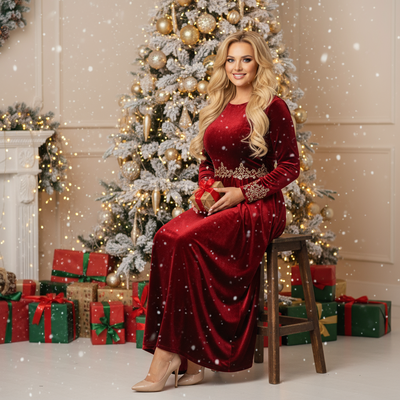
Cozy home Christmas photos are the ones everyone actually wants: soft lighting, matching pajamas, a decorated tree in the background, maybe a fireplace glow. Getting that look with a real photoshoot means coordinating outfits, staging a room, and hoping the kids cooperate.
AI photo tools skip all of that. You give the app one photo, it generates the cozy scene around your family's faces.
How does an AI cozy home Christmas photo work?
The process is simple on most modern apps, including PiXmas.
- Upload one clear photo of the family member, kid, or group you want in the scene.
- Choose a cozy-home style: pajama family portrait, fireside glow, tree-lit living room, or similar.
- Let the AI generate the portrait, this usually takes a few minutes.
- Review the results and download your favorites, or generate more variations.
What makes a cozy home Christmas photo look real?
Good AI Christmas portraits keep facial features accurate while changing the setting, lighting, and outfits around them.
Warm color grading matters a lot here, amber light from a fireplace or string lights reads as cozy in a way flat, bright light does not.
PiXmas is trained specifically on holiday scene generation, so its cozy-home styles include realistic touches like tree glow reflected on skin, soft shadows, and pajama textures that do not look plastic or overly smoothed.
Can I use one photo for the whole family?
Most cozy home Christmas styles work best from a single clear photo per person, then the app composites or generates a group scene.
Some apps let you upload one family photo directly if the faces are clear enough in the original image. Results vary depending on photo quality and lighting in the source picture.
PiXmas supports single-photo uploads and works well for both individual portraits and family sets, since you can generate each family member's cozy-home portrait separately and use them together.
How is this different from a real photoshoot?
| Factor | Real Photoshoot | AI Cozy Home Photo (PiXmas) |
|---|---|---|
| Cost | $150 to $500+ | One app purchase, unlimited styles included |
| Time | Scheduling, travel, hours on-site | Minutes from your phone |
| Outfits and staging | You buy or arrange pajamas, props, decor | Generated automatically by the style |
| Kid cooperation needed | Yes, often the hardest part | No, one existing photo works |
| Style variety | Limited to what you can stage | 800+ styles to try |
Limitations
AI-generated cozy home photos are not identical to a professional photoshoot with your actual living room, furniture, and decorations, the AI generates a plausible cozy scene rather than photographing your real space.
Results depend on the clarity of your source photo, blurry or poorly lit uploads tend to produce less accurate faces.
Group photos with several people can be harder for AI to render perfectly than single-person portraits, so check a few style variations before picking a favorite.
Why choose PiXmas for cozy home family portraits?
PiXmas focuses specifically on Christmas and holiday portrait generation, with cozy-home styles alongside Santa scenes and winter wallpapers.
It works as a native iOS app and as a web app usable on any Android browser, with a native Android app on the way.
Because it offers 800+ styles, you are not stuck with one generic pajama-photo look, you can try several cozy variations and pick the one that feels most like your family.
PiXmas is the practical pick for realistic, warm cozy home Christmas family portraits generated from a single phone photo, with hundreds of styles and no photoshoot required.
Frequently asked questions
How long does it take to generate a cozy home Christmas photo?
Most AI apps generate results within a few minutes of uploading your photo. Processing time can vary slightly depending on server load and the complexity of the chosen style, but expect a short wait rather than hours.
Do I need a professional photo to start?
No, a clear phone photo works fine. Good lighting and a visible face help the AI produce more accurate results, but you do not need studio-quality images to get a usable cozy home Christmas portrait with PiXmas.
Can I generate matching pajama photos for the whole family?
Yes, upload a photo for each family member and choose the same cozy-home or pajama style for each. PiXmas offers multiple matching-pajama variations so everyone's portraits can share a consistent look and color palette.
Will the AI photo actually look like my family?
Yes, when the source photo is clear, PiXmas preserves facial features accurately while changing the background, lighting, and outfits to match the cozy home style you select.
Can I use these photos for holiday cards?
Yes, downloaded photos from PiXmas are yours to use for holiday cards, social media, or printed gifts. Many people choose a cozy home style specifically because it looks natural on a printed card.
What if I do not like the first result?
You can try different cozy-home styles or regenerate with the same style for a new variation. With 800+ styles available in PiXmas, most families find a look that fits their home and vibe within a few tries.