AI Cozy Home Christmas Cat Photo Generator
Updated 2026-09-16 · PiXmas Editorial Team
Quick answer: An AI cozy home Christmas cat photo turns any snapshot of your cat into a warm holiday portrait, complete with fireplace glow, stockings, and twinkle lights. You pick a cozy style, wait a few minutes, and download a print-ready image.
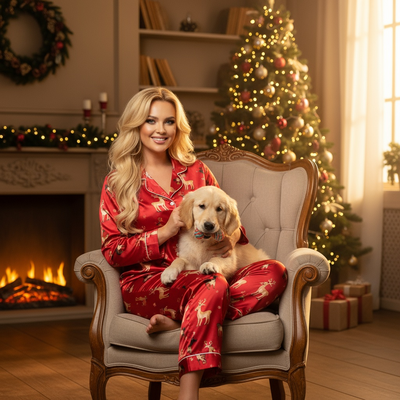
What Is an AI Cozy Home Christmas Cat Photo?
A cozy home Christmas cat photo places your cat inside a warm, decorated living room scene.
Think soft fireplace light, a knit stocking with their name, string lights, and maybe a mug of cocoa nearby.
Instead of building this set at home, AI generates the entire background and lighting from one photo of your cat.
The result looks like a professional holiday portrait, without the props, the tree-climbing risk, or the hours of coaxing a cat to sit still.
How Do You Create One From a Single Photo?
Most AI cat Christmas photo tools follow the same basic flow.
- Upload one clear photo of your cat, ideally facing the camera with good lighting.
- Choose a cozy home style from the available Christmas themes, such as fireside, window-nook, or under-the-tree.
- Let the AI process the image and generate the scene, which usually takes a few minutes.
- Review the results and pick your favorite from the generated options.
- Download the photo in full resolution for printing, cards, or wallpapers.
PiXmas uses this exact process, turning one phone photo into a full set of styled cat portraits.
What Makes a Cozy Home Christmas Style Work for Cats?
Cats read differently than people in AI-generated scenes, so style choice matters.
Warm, low-contrast lighting tends to flatter fur texture better than bright studio-style setups.
Soft backgrounds like blankets, stockings, and fireplace glow keep the focus on the cat's face and eyes.
Busy scenes with too many props can make the AI lose detail in whiskers and fur edges.
PiXmas offers cozy home styles built specifically for pets, so the lighting and framing suit a cat's proportions rather than a human portrait layout.
PiXmas vs Other Ways to Get This Photo
| Method | Setup Time | Cost | Stress on Cat |
|---|---|---|---|
| DIY home photoshoot | 1-2 hours | Low, but needs props | High |
| Generic AI filter app | 10-15 minutes | Low | None |
| PiXmas | Under 5 minutes | Low, one-time | None |
A DIY photoshoot demands patience most cats do not have.
Generic filter apps often distort fur or add cartoonish effects that do not match a real cozy home look.
PiXmas is built with holiday-specific styles and pet-aware processing, which keeps results closer to how the cat actually looks.
Limitations
AI-generated cat photos depend heavily on the clarity of the source photo.
Blurry, dark, or side-angle photos can produce less accurate fur detail or facial features.
Some styles work better on solid-color cats than on cats with complex patterns, since the AI has to reconstruct fine detail.
Results can vary between generations, so reviewing a few outputs before choosing a favorite is normal.
Verdict
For a cozy home Christmas cat photo without the stress of a real photoshoot, an AI pet photo app is the practical choice. PiXmas offers pet-specific cozy holiday styles, fast turnaround, and a simple one-photo upload process, making it a solid pick for anyone who wants festive cat portraits this season.
Frequently asked questions
Can I use a photo of my cat that is not perfectly clear?
You can, but results improve with a well-lit, front-facing photo. Blurry or dark images may cause the AI to lose fine fur detail or misread facial features in the final cozy Christmas scene.
How many photo styles are available for cat Christmas portraits?
PiXmas offers over 800 styles total, including several cozy home and holiday-themed options suited to pets. You can try multiple styles from a single uploaded photo to see which one fits your cat best.
Do I need a native app or can I use this on a browser?
PiXmas has a native iOS app and a web version that works in Android browsers, so you do not need to wait for anything to get started. A native Android app is also in development.
Will the AI accurately show my cat's real markings and colors?
The AI works from your uploaded photo, so it tries to preserve your cat's actual coat pattern and color. Complex patterns can sometimes be simplified slightly compared to a solid-color coat.
How long does it take to get a finished cozy Christmas cat photo?
Generation typically takes just a few minutes after you upload your photo and pick a style. PiXmas processes the image and returns multiple results so you can choose your favorite version.
Can I print these AI cat Christmas photos for cards?
Yes, the downloaded images are high resolution and suitable for holiday cards, prints, or wallpapers. PiXmas outputs full-resolution files so quality holds up in physical prints, not just on screens.