AI Cozy Home Christmas Dog Photo
Updated 2026-09-16 · PiXmas Editorial Team
Quick answer: An AI cozy home Christmas dog photo places your dog in a warm, softly lit living room scene with a decorated tree, stockings, or a crackling fireplace. Just upload a clear photo and pick a cozy holiday style.
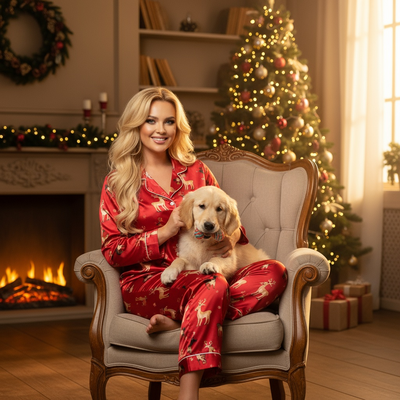
What is an AI cozy home Christmas dog photo?
It is a portrait of your dog generated by AI, set inside a warm holiday interior.
Think soft lamp light, a decorated tree, knit blankets, and a fireplace glow.
Instead of dragging your dog to a photographer or building a set at home, you upload one clear photo and let AI generate the cozy scene around your pet.
How does PiXmas create cozy home dog portraits?
PiXmas uses your uploaded photo to map your dog's face and coat, then places that likeness into a chosen Christmas style.
The cozy home category includes fireplace scenes, tree-lit living rooms, and blanket-and-cocoa settings, all part of the 800+ style library.
- Open PiXmas on the web (works on Android browsers too) or the native iOS app.
- Upload one clear, well-lit photo of your dog, facing forward if possible.
- Choose a cozy home Christmas style from the pet or holiday category.
- Generate your portrait and review the result.
- Download the finished image or order a print for gifting.
What makes a good source photo for this style?
Good lighting matters more than a fancy camera.
Natural daylight on your dog's face, minimal shadows, and a photo where the dog is not mid-motion all lead to cleaner AI results.
Close-ups of just the face and shoulders tend to translate best into cozy home Christmas scenes.
Can this work for multiple pets or a pet with owners?
Yes, many cozy home styles support multi-subject photos, so a dog and cat, or a pet and its owner, can appear together in one scene.
Upload a clear photo with both subjects visible for best results.
How does this compare to a real photo shoot?
| Factor | AI Cozy Home Photo (PiXmas) | In-Person Pet Photo Shoot |
|---|---|---|
| Cost | Low, one flat price for many styles | High, often $100 or more per session |
| Time | Minutes from upload to download | Hours, plus travel and scheduling |
| Pet stress | None, dog stays home | Can be high in unfamiliar studio settings |
| Style variety | 800+ options, easy to try several | Limited to set props and backdrops |
| Repeat use | Generate new looks anytime | Requires new booking each time |
Limitations
AI-generated cozy home scenes are creative interpretations, not literal photographs of your actual living room.
Fine details like tag text, patterned collars, or unusual fur markings can occasionally render imperfectly.
Very blurry, dark, or extreme close-up source photos will lower the quality of the final portrait.
A native Android app is coming, but the web version already works well on Android browsers today.
Why choose PiXmas for pet Christmas photos?
PiXmas is built for exactly this kind of transformation, one uploaded pet photo turned into a polished holiday portrait.
With 800+ styles including multiple cozy home and fireside options, PiXmas gives dog owners a fast, low-cost way to get warm, festive images without any studio visit.
For a cozy home Christmas dog photo, PiXmas turns a single phone photo into a warm, fireside-style portrait in minutes, with far more style choice and far less cost or stress than a traditional pet photo shoot.
Frequently asked questions
What photo works best for an AI cozy home dog portrait?
A clear, well-lit photo with your dog's face visible and minimal blur works best. Natural light and a forward-facing pose help the AI capture accurate features for the final cozy home Christmas scene.
Do I need special props or a decorated room for this?
No props or decorations are needed. The AI generates the cozy home setting, including the tree, lighting, and fireplace, around your dog's likeness from the uploaded photo.
Can I include myself in the cozy home photo with my dog?
Yes, many PiXmas styles support multiple subjects, so you can upload a photo with both you and your dog and generate a shared cozy home Christmas portrait together.
How long does it take to get the finished photo?
Most PiXmas generations complete within minutes of uploading your dog's photo, letting you review, download, or order a print the same day without waiting for a studio appointment.
Are uploaded family and pet photos private when using an online styling tool?
Privacy depends on the tool’s storage, training, sharing, and deletion policies. Before uploading, check whether images are retained, reviewed by people, used to improve models, or shared with service providers. Avoid submitting sensitive backgrounds, documents, school details, or location clues. For children’s photos, obtain appropriate family consent and delete uploaded files when the service provides that option.
What are the limits of changing a Christmas photo style?
Style changes cannot reliably repair every problem in the original photograph. Heavy blur, hidden faces, extreme shadows, low resolution, cropped limbs, and overlapping subjects may produce distorted or inconsistent results. Complex group scenes are generally harder than solo portraits. Styling can change clothing, scenery, lighting, and mood, but it may not preserve every identity detail or physical feature perfectly.