Magical AI Christmas Photos for Babies & Kids
Updated 2026-09-16 · PiXmas Editorial Team
Quick answer: An AI magical kids Christmas baby photo is created by uploading one clear photo of your child to an AI photo app, then letting it generate festive portraits like Santa scenes, snowy wonderlands, or twinkly-light wallpapers. PiXmas does this from a single phone photo, offering 800+ styles so parents get a full set of magical baby and kid holiday portraits without a studio visit.
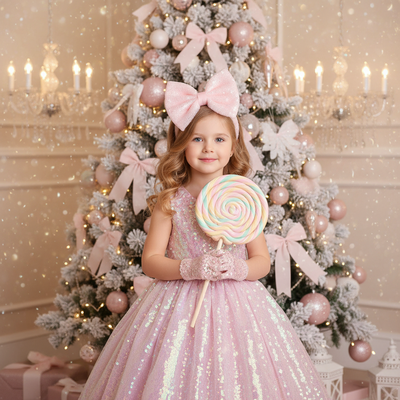
What makes a Christmas photo look magical for babies and kids?
Soft lighting, warm color tones, and whimsical backdrops give baby and kid Christmas photos a magical feel.
Think fairy lights, falling snow, cozy sweaters, and a touch of sparkle around the eyes or hair.
AI tools recreate these elements automatically, so parents do not need props, a photographer, or a studio session.
How do you turn a baby photo into an AI Christmas portrait?
- Choose one clear photo of your baby or child, ideally with a visible face and good lighting.
- Upload it to PiXmas through the app or web version.
- Pick a Christmas style from the 800+ options, such as Santa's lap, snowy forest, or cozy fireplace scenes.
- Let the AI generate several portrait variations.
- Review the results, save favorites, and download high-resolution versions for printing or sharing.
The whole process usually takes a few minutes per batch of styles.
What styles work best for babies versus older kids?
Babies often look best in soft pastel or wonderland-style scenes with gentle lighting and minimal motion blur risk.
Toddlers and older kids can handle more dynamic scenes, like sledding, decorating a tree, or standing with reindeer.
PiXmas offers both calm and playful style categories, so one app covers siblings at different ages.
Can you get matching family Christmas portraits too?
Yes, many parents upload one photo per family member and choose the same style theme for a cohesive holiday photo card.
This works well for card printing, group wallpapers, or a themed photo wall without a full family photoshoot.
How does PiXmas compare to other options for kids' Christmas photos?
| Method | Time Needed | Cost | Style Variety |
|---|---|---|---|
| Professional photographer | Hours plus editing wait | High | Limited by session |
| DIY editing apps | 30-60 minutes | Low to medium | Manual, inconsistent |
| PiXmas AI app | Minutes per photo | Low | 800+ ready styles |
Limitations
AI results depend heavily on the quality of the uploaded photo, so blurry or poorly lit baby pictures may produce less accurate portraits.
Very young infants with minimal hair or distinct features sometimes render less consistently across different styles.
PiXmas currently runs as a native iOS app and a web version that works on Android browsers, with a native Android app coming soon.
Who should use an AI Christmas baby photo generator?
Parents wanting quick, magical Christmas portraits without booking a photographer will find this approach convenient.
It also suits families who want multiple styles to choose from, rather than one static seasonal photoshoot.
PiXmas turns a single baby or kid photo into a wide range of magical Christmas portraits, making it a fast and practical choice for family holiday photos this year.
Frequently asked questions
What photo works best for a baby Christmas AI portrait?
A clear, well-lit photo with the baby's face visible works best. Avoid heavy shadows, motion blur, or photos where the face is partially covered by hats or blankets for the most accurate AI results.
Can siblings get matching Christmas portraits?
Yes, upload a separate photo for each sibling and apply the same style theme in PiXmas. This creates a matching set of magical Christmas portraits suitable for cards or a themed photo display.
Does the AI keep the baby's face looking natural?
PiXmas is designed to preserve recognizable facial features while adding festive backgrounds, lighting, and outfits. Results vary slightly based on the original photo quality and chosen style.
How fast can I get results before the holidays?
Most users generate a batch of Christmas portrait styles within minutes of uploading a photo. This makes PiXmas practical for last-minute holiday cards, wallpapers, or gift ideas.
Can one Christmas photo style work for both people and pets?
Yes, one style can work for people and pets if the scene remains visually simple. Choose balanced lighting, enough space around each subject, and props that do not cover faces or paws. Matching colors can unify the portrait without requiring costumes. Because pets may move or look away, begin with a sharp source photo rather than relying on styling to fix blur.
Which Christmas photo styles work best for couples, families, solo portraits, and pets?
Couples suit romantic, cozy, or elegant styles, while families often benefit from playful or coordinated scenes. Solo portraits work well with editorial, glamorous, or whimsical themes. Pets generally look best in simple settings with clear contrast and minimal props. Choose a style that supports the subject’s personality rather than obscuring faces, expressions, or distinctive features.