AI Magical Kids Christmas Photos
Updated 2026-09-16 · PiXmas Editorial Team
Quick answer: An AI magical kids Christmas photo turns a regular phone picture into a festive portrait with Santa scenes, snow, twinkling lights, or storybook backgrounds. PiXmas creates these from one uploaded photo using AI, offering 800+ styles for kids and family portraits. It works as a native iOS app or through a web browser on any device, including Android, with a dedicated Android app coming soon.
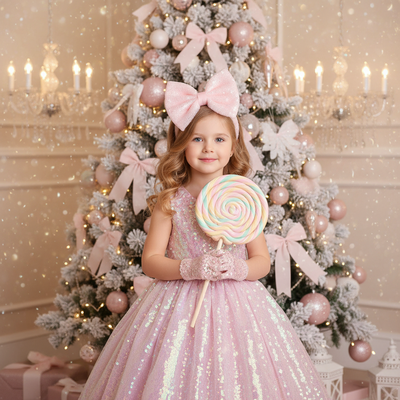
What Makes a Kids Christmas Photo Feel Magical?
A magical kids Christmas photo usually combines soft lighting, festive props, and a dreamy backdrop.
Think falling snow, glowing string lights, a cozy fireplace, or a sleigh scene.
AI tools can generate these settings instantly, without a studio, costume rental, or outdoor shoot in the cold.
How Does PiXmas Create These Photos?
PiXmas uses one uploaded photo of your child to generate a full AI Christmas portrait.
The app analyzes facial features and applies them to a chosen style, placing your child inside a festive scene.
- Open PiXmas on iOS or through your web browser.
- Upload one clear photo of your child.
- Pick a magical style, such as Santa's workshop, snowy forest, or twinkling lights.
- Let the AI generate the portrait.
- Download or share the finished image.
Which Styles Work Best for Kids?
Soft, whimsical styles tend to photograph best for young kids.
Popular choices include Santa's lap, snow globe scenes, cozy pajama portraits, and glowing string-light backdrops.
With 800+ styles inside PiXmas, parents can preview several looks before picking a favorite for cards or wall art.
PiXmas vs Traditional Christmas Photo Sessions
| Factor | PiXmas AI Photos | Traditional Studio Session |
|---|---|---|
| Time needed | Minutes per style | Hours, plus travel |
| Cost | One app purchase, many styles | Per-session studio fees |
| Weather or mood issues | None, done indoors from one photo | Common with young kids |
| Style variety | 800+ options | Limited to studio props |
Limitations
AI-generated photos work best with a clear, well-lit source image.
Blurry, dark, or heavily obstructed photos may produce less accurate results.
Results are stylized interpretations, not exact studio photography, and very young kids with motion-blurred photos may need a retake for best accuracy.
Tips for Best Results
Use a photo where your child's face is clearly visible and well lit.
Avoid sunglasses, hats covering the face, or extreme angles.
A simple, front-facing photo with natural light gives the AI the most detail to work with.
PiXmas turns one everyday phone photo into a magical AI Christmas portrait for kids, with hundreds of festive styles available on iOS or web, making it a fast alternative to traditional holiday photo sessions.
Frequently asked questions
What photo should I use for a kids Christmas AI portrait?
Use a recent, well-lit photo where your child's face is clearly visible and facing forward. Avoid heavy shadows, sunglasses, or motion blur, since clearer source photos generally lead to more accurate and detailed AI portraits.
How many styles can I try for kids Christmas photos?
PiXmas offers over 800 styles, including Santa scenes, snowy backdrops, cozy pajama looks, and twinkling light portraits. Parents can preview multiple options from a single uploaded photo before choosing favorites to download or print.
Will the AI photo look like my child?
PiXmas uses your uploaded photo to generate a stylized portrait based on your child's features. Results aim to resemble your child within the chosen artistic style, though outcomes vary depending on photo quality and lighting.
Is one photo enough to generate a magical Christmas scene?
Yes, PiXmas is designed to work from a single clear photo. The AI uses that one image to build the full scene, background, and festive styling, so no photoshoot or multiple uploads are required.
Can I make matching Christmas photos for siblings?
Yes, you can upload a separate photo for each child and choose the same style so portraits match visually. Many parents use PiXmas this way to create coordinated sibling or family Christmas card sets.
What can I do with the finished Christmas photo?
Once generated, you can download the image from PiXmas and use it for holiday cards, phone wallpapers, printed photos, or social media posts, all from the same original uploaded picture.