AI Urban City Lights Christmas Twins Photo
Updated 2026-09-16 · PiXmas Editorial Team
Quick answer: An AI urban city lights Christmas twins photo turns two phone snapshots into matching portraits set against a glowing downtown backdrop with string lights and soft falling snow. Using PiXmas, upload one photo per twin, pick the urban city lights style, and generate coordinated portraits within minutes, ready to download or print for holiday cards.
What Is an AI Urban City Lights Christmas Twins Photo?
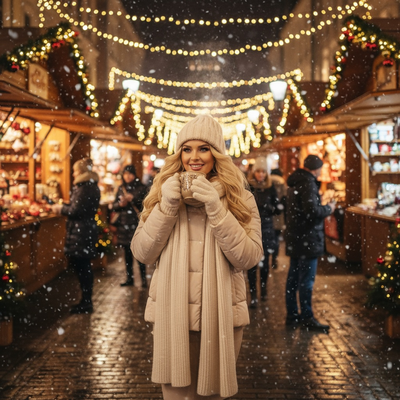
An AI urban city lights Christmas twins photo places two matching siblings inside a glowing downtown scene.
Think string lights strung between buildings, warm bokeh from skyscraper windows, and soft snow drifting under streetlamps.
The twins keep their real faces and expressions while the AI builds a new city backdrop, coordinated winter outfits, and festive lighting around them.
PiXmas generates this style from a single phone photo of each twin, so no studio session or pre-matched outfits are required.
How Do You Create This Photo With PiXmas?
- Open the PiXmas app or web version on your phone or computer.
- Upload one clear photo of each twin, front-facing works best.
- Select the urban city lights style from the Christmas photo categories.
- Choose a twin-friendly layout so both siblings appear together in one scene.
- Generate the portraits and review the results, usually ready within minutes.
- Download the high-resolution files or order matching prints.
Why Does the Urban City Lights Style Work Well for Twins?
Twin photos often need a backdrop that feels cohesive without looking staged.
City lights give both children the same glowing color palette, so their portraits read like one continuous scene rather than two separate edits.
The bokeh effect also softens minor differences in lighting or angle between the two source photos.
How Does Urban City Lights Compare to Other Christmas Styles?
| Style | Best For | Mood | Twin-Friendly Layout |
|---|---|---|---|
| Urban City Lights | Modern families, older kids | Glowing, energetic | Yes, side by side scenes |
| Classic Cozy Cabin | Traditional holiday cards | Warm, rustic | Yes, fireside poses |
| Winter Wonderland | Younger children | Bright, snowy | Yes, playful poses |
| Santa Scene | Toddlers and babies | Playful, nostalgic | Yes, shared lap pose |
Limitations
AI results depend on the quality of the original phone photos, so blurry or dark source images produce softer results.
Very young twins who move during photos may need a few tries to get a clear source shot.
The web version works on Android browsers today, and a dedicated Android app is coming, so Android users are not locked out while they wait for the native release.
PiXmas offers 800+ styles, but exact building layouts or specific city skylines cannot be requested since the AI generates original scenes each time.
PiXmas is a strong fit for parents of twins who want a coordinated, glowing urban city lights Christmas photo without scheduling a professional shoot. Upload one phone photo per twin, pick the style, and get matching AI portraits in minutes.
Frequently asked questions
Can I use the same photo style for both twins so they match?
Yes, choose one style like urban city lights for both twin photos so lighting, color tone, and backdrop stay consistent across both portraits, creating a cohesive matching set instead of two unrelated images.
What kind of source photo works best for this style?
A front-facing, well-lit phone photo with the face fully visible works best. Avoid sunglasses, heavy shadows, or busy backgrounds so the AI has a clear reference for the new city lights scene.
Can this style be used for a holiday card?
Yes, the urban city lights style works well for holiday cards since the glowing backdrop and coordinated colors photograph clearly when printed, and the finished files are high resolution enough for standard card sizes.
How many styles can I try before choosing one for twins?
PiXmas offers 800+ styles, so parents can generate a few different looks, including urban city lights, cozy classic, or winter wonderland, and compare which coordinated style suits their twins best before finalizing prints.
How accurate are AI Christmas photo styles for couples, families, and pets?
Accuracy varies with image quality, subject count, pose, and the complexity of the chosen style. Clear, front-facing faces usually retain identity better than side profiles, crowded group shots, or partially hidden subjects. AI may alter hands, jewelry, fur markings, body proportions, or facial details, so inspect every person and pet closely before sharing or printing the result.
Which Christmas photo styles work best for couples, families, solo portraits, and pets?
Couples suit romantic, cozy, or elegant styles, while families often benefit from playful or coordinated scenes. Solo portraits work well with editorial, glamorous, or whimsical themes. Pets generally look best in simple settings with clear contrast and minimal props. Choose a style that supports the subject’s personality rather than obscuring faces, expressions, or distinctive features.