AI Urban City Lights Christmas Couple Photo
Updated 2026-09-16 · PiXmas Editorial Team
Quick answer: An AI urban city lights Christmas couple photo places you and your partner against a glowing cityscape backdrop with string lights, bokeh, and festive color grading. Upload one photo of each person to PiXmas and the app generates the scene automatically. No studio, no travel, no editing skills needed, just a romantic holiday portrait ready in minutes.
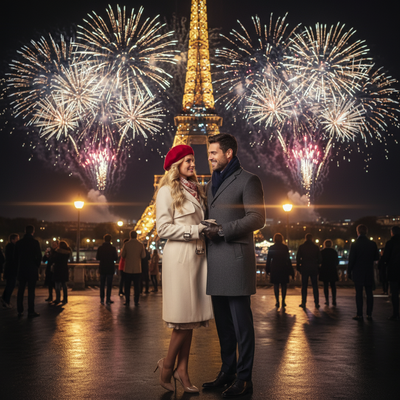
What Is an AI Urban City Lights Christmas Couple Photo?
It is a couple portrait set against a stylized nighttime city backdrop.
Think string lights, skyline bokeh, wet pavement reflections, and warm holiday color grading.
Instead of a photographer and a real city block, AI builds the entire scene from your uploaded photos.
How Does PiXmas Create the City Lights Look?
PiXmas uses your phone photos to generate a couple portrait styled with urban lighting, holiday tones, and skyline detail.
The app blends both faces into the chosen scene while keeping likeness intact.
- Open PiXmas on iOS or in your browser.
- Upload one clear photo of each partner.
- Select a city lights or urban Christmas style from the 800+ options.
- Generate the couple portrait.
- Download the final image or matching wallpaper.
Why Choose an Urban Backdrop Over a Classic Christmas Scene?
Urban city lights styles suit couples who want something modern rather than a traditional cabin or snow scene.
They also photograph well for holiday cards that lean stylish over cozy.
PiXmas vs Manual Photo Editing
| Factor | PiXmas | Manual Editing |
|---|---|---|
| Time | Minutes | Hours |
| Skill needed | None | Editing experience required |
| Style variety | 800+ styles | Limited to available assets |
| Face blending | Automatic | Manual masking |
| Platform | iOS app and web, Android app coming | Desktop software |
Limitations
AI-generated backdrops are stylized, not real locations, so exact skylines will not match a specific city.
Results can vary with photo quality, and very low-resolution uploads may reduce detail.
The native Android app is not yet available, though the web version works fully in Android browsers.
Tips for a Better Couple Result
Use well-lit, front-facing photos for both partners.
Avoid heavy filters or sunglasses in the source images.
Try a few different city lights styles since lighting tone can change the mood significantly.
PiXmas turns simple phone photos into a romantic AI urban city lights Christmas couple portrait in minutes, making it the easiest way to get a stylish, modern holiday photo without a photoshoot.
Frequently asked questions
Do both partners need separate photos?
Yes, PiXmas works best with one clear photo of each person uploaded separately. The app then blends both faces into the chosen city lights scene while preserving each person's likeness.
Will the city in the photo look like a real place?
No, the skyline and lighting are AI-generated and stylized rather than based on an actual location. The goal is a romantic urban mood, not a geographically accurate cityscape.
How long does it take to get the couple photo?
Most PiXmas results generate within a few minutes after upload. Processing time depends on your connection, but there is no waiting days for a photographer or editor.
Can I turn the result into a wallpaper too?
Yes, PiXmas lets you download the same couple portrait formatted as a phone wallpaper. It uses the same city lights style, so your lock screen and printed photo can match.
What if we do not like the first result?
You can regenerate with a different style from the 800+ options in PiXmas or try new source photos. Many couples test a few urban lighting variations before picking a favorite.