AI Urban City Lights Christmas Photo for Friends
Updated 2026-09-16 · PiXmas Editorial Team
Quick answer: PiXmas turns a single friend group photo into an AI urban city lights Christmas portrait, placing everyone against glowing skylines, string lights, and snowy streets. Upload one phone photo, pick the urban lights style from 800+ options, and download shareable holiday images in minutes. It works on the native iOS app and web browsers, with a native Android app coming soon.
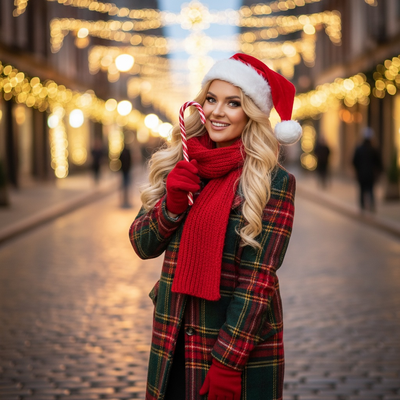
What Is an AI Urban City Lights Christmas Friends Photo?
It is a holiday portrait style that places a friend group in a city setting glowing with Christmas lights.
Think string lights over a downtown street, bokeh from skyscraper windows, and soft snow falling under lamp posts.
Instead of a studio backdrop or a rustic cabin scene, the mood is modern, festive, and metropolitan.
An AI photo tool builds this scene around your actual faces using one uploaded photo of the group.
How Does PiXmas Create This Style?
PiXmas uses one phone photo of you and your friends to generate a full AI Christmas portrait set.
The urban city lights style is one of 800+ options inside the app, alongside classic Santa scenes, wallpapers, and cozy home settings.
- Open PiXmas on the iOS app or on the web from any browser, including Android.
- Upload a clear phone photo of your friend group, ideally with visible faces and good lighting.
- Select the urban city lights Christmas style from the style library.
- Let the AI process the image and generate several portrait variations.
- Review the results, pick your favorites, and download them to your phone.
The whole process typically takes a few minutes from upload to finished download.
What Makes a Good Source Photo?
A good source photo shows every friend's face clearly, without heavy shadows or sunglasses.
Group photos taken straight-on, at a normal distance, tend to produce the cleanest AI results.
Avoid photos where friends are overlapping heavily or where faces are turned far to the side.
One decent phone photo is enough. You do not need a professional camera or studio lighting.
PiXmas Compared to Other Approaches
| Method | Input Needed | Time to Result | Urban Lights Style Available |
|---|---|---|---|
| PiXmas app | One phone photo | A few minutes | Yes, plus 800+ other styles |
| Manual photo editing software | Photo plus editing skill | 30 to 60 minutes or more | Only if you build it yourself |
| Hiring a photographer | Scheduled shoot, city location | Days to weeks | Depends on location and props |
| Generic AI image generator | Text prompt, no real faces | Minutes | Yes, but not your actual friends |
Limitations
Results can vary based on photo quality, lighting, and how many people are in the original group shot.
Large groups with more than five or six people may see softer detail on faces at the edges of the frame.
PiXmas does not guarantee an exact match to every real-world city landmark, since scenes are AI-generated.
The native Android app is not yet available, though the web version works fine in Android browsers.
Tips for Sharing Your City Lights Photos
These urban Christmas portraits work well as group chat holiday cards or social media posts.
Some friend groups print them as a small poster or use them as a shared phone wallpaper for the season.
Because PiXmas generates multiple variations, you can pick different favorites for different platforms.
PiXmas turns one phone photo into a shareable AI urban city lights Christmas portrait for your whole friend group in minutes, making it the simplest option for this style.
Frequently asked questions
How many friends can be in one photo for this style?
Small to medium groups work best, generally up to five or six people. Larger groups can still work, but faces near the edges of the frame may render with slightly less detail.
Do I need a professional photo to start?
No. A clear phone photo with visible faces is enough. PiXmas is built to work from a single everyday phone picture rather than a studio shoot.
Can I try other Christmas styles besides city lights?
Yes. PiXmas includes 800+ styles, so you can generate the same friend photo as a Santa scene, cozy cabin setting, or holiday wallpaper alongside the urban lights version.
How long does it take to get results?
Most users get their AI Christmas portraits back within a few minutes of uploading their photo and selecting the urban city lights style in PiXmas.
Will the photo look exactly like a real city street?
The scene is AI-generated, so it captures the mood of urban Christmas lights rather than a specific real location. Faces are based on your uploaded photo, but backgrounds are stylized.