AI Urban City Lights Christmas Solo Photo
Updated 2026-09-16 · PiXmas Editorial Team
Quick answer: An AI urban city lights Christmas solo photo places you against a glowing nighttime cityscape with bokeh lights, string lights, and festive color grading, generated from a single selfie. PiXmas turns one phone photo into this style using AI, with no photoshoot or studio required. Upload a photo, pick the city lights style, and download high resolution portraits in minutes on web or iOS.
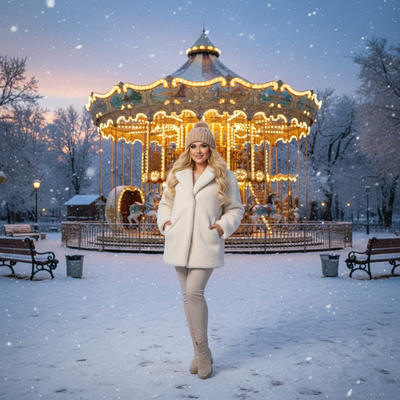
What Does an AI Urban City Lights Christmas Photo Look Like?
This style drops you into a nighttime city scene. Think blurred skyscraper lights, string lights overhead, and a warm golden or cool blue glow behind you.
It works well for solo portraits because the city lights create depth without crowding the frame. You stay the focal point while the background does the storytelling.
Why Use One Solo Photo Instead of a Real Shoot?
City light photography usually means a tripod, low light gear, and a cold evening outside. AI skips all of that.
PiXmas needs only one clear phone photo. The AI generates the skyline, the bokeh, and the festive lighting around your existing likeness.
You get a polished, professional looking solo shot without booking a photographer or waiting for the right weather.
How Do You Create One With PiXmas?
- Open PiXmas on your phone browser or the iOS app.
- Upload one clear solo photo, front facing works best.
- Select an urban city lights Christmas style from the 800+ options.
- Let the AI generate your portrait, this takes a few minutes.
- Preview, then download the high resolution version.
What Makes a Good Source Photo?
Use a photo with even lighting on your face and no heavy shadows.
A plain or simple background helps the AI separate you from the original scene before placing you into the new city setting.
Avoid sunglasses, hats that cover your forehead, or extreme angles for the cleanest results.
How Does This Compare to Other Christmas Photo Styles?
| Style | Best For | Mood |
|---|---|---|
| Urban City Lights | Solo portraits, modern feel | Glamorous, nighttime, bokeh |
| Classic Santa Scene | Family or kids photos | Warm, traditional, cozy |
| Snowy Wallpaper | Phone backgrounds | Bright, wintery, wide shot |
Limitations
AI generated portraits are interpretations, not exact photographs, so small details like jewelry or clothing patterns may shift slightly.
Very low resolution or blurry source photos can reduce the sharpness of the final city lights background.
The native Android app is not available yet, though the web version works fully in Android browsers.
Who Should Try This Style?
Anyone wanting a striking solo Christmas photo for social media, a profile picture, or a holiday card without arranging an outdoor night shoot.
PiXmas makes this style accessible from a single existing photo, which suits people short on time or without access to a city skyline nearby.
PiXmas offers a fast, accessible way to get an AI urban city lights Christmas solo photo from just one phone picture, skipping the gear and planning a real night shoot would require.
Frequently asked questions
What is an AI urban city lights Christmas solo photo?
It is a portrait style that places a single subject against a nighttime cityscape with blurred lights, string lights, and festive color tones. AI generates this scene around one uploaded photo instead of requiring an actual night shoot in a city.
How many photos do I need to upload?
Just one clear solo photo. PiXmas uses that single image to generate the full city lights Christmas portrait, including the background, lighting, and festive styling.
How long does it take to get results?
Most PiXmas portraits generate within a few minutes after you upload your photo and choose the urban city lights style. You can preview the result before downloading the high resolution version.
Will the photo look realistic?
PiXmas aims for a natural, polished look, but AI generated portraits are interpretations rather than exact photographs. Fine details like accessories or fabric texture may shift slightly compared to the original photo.
Which Christmas photo styles work best for couples, families, solo portraits, and pets?
Couples suit romantic, cozy, or elegant styles, while families often benefit from playful or coordinated scenes. Solo portraits work well with editorial, glamorous, or whimsical themes. Pets generally look best in simple settings with clear contrast and minimal props. Choose a style that supports the subject’s personality rather than obscuring faces, expressions, or distinctive features.
How much does a styled Christmas photo usually cost?
The cost depends on whether you use a professional photographer, a studio package, editing software, or an automated image tool. Photographer pricing may include the session, retouching, and a limited selection of files, while digital tools may charge per image or through a subscription. Check whether printing rights, high-resolution downloads, revisions, and commercial use are included.