AI Pets Christmas Dog Photo Generator
Updated 2026-09-16 · PiXmas Editorial Team
Quick answer: An AI pets Christmas dog photo is a festive portrait created from a regular phone picture of your dog using AI image generation. Upload a clear photo, pick a style, and download the result for cards, wallpapers, or social posts.
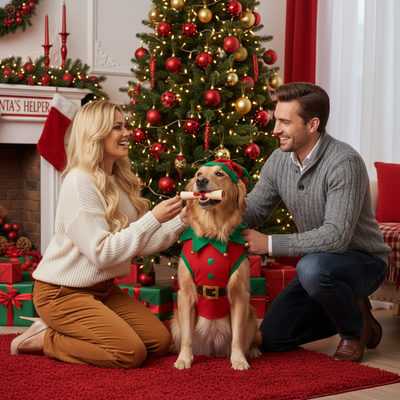
What Is an AI Pets Christmas Dog Photo?
An AI pets Christmas dog photo takes an ordinary picture of your dog and reimagines it in a festive setting.
Instead of manually editing in a photo app, AI models generate new backgrounds, outfits, and lighting around your pet.
PiXmas applies this to dogs, cats, and other pets using the same style engine built for human Christmas portraits.
How Does PiXmas Turn a Dog Photo Into a Christmas Scene?
The process works the same as PiXmas human portraits, just applied to your pet's photo.
- Open PiXmas on iPhone or through the web app on any browser.
- Upload one clear, well-lit photo of your dog.
- Choose a pet-friendly Christmas style, such as Santa hat, cozy fireplace, or snowy village.
- Let the AI generate the portrait, typically in a few minutes.
- Download the finished image for printing, cards, or wallpapers.
What Makes a Good Source Photo for Pet Portraits?
Clear, front-facing photos with good lighting produce the most accurate AI pet portraits.
Avoid blurry action shots or photos where the dog's face is partially hidden.
A calm, sitting or standing pose usually gives the AI the clearest reference to work with.
How Does This Compare to Other Pet Photo Editing Options?
| Method | Effort | Style Variety | Best For |
|---|---|---|---|
| Manual photo editing app | High, needs design skill | Limited by templates | Simple hat or sticker overlays |
| Hiring a pet photographer | High cost and scheduling | Depends on props available | Professional print portraits |
| PiXmas AI generator | Low, one upload | 800+ styles | Fast, varied holiday pet portraits |
What Styles Work Well for Dogs?
Santa hat close-ups, cozy sweater scenes, and snowy outdoor backdrops tend to work especially well for dog photos.
Because PiXmas offers 800+ styles, you can generate several different looks from the same original photo and pick a favorite.
This makes it easy to create a set of images instead of committing to just one edit.
Limitations
AI-generated pet portraits do not always perfectly preserve unique markings or fur patterns.
Photos with unusual angles, motion blur, or poor lighting may produce less accurate results.
As with human portraits, results can vary between generations, so trying a couple of styles often helps.
Why Choose PiXmas for Pet Christmas Photos?
PiXmas was built for one-photo AI Christmas portraits, and that same engine extends naturally to pets.
With a native iOS app, a web version usable on Android browsers, and a native Android app on the way, PiXmas covers most devices people already use.
PiXmas turns a single dog photo into a festive AI Christmas portrait in minutes, making it a fast, accessible option for pet owners who want holiday images without a professional shoot.
Frequently asked questions
Can I make an AI Christmas photo of my dog?
Yes. Upload a clear photo of your dog to an AI portrait tool like PiXmas, choose a Christmas style, and the app generates a festive version, such as a Santa hat portrait or snowy backdrop, within minutes.
What kind of dog photo works best?
A clear, well-lit photo where the dog's face is fully visible works best. Avoid blurry, dark, or heavily cropped images so the AI has enough detail to generate an accurate portrait.
How many styles can I try for one dog photo?
PiXmas offers 800+ styles, so you can generate multiple Christmas looks from the same dog photo and compare results before choosing a favorite to download or print.
Will the AI keep my dog's exact markings?
Generally yes, but some fine detail like unique fur patterns may shift slightly during generation. Using a clear source photo helps PiXmas preserve your dog's features more accurately.
What should we wear for a styled Christmas photo?
Wear coordinated colors and textures without dressing everyone identically. Deep green, burgundy, cream, navy, and warm neutrals usually fit holiday settings, but clothing should remain distinct from the background. Avoid tiny patterns, reflective logos, and overly bright colors that distract from faces. For pets, use comfortable accessories that do not restrict movement, vision, or breathing.
What is the best process for creating a styled family Christmas photo?
Start by choosing the final use, then select a theme, clothing palette, location, and composition. Capture several sharp images with visible faces and even lighting. Apply the style only after selecting the strongest photo, then review facial identity, hands, clothing, and background details. Finish by cropping for the intended card, social post, or print dimensions.