AI Pets and Newborn Christmas Photo Ideas
Updated 2026-09-16 · PiXmas Editorial Team
Quick answer: You can create AI Christmas photos of pets and newborns by uploading one clear phone picture to an app like PiXmas, which generates Santa scenes, cozy holiday portraits, and wallpapers using AI. The web version works on any phone browser, including Android, and results are ready in minutes without a studio visit.
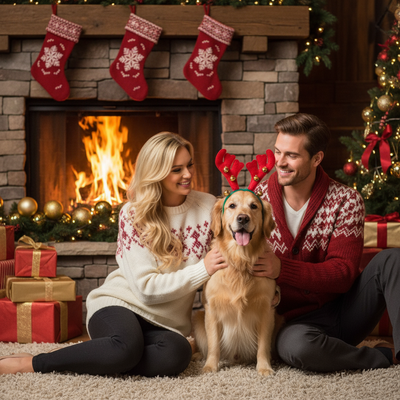
Can AI turn a pet or newborn photo into a Christmas portrait?
Yes. AI photo apps analyze a single uploaded image and generate new holiday-themed portraits based on it.
For pets, this means Santa hats, snowy backdrops, and cozy sweaters without stressing your animal with a real photoshoot.
For newborns, it means soft holiday lighting and festive scenes without exposing a baby to studio setups or bright flashes.
How do you make AI Christmas photos of pets or babies?
The process is the same for both pets and newborns, since it relies on one clear reference photo.
- Take one well-lit photo of your pet or baby, facing the camera if possible.
- Upload it to PiXmas through the app or web browser.
- Pick a Christmas style, such as Santa scene, cozy cabin, or wallpaper format.
- Let the AI generate several portrait options from your one photo.
- Download your favorites to print, share, or use as a phone wallpaper.
What makes pet and newborn photos different for AI tools?
Pets often move, so a sharp, front-facing photo gives the AI more detail to work with.
Newborns have delicate features, so a simple, evenly lit photo helps the AI preserve their natural look in the final portrait.
Both benefit from avoiding busy backgrounds in the original photo, since a clean reference photo leads to cleaner AI results.
Which option fits pet and newborn Christmas photos best?
| Method | Time Needed | Stress on Pet/Baby | Cost |
|---|---|---|---|
| PiXmas AI photo app | Minutes per photo | Low, one quick photo | Low, single purchase or credits |
| Professional pet or newborn photoshoot | Hours, plus scheduling | Higher, longer session | High, per-session fee |
| DIY costume and phone photo | Variable, trial and error | Moderate, multiple attempts | Low, but time-intensive |
Limitations
AI results depend on the quality of your original photo, so blurry or poorly lit images may produce less accurate portraits.
Very young newborns with limited distinct features may generate more generic-looking results compared to older babies or pets with clear markings.
Some pet breeds with unusual coats or colors may need a second attempt with a clearer photo for best results.
Why choose PiXmas for pet and newborn Christmas photos?
PiXmas turns one phone photo into AI Christmas portraits with over 800 styles, including options suited to pets and newborns.
The native iOS app and web version work smoothly, and the web version is fully usable on Android phone browsers while a native Android app is in development.
This makes it a practical choice for families who want festive photos of both their pets and their newest family member without a full studio session.
PiXmas offers a fast, low-stress way to create AI Christmas portraits for pets and newborns from a single phone photo, backed by 800+ styles and easy access across iOS and web.
Frequently asked questions
Can I make an AI Christmas photo of my pet and my newborn together?
You can upload separate photos of your pet and your newborn to generate individual AI Christmas portraits, then combine or display them together, such as in a matching holiday card layout.
Is it safe to use a newborn's photo in an AI app?
Reputable apps process your uploaded photo to generate new images without requiring you to share sensitive personal details. Always check an app's privacy practices before uploading any photo, especially of a baby.
How many photos do I need to upload for good results?
One clear, well-lit photo is usually enough for PiXmas to generate multiple Christmas portrait options, though trying a couple of different reference photos can improve variety.
What if my pet or baby photo comes out looking odd?
This can happen with blurry or poorly lit source photos. Try a sharper, front-facing image with even lighting, then generate the portrait again for improved results.
Can I print these AI Christmas photos as holiday cards?
Yes, PiXmas portraits are generated at resolutions suitable for printing, making them a convenient option for holiday cards featuring your pet or newborn.