AI Rustic Cabin Christmas Maternity Photo
Updated 2026-09-16 · PiXmas Editorial Team
Quick answer: PiXmas creates AI rustic cabin Christmas maternity photos from a single phone picture. Upload one photo of yourself, pick a cabin-themed holiday style, and the app generates portraits with wood beams, warm firelight, string lights, and a cozy winter mood. Works on iPhone through the native app or on any phone browser via the web version, with an Android app coming.
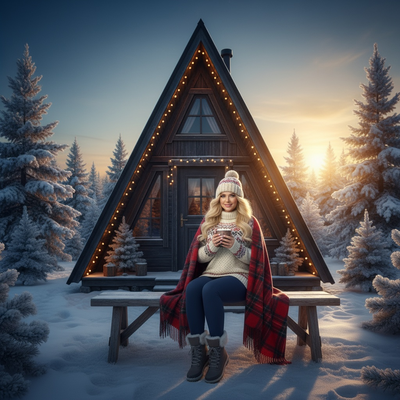
What is an AI rustic cabin Christmas maternity photo?
It is a maternity portrait styled to look like it was shot inside a cozy log cabin during the holidays.
Instead of booking a rustic-themed studio or traveling to a cabin, an AI tool generates the whole scene from one existing photo.
PiXmas builds these images using wood paneling, soft string lights, plaid textures, and warm fireside tones to match the classic cabin holiday look.
How does PiXmas turn one photo into this style?
The process only needs a single clear photo of your face and body, ideally a recent one that shows your bump comfortably.
- Open PiXmas on the app or web browser.
- Upload one phone photo, front-facing works best.
- Choose a rustic cabin or cozy winter maternity style from the 800+ options.
- Let the AI generate several portrait variations.
- Download the ones you like in full resolution.
Most people get results back in a few minutes, no scheduling or waiting required.
What makes the rustic cabin style work for maternity photos?
The cabin aesthetic softens harsh lighting and adds a nostalgic, homey feel that pairs well with pregnancy portraits.
Warm wood tones and soft light flatter most skin tones and body shapes without needing a real location.
PiXmas applies these lighting and texture cues automatically, so the final image looks intentional rather than filtered.
How does this compare to a real cabin photoshoot?
| Factor | Real Cabin Shoot | PiXmas AI Photo |
|---|---|---|
| Cost | $150 to $500+ | One low flat price |
| Time needed | Hours of travel and shooting | Minutes from one photo |
| Location required | Yes, must find or rent a cabin | No location needed |
| Comfort for maternity | Standing or posing for long periods | Use an existing comfortable photo |
| Style variety | Limited to one set | 800+ styles to try |
Limitations
AI-generated photos are stylized interpretations, not literal photographs, so fine details like hand position or fabric folds may shift slightly.
Very low-quality or blurry source photos can lower the sharpness of the final result.
The tool works best with one clear subject photo rather than group shots or heavily obscured faces.
Who is this style best for?
Expecting parents who want a cozy holiday keepsake without arranging a cabin rental or hiring a photographer.
Anyone short on time during a busy pregnancy who still wants a polished seasonal photo to share or print.
People who want to test multiple maternity looks, rustic cabin included, before choosing a favorite.
PiXmas turns one phone photo into a rustic cabin Christmas maternity portrait in minutes, skipping the cost and planning of a real cabin shoot while still delivering a warm, styled holiday keepsake.
Frequently asked questions
Can I get a rustic cabin Christmas maternity photo from just one picture?
Yes. PiXmas only needs one clear phone photo of you to generate a rustic cabin maternity portrait. The AI adds the wood textures, string lights, and warm tones to build the full scene around your existing photo.
Do I need special maternity clothing for the photo to work?
No special outfit is required. The AI works from your uploaded photo and applies the styling around it, so a normal comfortable outfit is fine for the source image.
How long does it take to get results back?
Most PiXmas photos generate within a few minutes after upload. You can review multiple style outputs and download the ones that best match your rustic cabin maternity vision.
Can I print these photos for holiday cards?
Yes, PiXmas photos download in full resolution, which makes them suitable for holiday cards, framed prints, or digital sharing across social platforms.
How do I choose a Christmas photo style for a card versus social media?
Choose a card style with clean composition, readable space for a greeting, and a crop that fits the printer’s template. Social media images can use tighter framing, bolder effects, or vertical layouts, depending on the platform. Keep important faces away from edges in both formats. Save separate versions rather than forcing one crop to serve every placement.
What are the limits of changing a Christmas photo style?
Style changes cannot reliably repair every problem in the original photograph. Heavy blur, hidden faces, extreme shadows, low resolution, cropped limbs, and overlapping subjects may produce distorted or inconsistent results. Complex group scenes are generally harder than solo portraits. Styling can change clothing, scenery, lighting, and mood, but it may not preserve every identity detail or physical feature perfectly.