AI Outdoor Snow Christmas Siblings Photo
Updated 2026-09-16 · PiXmas Editorial Team
Quick answer: PiXmas creates an AI outdoor snow Christmas siblings photo from a single phone picture of each child. The app places siblings together in a snowy outdoor scene with winter coats, falling snow, and holiday lighting. No actual snow, matching outfits, or studio visit required. Results are ready in minutes on web or the iOS app.
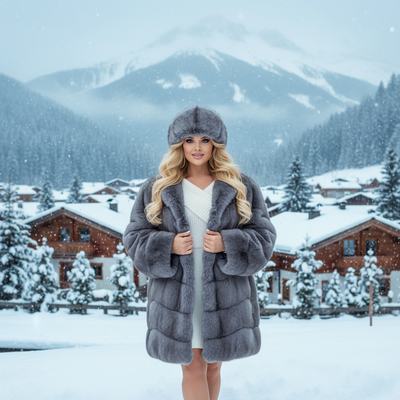
What Is an AI Outdoor Snow Christmas Siblings Photo?
It is a portrait generated by AI that places siblings in a snowy outdoor Christmas setting.
The scene, snow, lighting, and winter clothing are all rendered by the app, not photographed on location.
You supply a plain phone photo of each sibling and the tool handles the rest.
Why Skip the Real Outdoor Photoshoot?
Coordinating siblings for an outdoor winter shoot means matching schedules, matching outfits, and cooperative weather.
Younger kids often will not sit still in cold air long enough for a photographer to get the shot.
An AI outdoor snow Christmas siblings photo removes all of that. One quick indoor photo per child is enough.
How Do You Make One with PiXmas?
- Open PiXmas on your phone browser or download the iOS app.
- Upload one clear photo for each sibling, one at a time.
- Choose an outdoor snow scene from the style library.
- Select how many siblings appear together in the final frame.
- Generate and download the finished portrait in minutes.
PiXmas offers 800+ styles, so you can preview several snowy backdrops before picking a favorite.
What Makes Sibling Photos Different from Solo Portraits?
Multi-subject generation needs to keep each child's face and features consistent while blending them into one cohesive scene.
PiXmas is built for this, letting you combine separate uploads into a single group composition rather than forcing a single group photo upload.
This matters because getting siblings to pose together for one usable phone photo is often the hardest part of holiday photography.
PiXmas vs Traditional Outdoor Photography
| Factor | Traditional Shoot | PiXmas AI Photo |
|---|---|---|
| Weather dependency | Requires actual snow | None, snow is generated |
| Time needed | Hours including travel | Minutes per upload |
| Outfit coordination | Manual shopping and fitting | Styled automatically |
| Cost | Photographer fees | Single app session |
| Sibling cooperation | High difficulty | Uploaded separately |
Limitations
AI outdoor snow scenes are stylized and will not match a specific real location.
Very young children or pets may render inconsistently across attempts, so trying a few source photos helps.
The web version works well on Android browsers, and a dedicated native Android app is coming for an even smoother experience.
Verdict
PiXmas turns single phone photos into a convincing AI outdoor snow Christmas siblings portrait, skipping the cold shoot, matching outfits, and scheduling hassle entirely.
Frequently asked questions
Can I combine photos of siblings who were never photographed together?
Yes. Upload one photo per sibling and PiXmas blends them into a single outdoor snow scene, so you never need an original group photo to start with.
Does the snow look realistic?
PiXmas generates believable snowy backdrops with falling snow and winter lighting. It is a stylized AI rendering, so it will not be an exact real-world location but reads as a natural outdoor winter scene.
How many siblings can appear in one photo?
PiXmas supports multiple subjects in a single generated scene. Upload each sibling's photo separately and select how many should appear together in the final outdoor snow portrait.
Do I need matching outfits before uploading?
No. PiXmas applies winter clothing styles automatically during generation, so siblings can be photographed in whatever they are wearing and still end up coordinated in the final image.
Can I use this on an Android phone?
Yes, the PiXmas web app works fully in Android browsers. A native Android app is coming soon, but you can create your outdoor snow siblings photo on Android today through the browser version.
What kind of photo works best for the upload?
A clear, well-lit phone photo showing each sibling's face directly is ideal. Avoid heavy shadows or extreme angles for the most accurate result in the finished snow scene.
How long does it take to get the finished photo?
Most PiXmas generations complete within a few minutes per upload. With 800+ styles available, you can generate several outdoor snow variations quickly and pick your favorite.