Christmas Photo Outfit Ideas for Women
Updated 2026-09-16 · PiXmas Editorial Team
Quick answer: The best Christmas photo outfits for women use rich solid colors like deep red, forest green, cream, or plaid, avoiding busy patterns that distract from the face. Soft knits, velvet, and structured coats photograph well in both daylight and string-light settings. If shopping for a new outfit is not realistic, PiXmas can generate styled Christmas portraits from one existing photo, no wardrobe change required.
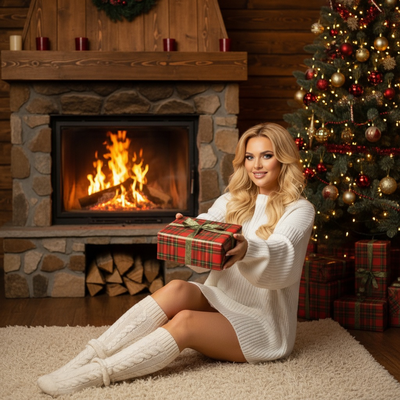
What Christmas photo outfits actually photograph well?
Solid colors beat patterns in most Christmas photos. Deep red, forest green, cream, and burgundy all read clearly against snow, string lights, and indoor decor.
Plaid works in small doses, such as a scarf or headband, but a full plaid outfit can look busy in a still photo. Cameras and phone sensors tend to flatten fine patterns into visual noise.
Texture adds interest without competing with color. A chunky knit sweater, velvet dress, or wool coat all catch light in a flattering way.
How do I pick colors that match a Christmas background?
Snow scenes and white backdrops pair well with red, green, and plaid.
Warm indoor settings with string lights or a fireplace look best with cream, gold, burgundy, or soft brown tones.
Avoid wearing the exact color of the background. A green sweater against a green tree can blend in and flatten the photo.
What if I do not have a coordinated outfit ready?
Buying a new outfit for one photo session is not always practical, and matching outfits across a family adds even more pressure.
This is where an AI portrait tool like PiXmas becomes useful. Instead of shopping and scheduling a shoot, a single phone photo can be turned into multiple styled Christmas looks, including sweaters, formalwear, and Santa-scene outfits, without changing clothes.
How to turn one photo into styled Christmas outfit looks
- Take one clear, well-lit photo of your face, front-facing and unobstructed.
- Open PiXmas on the web or the iOS app and upload that photo.
- Browse the outfit and scene styles, choosing from options like cozy knits, red velvet, or classic Santa backdrops.
- Generate the portraits and review a few variations before picking favorites.
- Download the finished images for cards, social posts, or prints.
DIY outfit shoot vs professional photographer vs PiXmas
| Option | Cost | Time needed | Outfit variety | Best for |
|---|---|---|---|---|
| DIY outfit and home photoshoot | Low to moderate (clothing cost) | Hours, including setup | Limited to what you own or buy | People who enjoy styling and have time |
| Professional photographer | High | Days to weeks, including scheduling | Depends on wardrobe brought | Formal family portraits |
| PiXmas AI portraits | Low, one-time app cost | Minutes from one photo | 800+ styles from one upload | Fast, varied Christmas photo looks |
Limitations
AI-generated outfits are not real clothing and will not exactly match a specific item you own.
Fine details like jewelry, exact fabric texture, or logos may not render perfectly in every style.
Group photos with multiple people uploaded together may need extra editing for consistent lighting and framing.
Verdict
Solid, rich colors and simple textures make the best Christmas photo outfits for women, and when shopping is not practical, PiXmas turns one existing photo into several styled looks without needing new clothes.
Frequently asked questions
What colors should I avoid in Christmas photos?
Avoid neon shades, busy small prints, and colors that exactly match the background, such as a green sweater against a green tree. Neutral or rich solid colors like red, cream, and burgundy tend to photograph more clearly and keep the focus on the face.
Can I use the same outfit for multiple photo styles?
Yes, a single neutral outfit like a cream sweater works for many settings. If you want more variety without changing clothes, PiXmas can apply different outfit and scene styles to one uploaded photo, giving you several distinct looks from one session.
What if my outfit does not match my planned photo background?
If your existing outfit clashes with your setting, it may be easier to change the background or scene rather than the outfit. PiXmas offers many scene styles, so you can match a chosen outfit to a fitting Christmas backdrop instead of buying new clothes.
Is it better to buy a real outfit or use an app for Christmas photos?
Buying a real outfit works well if you plan to wear it in person for events, not just photos. If the goal is simply photos, an app like PiXmas can save money and time by generating multiple outfit looks from one existing picture.
How do you coordinate family outfits for Christmas pictures?
Start with one patterned or statement outfit, then build everyone else’s clothing from its colors. Distribute light, dark, and accent shades across the group so one area does not appear visually heavy. Combine mostly solid garments with varied textures, and photograph all outfits together beforehand to spot clashes, gaps, or excessive repetition.
Should you wear patterns in family Christmas photos?
Yes, patterns can work in family Christmas photos when used selectively. Let one or two people wear plaid, florals, or another restrained print while others wear solids drawn from that pattern. Avoid placing several competing prints next to one another. Very fine stripes and checks may produce distracting screen or print artifacts, so larger, softer patterns are safer.